George Chandra Eka
Google has introduced a significant enhancement to its widely used cloud storage platform, Google Drive, by integrating its advanced artificial intelligence model, Gemini, to streamline file organization. This new feature, dubbed "Organize My Files in Drive," offers intelligent suggestions for categorizing and relocating digital assets, marking a pivotal step in Google’s ongoing commitment to leveraging AI for improved user productivity and experience. The rollout, which commenced for Workspace users in June after initial testing last fall, aims to tackle the pervasive problem of digital clutter that has long plagued users of cloud storage services.
For many professionals and individuals navigating the complexities of modern digital workflows, Google Drive has become an indispensable repository for documents, presentations, spreadsheets, photos, and a myriad of other files. However, as digital accumulation accelerates, the sheer volume of content often leads to disorganization. Users frequently report difficulties in locating specific files, struggling with Drive’s traditional search functionalities, and dedicating significant time to manual categorization. This challenge is precisely what Google seeks to address with the new Gemini-powered tool, transforming a tedious chore into an intuitive, AI-assisted process.
Addressing the Digital Deluge: Gemini’s Intelligent Approach
The core functionality of "Organize My Files in Drive" lies in Gemini’s ability to analyze a user’s existing organizational structures and patterns within their private Drive folders. Based on this understanding, the AI model generates actionable recommendations for moving "loose" or uncategorized files into appropriate directories. Google explicitly states that Gemini "can help you organize your Drive by providing suggestions of where to move loose files based on your organizing structure and strategies." This proactive approach shifts the burden from manual sorting to a guided, approval-based system, requiring users only to review and sanction Gemini’s proposed changes. The promise is a more efficient, less frustrating digital environment where important files are easily discoverable and accessible.
The introduction of this feature is not an isolated development but rather a coherent part of Google’s broader strategy to infuse AI across its entire suite of products and services. Gemini, Google’s multimodal AI model, has been increasingly integrated into various Google Workspace applications, from enhancing search capabilities in Gmail to drafting content in Docs and Slides. Its deployment in Google Drive underscores the company’s vision of AI as a fundamental layer of personalized productivity, designed to anticipate user needs and automate routine tasks.

Eligibility and Access: The Subscription Gateway
Access to the "Organize My Files in Drive" feature is currently contingent upon a paid subscription, reflecting Google’s strategy to enhance the value proposition of its premium AI offerings. Individual users will require a Google AI Pro or AI Ultra subscription to utilize Gemini’s organizational capabilities within their personal Google Drive accounts. The AI Pro subscription, priced at $20 per month, offers a compelling package that includes 5TB of additional cloud storage – a significant upgrade from the standard free tier – alongside other benefits such as a YouTube Premium Lite subscription. For users who rely heavily on Google Drive as their primary cloud storage solution, this bundled offering presents a potentially worthwhile investment, not only for the AI features but also for the expanded storage capacity.
Beyond individual subscriptions, the feature is also available to Google Workspace Business, Enterprise, and Education customers. This tiered availability emphasizes Google’s commitment to supporting both individual productivity and large-scale organizational efficiency. However, a crucial distinction exists: users cannot leverage their workplace accounts to organize personal files, nor can Gemini assist in organizing files and folders shared with colleagues. The feature is specifically designed to operate within private folders, respecting the boundaries of individual data ownership and collaborative workspaces. This limitation highlights Google’s careful consideration of privacy and data segmentation, ensuring that AI-driven suggestions do not inadvertently interfere with shared team assets or sensitive company data.
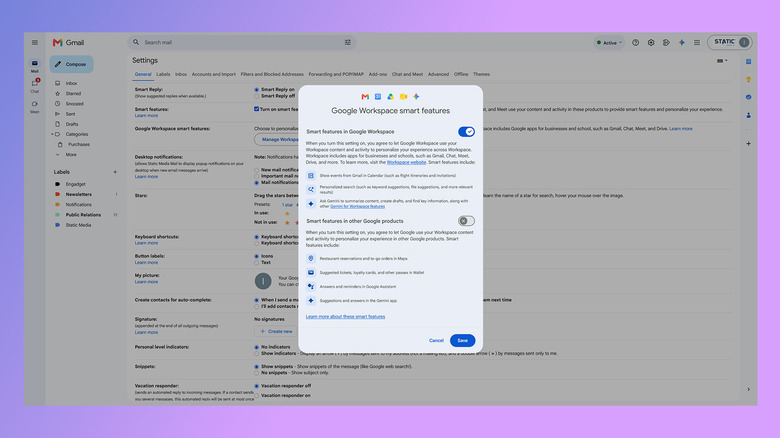
Furthermore, a prerequisite for activating Gemini’s organizational tools is the enablement of "Smart features in Google Workspace." This setting, typically active by default in most regions where Google Workspace is available, governs the functionality of various AI-powered tools across the suite. Users who are unsure of its status can verify and enable it within their Google Workspace settings, ensuring that their account is prepared to harness the full spectrum of AI assistance Google offers.
The Mechanics of Digital Decluttering: How Gemini Operates
Once the necessary subscriptions and settings are in place, engaging Gemini for file organization is designed to be a straightforward process. Users will likely encounter prompts or dedicated sections within the Google Drive interface, inviting them to initiate the organization process. Gemini will then analyze the user’s files, specifically focusing on those that are not currently nested within a defined folder structure. Based on its learned understanding of the user’s categorization habits, it will propose movements, often presenting these suggestions in an easily reviewable format, such as cards or lists.

A critical aspect of Gemini’s operation is its focus on suggestions rather than autonomous actions. This user-centric design ensures that individuals retain ultimate control over their digital environment. Each proposed file movement can be previewed, allowing users to inspect the file or document before approving its relocation. This iterative feedback loop is essential for building user trust and refining Gemini’s understanding of individual preferences over time.
However, it is important to note certain limitations of the current implementation. One significant aspect is that Gemini does not currently offer functionality to rename files. This means that while it can intelligently sort files into appropriate folders, the responsibility for maintaining consistent and descriptive file naming conventions still rests with the user. This limitation underscores the need for users to have a foundational level of organization, particularly regarding file naming, to maximize the utility of Gemini’s suggestions.
Furthermore, the article highlights that "Gemini doesn’t appear to read the contents of your documents to generate its suggestions." This implies that the AI primarily relies on metadata, file names, file types, and existing folder structures to infer organizational logic. For users with a plethora of "untitled documents" or ambiguously named files, Gemini’s ability to provide accurate and useful suggestions may be significantly diminished. This observation suggests that the feature will be most effective for users who already adhere to some form of naming convention or who are willing to undertake an initial manual cleanup to label their files descriptively. If a user needs to go through all their files to name them, they might find it equally efficient to organize them into folders concurrently. However, Gemini can then serve as an invaluable tool for maintaining order, catching any new files that might slip through the cracks of a manual filing system.
The Broader Context: AI’s March into Productivity
The integration of Gemini into Google Drive is emblematic of a broader industry trend where artificial intelligence is increasingly being woven into the fabric of everyday productivity tools. The promise of AI in this domain is not merely automation, but intelligent assistance that anticipates needs, simplifies complex tasks, and frees up human cognitive resources for more creative and strategic endeavors.
Google, with its vast data infrastructure and deep expertise in AI research, is at the forefront of this transformation. The company’s significant investments in developing models like Gemini are aimed at maintaining its competitive edge in the fiercely contested cloud computing and productivity software markets. By embedding AI directly into core services like Drive, Google is not only enhancing the user experience but also strengthening the sticky nature of its ecosystem. The more indispensable Google’s AI-powered tools become, the greater the loyalty and reliance among its user base.
This move also reflects a response to the growing problem of "digital hoarding" and information overload. In an age where data generation far outpaces human capacity for organization, AI offers a scalable solution. Studies consistently show that professionals spend a significant portion of their workday searching for information, highlighting a critical inefficiency that AI-driven tools like "Organize My Files in Drive" seek to mitigate. By reducing the time spent on administrative tasks such as file management, Google aims to empower users to focus on higher-value activities, thereby boosting overall productivity.
Implications and Future Outlook
The implications of Gemini’s enhanced organizational capabilities for Google Drive are multifaceted. For individual users, it promises a significant reduction in digital stress and an improvement in workflow efficiency. The ability to quickly locate files and maintain an orderly digital workspace can translate into tangible benefits, from saving time to reducing cognitive load. For businesses and educational institutions leveraging Google Workspace, this feature can contribute to better data governance, improved collaborative efficiency (indirectly, by keeping private files organized), and a more streamlined digital environment for employees and students.
From a strategic perspective, this feature bolsters Google’s subscription offerings. By bundling advanced AI capabilities with additional storage and other premium services, Google creates a more compelling value proposition for its AI Pro/Ultra tiers, potentially driving increased adoption of its paid ecosystem. This is particularly crucial as tech companies increasingly look towards recurring revenue models.
Looking ahead, the evolution of such AI-powered organizational tools is likely to be dynamic. While current limitations exist, such as the inability to rename files or read file content for deeper context, future iterations could potentially overcome these. As AI models become more sophisticated and multimodal, they might gain the capacity to understand the semantic content of documents, suggest more nuanced organizational structures, and even offer intelligent file renaming suggestions based on content analysis. The ethical considerations surrounding AI accessing and processing personal data will, of course, continue to be a paramount concern, guiding the development and deployment of these advanced features.
In conclusion, Google’s integration of Gemini into Drive’s file organization represents a significant leap forward in personal and professional digital management. By offering an intelligent, AI-assisted solution to digital clutter, Google is not only enhancing the utility of its cloud storage service but also reinforcing its position as a leader in AI-driven productivity. While currently limited to premium subscribers and private files, the feature sets a precedent for how artificial intelligence will continue to reshape our interaction with digital information, making our increasingly complex digital lives more manageable and efficient. The era of the self-organizing cloud is dawning, and Google is at its vanguard.