
 George Chandra Eka
Spam calls, a relentless nuisance that has evolved from simple telemarketing to sophisticated robocalls and spoofing attacks, continue to plague mobile users worldwide. While once necessitating reliance on third-party applications for relief, modern operating systems like iOS and Android, alongside diligent efforts from mobile carriers and regulatory bodies, now offer robust, integrated tools to combat this pervasive threat. This development marks a significant shift, empowering consumers to reclaim control over their communication channels without incurring additional subscription costs or installing supplementary software. The battle against unsolicited calls is an ongoing technological arms race, but the latest advancements in caller identification and screening provide users with increasingly effective arsenals to defend against unwanted interruptions and potential fraud.
The Evolution and Impact of Unwanted Calls
The phenomenon of unsolicited telephone calls is far from new, tracing its roots back to early telemarketing efforts. However, the digital age, particularly the advent of Voice over Internet Protocol (VoIP) and autodialing technology, transformed this annoyance into a full-blown crisis. Robocalls, characterized by automated, pre-recorded messages, can be deployed at a massive scale and minimal cost, making them a favored tool for legitimate businesses, political campaigns, and, most concerningly, malicious scammers. Caller ID "spoofing," which allows callers to falsify the information displayed on a recipient’s caller ID, further exacerbates the problem by making it difficult to discern legitimate calls from deceptive ones, often mimicking local numbers or well-known entities like banks or government agencies.
The financial and psychological toll of spam calls is substantial. According to reports from the Federal Communications Commission (FCC) and the Federal Trade Commission (FTC), American consumers alone receive billions of robocalls annually. In 2023, the total number of robocalls placed in the U.S. was estimated to be around 50 billion, though some estimates place it even higher, reflecting a slight decrease from peak years but still a monumental volume. These calls are not merely an inconvenience; they are often conduits for sophisticated scams, ranging from tech support fraud and imposter scams (e.g., pretending to be the IRS or Social Security Administration) to extended car warranty pitches and healthcare schemes. The FTC reported that consumers lost billions of dollars to fraud in 2023, with phone calls remaining a primary contact method for scammers. Beyond direct financial loss, the constant barrage of unwanted calls erodes trust in telephone communication, leading many to avoid answering calls from unknown numbers altogether, potentially missing important legitimate contacts.
A Coordinated Response: Regulators, Carriers, and Tech Giants
The escalating crisis of robocalls spurred a multi-faceted response from government agencies, telecommunications providers, and smartphone manufacturers. A significant legislative milestone was the TRACED Act (Telephone Robocall Abuse Criminal Enforcement and Deterrence Act), signed into law in December 2019. This bipartisan legislation mandated the implementation of the STIR/SHAKEN (Secure Telephone Identity Revisited/Signature-based Handling of Asserted information using Tokens) framework. STIR/SHAKEN is a set of technical standards designed to combat caller ID spoofing by authenticating and verifying caller ID information for calls carried over internet protocol (IP) networks. In essence, it acts like a digital fingerprint for phone calls, allowing carriers to confirm that a call is coming from the number it claims to be.
Mobile carriers were instrumental in deploying STIR/SHAKEN across their networks. Major providers like AT&T, Verizon, and T-Mobile proactively implemented these protocols, often ahead of the FCC’s deadlines, and subsequently rolled out enhanced spam protection features to their subscribers. These carrier-level protections often include automatic spam call blocking, scam alerts, and even advanced call screening services. For instance, AT&T offers "Call Protect," Verizon has "Call Filter," and T-Mobile provides "Scam Shield," all designed to identify, label, and block suspicious calls, often free of charge for basic features, with premium tiers offering more granular control. These systems leverage vast databases of known spam numbers, real-time call analytics, and customer reporting to continuously update their defenses.

In parallel, smartphone operating systems have significantly bolstered their native capabilities. Apple and Google, recognizing the widespread user frustration, have integrated powerful call filtering and screening tools directly into iOS and Android. This strategic move aims to provide a baseline of protection for all users, regardless of their carrier’s specific offerings, and leverages the deep integration of these features with the device’s core communication functions. The synergy between regulatory mandates, carrier infrastructure, and device-level software has created a more formidable barrier against spam and scam calls than ever before.
Leveraging Built-in Defenses on iPhone
Apple’s iOS has steadily enhanced its call management capabilities, moving beyond simple blocking to sophisticated filtering and screening. To access these critical settings on your iPhone, navigate to Settings > Phone. Within this menu, several options under the "Call Filtering & Silenced Calls" section are paramount for combating spam.
The first crucial setting is under "Call Blocking & Identification." Here, ensure that any carrier-provided spam identification apps (if installed and configured, though less necessary with iOS’s native tools) are enabled. More importantly, the system itself leverages carrier data to identify and flag potential junk calls. When enabled, calls identified by your carrier as spam will not ring your phone; instead, they are automatically sent to voicemail. These filtered calls are still visible in the Phone app’s "Recents" tab, typically under a "Spam" or "Junk" category, accessible via a button in the top-right corner. This ensures you don’t miss potentially legitimate calls misidentified as spam while still enjoying a quieter device.
For a more aggressive approach to unknown numbers, the "Silence Unknown Callers" feature is invaluable. When enabled, this setting automatically silences all incoming calls from numbers not saved in your contacts, not recently dialed by you, and not suggested by Siri. These calls are sent directly to voicemail and appear in your Recents list. While highly effective at reducing interruptions from spammers, users must exercise vigilance. It is imperative to proactively save numbers of important contacts, such as doctors’ offices, school administrators, or new work clients, to your address book. Failure to do so could result in missing legitimate, time-sensitive calls that are mistakenly routed to voicemail. The Phone app’s Recents tab provides a clear view of these silenced calls, allowing you to review and add numbers to your contacts as needed.
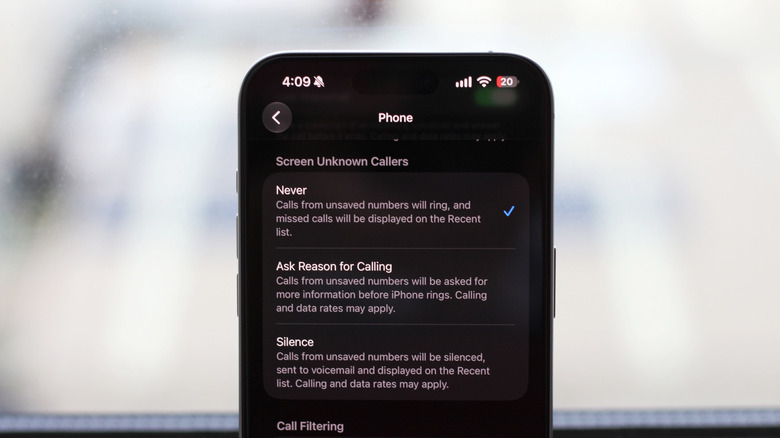
Perhaps the most advanced feature for iPhone users is "Call Screen," which allows your iPhone to intelligently screen unknown callers and ask them for the reason for their call. Introduced with iOS 17, this feature provides a live transcript of the caller’s response on your screen, allowing you to decide in real-time whether to answer the call, send it to voicemail, or hang up. This acts as a highly effective intermediary, preventing you from engaging directly with potential spammers while providing context for legitimate, unsaved callers. It’s particularly useful for those who frequently receive calls from new contacts or service providers. To enable and configure this, navigate to Settings > Phone > Call Screening. Users can choose from options like "Never," "Silence," or "Ask Reason for Calling." The "Ask Reason for Calling" option transforms your iPhone into a personal gatekeeper, offering an unprecedented level of control over who gets through. It’s important to note that the availability and functionality of Call Screen may vary by region and carrier, and it requires iPhones running iOS 17 or newer. Regularly updating your iOS version ensures access to the latest security and privacy enhancements, including improved call filtering.
Managing Spam Calls on Android Devices
Android’s approach to spam call management is robust, with Google’s own "Phone by Google" app serving as the primary dialer for many devices and offering comprehensive built-in protections. While the specific menu paths may vary slightly depending on your phone’s manufacturer (e.g., Samsung, Pixel, OnePlus) and its customized Android skin, the core functionalities remain consistent. If your Android device uses a non-Google dialer, it’s often advisable to download the "Phone by Google" app from the Play Store and set it as your default for enhanced spam protection.
To configure spam filtering in the Google Phone app, launch the application, tap the three-dot menu (or "hamburger" icon), and select "Settings." Within the settings, look for the "Call Assist" or "Spam and Call Screen" section. Here, the key options are:
- "See caller and spam ID": Enabling this feature allows the Phone app to identify incoming calls, displaying information about the caller even if they’re not in your contacts. Crucially, it will warn you if an incoming call is suspected to be spam or a scam, often showing a "Spam" or "Scam Likely" label on the incoming call screen. This provides you with vital information before you even answer.
- "Filter spam calls": This is a more aggressive setting. When activated, it automatically silences suspected spam calls, preventing your phone from ringing. These calls are still recorded in your call history and voicemail, allowing you to review them at your convenience without disruption. This feature relies on Google’s extensive database of known spam numbers and real-time analysis of call patterns. Both "See caller and spam ID" and "Filter spam calls" generally require Android 6.0 (Marshmallow) or newer and the latest version of the Phone by Google app.
For users with specific Android devices, particularly Google Pixel phones (Pixel 6 and newer) and some Samsung models, an even more advanced feature called "Call Screen" is available. This feature leverages Google’s AI capabilities to answer unknown calls on your behalf and provide a real-time transcript of the conversation.
- On Google Pixel phones: Navigate to Phone app > Settings > Spam and Call Screen > Call Screen. Here, you can customize how Call Screen handles unknown calls, choosing options like "Automatically screen. Decline robocalls" or "Ring phone" and "Screen unknown calls." When Call Screen is active, Google Assistant answers the call, asks the caller for their name and purpose, and transcribes their response onto your screen. You can then decide to pick up, send to voicemail, or mark as spam. This conversational AI offers an exceptional level of protection and insight into unknown callers.
- On supported Samsung phones: The feature is typically found by opening the Phone app, tapping the three-dot icon in the top-right corner, and navigating to Settings > Call screening. Samsung’s implementation offers similar functionalities, allowing the phone to answer and transcribe calls from unknown numbers, empowering the user to make an informed decision.
These advanced call screening options on Android effectively create a personalized receptionist for your phone, drastically reducing the chances of engaging with unwanted callers while ensuring you don’t miss important legitimate ones.
Beyond Built-in Features: Complementary Strategies
While built-in smartphone and carrier tools provide a strong defense, a multi-layered approach offers the best protection:
- Block Individual Numbers: For persistent nuisance calls that slip through the filters, manually blocking the number is always an option. This is typically done directly from your phone’s recent calls list. However, spammers frequently change their numbers, making this a reactive and often temporary solution.
- Report Spam Calls: Actively reporting spam calls to your carrier, the FCC, and the FTC (via their websites or the National Do Not Call Registry) contributes to the collective effort. These reports help authorities track patterns, identify bad actors, and update spam databases.
- National Do Not Call Registry: While not a panacea against malicious scammers, registering your number on the National Do Not Call Registry (donotcall.gov) can reduce legitimate telemarketing calls. Scammers, by definition, do not respect this registry, but it can still help thin out the overall volume of unwanted calls.
- Be Skeptical and Vigilant: The most crucial defense is user awareness. Never provide personal information (like bank account numbers, Social Security numbers, or passwords) over the phone unless you initiated the call and are certain of the recipient’s identity. If a call seems suspicious, hang up and call back the organization using an official number from their website or a trusted source.
- Review Call Logs: Regularly check your silenced calls and voicemail. While the filters are effective, a legitimate call might occasionally be misidentified, especially from new contacts or automated systems (like appointment reminders) not yet in your address book.
The Broader Impact and Future of Spam Call Defense
The concerted efforts by regulators, carriers, and device manufacturers have fundamentally altered the landscape of spam call defense. Consumers are no longer passive recipients of an endless stream of unwanted calls but are now empowered with sophisticated tools that offer significant control. This shift contributes to a restoration of digital trust in phone communication, which had been severely eroded by the robocall epidemic.
However, the battle is far from over. Spammers and scammers are constantly evolving their tactics, leveraging new technologies like AI to generate more convincing voice clones or evade detection. The ongoing challenge lies in staying ahead of these malicious innovations. Future developments may include more advanced AI-driven call screening, proactive identification of scam patterns across vast networks, and even stronger authentication protocols beyond STIR/SHAKEN. The interplay between user education, regulatory enforcement, and technological innovation will continue to shape the future of how we manage and mitigate the persistent plague of spam calls, striving for a communication environment that is both secure and free from unwarranted intrusions.







