
 Metty Iskandar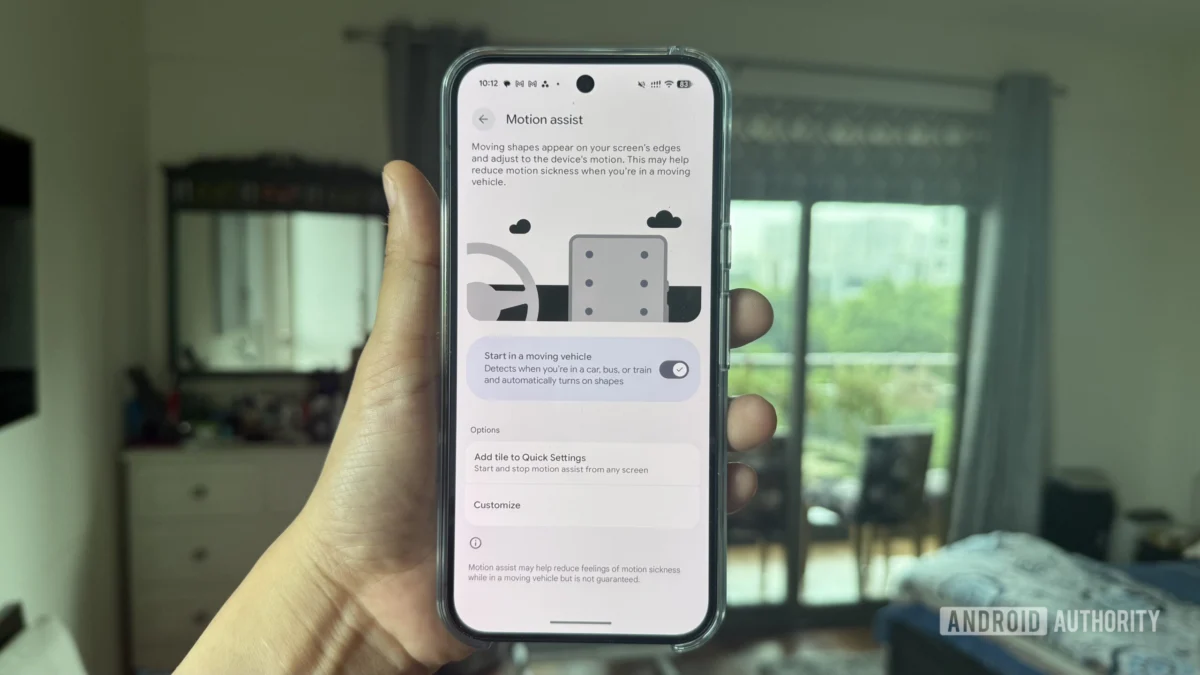
Google is commencing a gradual rollout of its innovative Motion Assist feature, designed to alleviate motion sickness experienced by smartphone users while in transit, beginning with its flagship Pixel devices running Android 17. This new functionality, previously codenamed Motion Cues, represents a significant step in Google’s ongoing efforts to enhance user comfort and accessibility through software innovation. The feature, which was first identified in December 2024, is now making its way to select users, suggesting a phased deployment strategy by the tech giant.
Unveiling Motion Assist: A New Frontier in Mobile Comfort
Motion Assist operates by intelligently displaying subtle visual cues on the device’s screen, synchronized with the perceived motion of a moving vehicle. The underlying principle is to provide a stable visual anchor that can help mitigate the sensory conflict between visual input and the body’s vestibular system, a common cause of motion sickness. This can be particularly beneficial for individuals who experience discomfort when reading, gaming, or interacting with their phones during car rides, train journeys, or even flights.
The feature is accessible through the Google Play Settings menu. Users can navigate to Settings > Your profile > All services, and then locate "Motion Assist" within the "Personal & device safety" section. Once accessed, the primary screen features a toggle that, when activated, enables Motion Assist to automatically detect and engage when the phone senses it is being used within a moving vehicle. This automated detection aims to provide a seamless experience, requiring minimal user intervention once set up.
Further enhancing user convenience, Google has introduced a Quick Settings tile for Motion Assist. This allows users to swiftly enable or disable the feature directly from their Quick Settings panel, bypassing the need to delve into the main Settings menu. When Motion Assist is active, a persistent notification informs the user that the feature is running. Tapping this notification provides an immediate option to deactivate it, offering a layer of control and transparency.
Customization and Technical Advancements
A key aspect of Motion Assist’s design is its user-configurable nature. The feature offers a range of customization options, allowing users to tailor the visual cues to their preferences. This includes the ability to modify the color, shape, and opacity of the motion indicators. Additionally, a "Randomization" option can be enabled, which dynamically alters these settings, providing a more varied and potentially more effective visual experience for different users and scenarios.
The technical implementation of Motion Assist has also seen significant evolution since its initial discovery. When the feature, then known as Motion Cues, was first observed, it relied on Android’s "Display over other apps" permission. This traditional method presented a significant limitation: the motion dots could not be displayed over certain critical system UI elements, including the Settings app itself, the status bar, notifications, Quick Settings panel, lock screen, or the volume panel. This restriction meant that the feature’s effectiveness could be compromised when users were interacting with these specific system interfaces.
However, Google has evidently invested considerable effort in refining the underlying architecture. Recent developments indicate that the company has implemented OS-level API changes specifically for Motion Assist. These advancements have overcome the previous limitations, enabling the motion dots to now appear seamlessly over a broader spectrum of applications and system UI elements. This is a crucial enhancement, as it ensures that the visual anchors remain present and functional regardless of what the user is actively doing on their device. The ability to overlay these cues across the entire interface signifies a more robust and comprehensive solution for combating motion sickness.
Phased Rollout and Device Variability
The current rollout of Motion Assist is characterized by its gradual nature. Reports from users in contributor Aseemble Debug’s Telegram group indicate that the feature is appearing on some Pixel phones. However, the distribution is not uniform. For instance, the feature is present on a Pixel 11 Pro XL running Android 17 but is notably absent on a Pixel 10 Pro XL also running Android 17. This disparity underscores Google’s phased approach, suggesting that the feature is being released in waves, potentially to monitor performance, gather feedback, and manage server load.
This phased rollout strategy is a common practice for Google when introducing new features, particularly those with potential hardware or software dependencies, or those that require extensive user testing in real-world conditions. It allows the company to identify and address any unforeseen issues before a wider release. The variability in availability, even among devices running the same operating system version, highlights the complexity of such deployments. Users who do not yet see Motion Assist on their devices are advised to remain patient, as it is likely to become available in subsequent updates.
Historical Context and Future Implications
The journey of Motion Assist from concept to a nascent public release provides insight into Google’s commitment to user-centric design. The initial identification of Motion Cues in December 2024 marked the beginning of a development cycle focused on addressing a common, yet often overlooked, user pain point. The evolution from a rudimentary implementation to a more sophisticated, OS-integrated feature demonstrates a dedication to refining user experience through iterative development and leveraging platform capabilities.
The broader implications of Motion Assist extend beyond mere comfort. For many, motion sickness can be a significant barrier to productivity and entertainment on mobile devices during travel. By mitigating this discomfort, Motion Assist has the potential to unlock new possibilities for how and when people use their smartphones. This could include increased usage for work-related tasks on the go, more extended periods of engagement with educational content during commutes, or simply a more enjoyable experience for passengers using their devices for leisure.
Furthermore, the development of OS-level API changes specifically for this feature suggests a precedent for future accessibility and comfort-oriented functionalities. It indicates Google’s willingness to adapt and enhance the core Android operating system to better serve diverse user needs. As mobile devices become increasingly integrated into our daily lives, features that enhance comfort and reduce physical discomfort are likely to gain prominence.
The phased rollout also presents an opportunity for Google to gather valuable data on feature adoption, usage patterns, and user satisfaction. This data can inform future iterations and potential expansions of the feature to a wider range of Android devices, not just Pixel phones. It is conceivable that similar functionalities could be integrated into other Android devices through future OS updates or even as part of Google Play Services.
In conclusion, the commencement of the Motion Assist rollout on Pixel devices signifies a promising development in mobile user experience. By directly addressing the challenge of motion sickness, Google is demonstrating its commitment to creating a more inclusive and comfortable digital environment for all users, regardless of their travel circumstances. As the feature becomes more widely available, its impact on how individuals interact with their devices during transit is anticipated to be substantial.









