George Chandra Eka
The capability to leverage an Apple iPad as an auxiliary display for a Mac or Windows personal computer has emerged as a significant boon for professionals seeking enhanced productivity and greater mobility in their computing environments. This functionality, once primarily the domain of specialized third-party applications, has been increasingly integrated into operating systems and refined by dedicated hardware solutions, offering users a versatile means to expand their digital workspace without investing in bulky, dedicated external monitors. The underlying principle involves extending the desktop of a primary computer onto the iPad’s high-resolution touchscreen, enabling multitasking, specialized input, and a more expansive view of digital content, a critical advantage in an era defined by remote work, hybrid models, and the demand for flexible workstations.
The Evolving Landscape of Digital Workspaces and the Rise of the Portable Monitor
The shift towards more agile and distributed work models over the past decade has fundamentally reshaped the requirements for personal computing setups. Traditional fixed-desk environments with multiple monitors, while highly effective for static workstations, often proved impractical for individuals working from diverse locations—be it a coffee shop, a co-working space, or a home office with limited real estate. This growing need for portable productivity tools spurred innovation in the realm of external displays. While dedicated portable monitors offered a solution, they introduced additional hardware to carry and power. The inherent processing power, high-quality Retina displays, and robust battery life of modern iPads positioned them uniquely to fill this gap, offering a dual-purpose device that could serve as both a standalone tablet and a dynamic second screen.
Early attempts to achieve this functionality were often characterized by latency issues and complex setup procedures, primarily relying on Wi-Fi or cumbersome wired connections coupled with proprietary software. However, advancements in wireless communication protocols, display technology, and operating system integration have progressively refined the user experience. The concept gained widespread mainstream recognition and adoption following Apple’s formal entry into this space, validating the utility and demand for such capabilities. Industry analysts have frequently highlighted the measurable productivity gains associated with multi-monitor setups, with various studies suggesting increases in efficiency ranging from 20% to 50% for tasks requiring extensive data comparison, content creation, or complex application management. This data underscores the intrinsic value of expanding screen real estate, even through a repurposed device like an iPad.
Apple’s Integrated Solutions: Sidecar and Universal Control
Apple, recognizing the inherent potential within its own ecosystem, introduced two pivotal features that seamlessly integrate the iPad into the Mac’s workflow: Sidecar and Universal Control. These functionalities leverage the tight hardware and software integration characteristic of Apple products, offering a polished and user-friendly experience for those operating within the macOS and iPadOS ecosystems.
Sidecar: Extending the Mac Desktop to the iPad
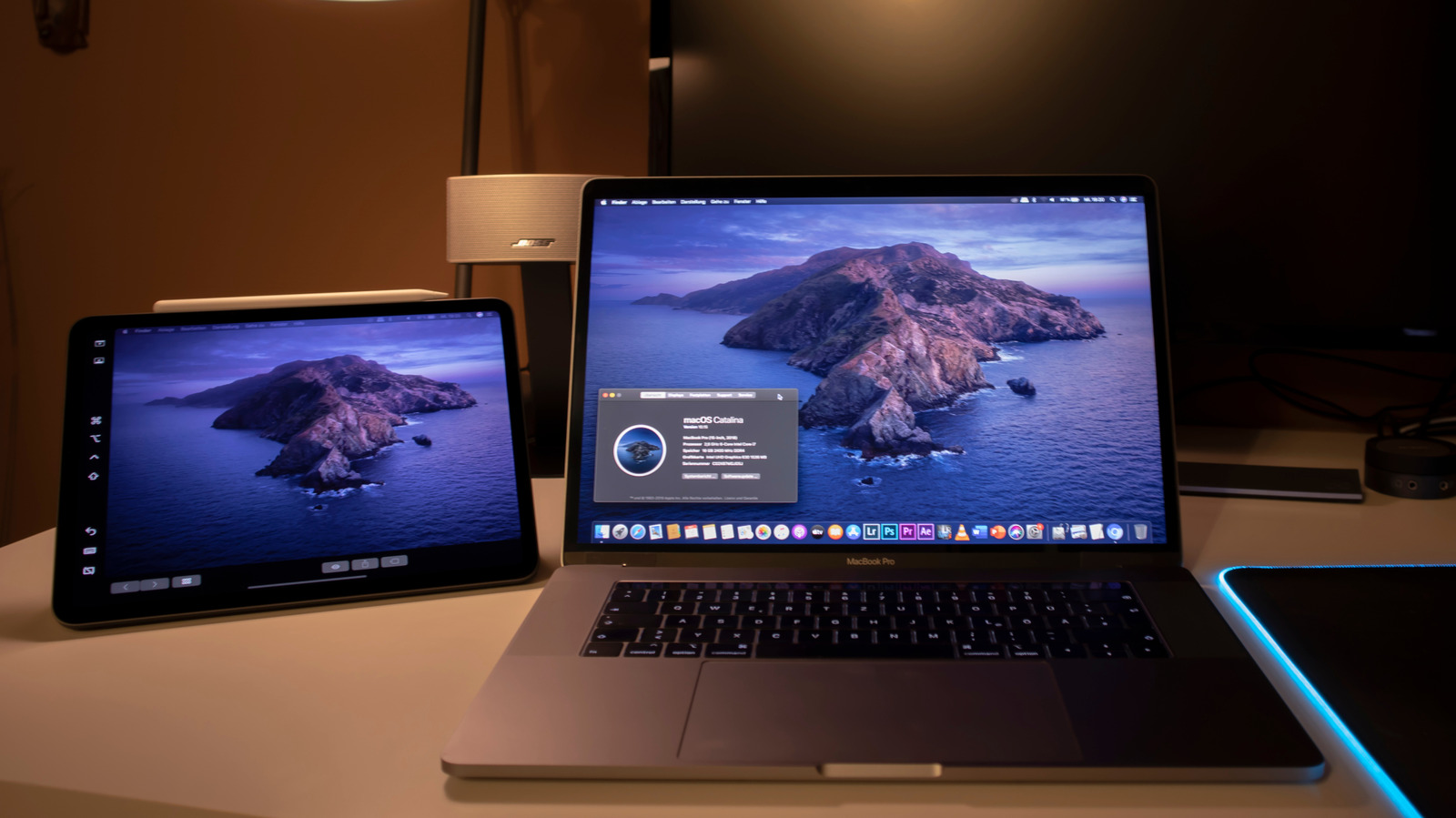
Sidecar was first unveiled as a flagship feature with macOS Catalina in October 2019, fundamentally changing how Mac users could perceive their iPad. Designed to transform an iPad into a secondary display for a Mac, Sidecar operates as a direct extension of the macOS desktop. This allows users to drag applications, documents, and windows from their Mac screen directly onto the iPad, effectively expanding their available workspace.
The primary requirements for utilizing Sidecar are straightforward, yet crucial for its operation. Both the Mac and the iPad must be signed in to the same iCloud account, a foundational element of Apple’s ecosystem integration strategy. This ensures secure and authenticated communication between the devices. Furthermore, both devices need to be in close proximity for wireless connectivity, though a wired connection via a USB-C or Lightning cable can also be used, often providing a more stable and lower-latency experience, particularly in environments with significant wireless interference. Specific macOS and iPadOS versions are also required, generally supporting Macs introduced in 2015 or later and iPads compatible with Apple Pencil.
Setting up Sidecar is designed for simplicity. On a compatible Mac, users can access the Control Center from the Menu Bar, locate the "Screen Mirroring" icon (represented by two overlapping squares), and select their iPad from the list of available devices. Upon selection, the iPad instantly transitions into an external monitor, mirroring or extending the Mac’s display. Users can then customize the arrangement of their screens within the "Display Settings" section of System Settings on the Mac, positioning the iPad screen relative to their primary display as they would with any other external monitor.
Beyond merely extending the display, Sidecar offers additional functionalities that significantly enhance its utility, especially for creative professionals. It supports Apple Pencil input, effectively transforming the iPad into a high-precision graphics tablet for the Mac. This allows for natural drawing, sketching, and annotation directly within macOS applications that support stylus input, such as Adobe Photoshop, Illustrator, or Affinity Designer. Furthermore, Sidecar introduces a customizable sidebar on the iPad’s display, offering quick access to common Mac controls like Command, Shift, and Undo, along with a Touch Bar if the Mac lacks one, providing contextual controls specific to the active application.
Universal Control: Seamless Multi-Device Interaction
Following the success of Sidecar, Apple further pushed the boundaries of multi-device integration with the introduction of Universal Control. Announced at WWDC 2021 and officially rolled out with macOS Monterey 12.3 and iPadOS 15.4 in March 2022, Universal Control represents a distinct yet complementary approach to multi-device interaction. Rather than turning the iPad into a secondary display, Universal Control allows a single mouse and keyboard connected to a Mac to seamlessly control up to three nearby Macs or iPads.
The core idea behind Universal Control is to create a fluid, continuous workspace across multiple Apple devices. Users can move their Mac’s cursor from their primary display directly onto an adjacent iPad or even another Mac’s screen, and then use the Mac’s keyboard to type on the iPad. This functionality extends to drag-and-drop operations, enabling users to effortlessly transfer files, images, and text between devices. For instance, a user could drag a photo from the Photos app on their Mac directly into a note on their iPad.
Similar to Sidecar, Universal Control has specific prerequisites. Both devices must be signed into the same iCloud account, and two-factor authentication must be enabled for security. Devices must also be within a certain proximity and have Wi-Fi and Bluetooth enabled. Most Macs and iPads released in the last few years are compatible. The setup is often automatic; simply placing devices near each other can trigger the functionality. If not, users can manually enable it via the "Display Settings" within the "Screen Mirroring" section of Control Center on their Mac, where they can link a keyboard and mouse to their iPad.
While Sidecar is about display extension, Universal Control focuses on input control and content transfer. Together, they provide a comprehensive suite of tools for Apple users to maximize their productivity across their ecosystem, illustrating Apple’s commitment to creating cohesive and powerful multi-device workflows.
Third-Party Alternatives: Bridging Gaps and Expanding Functionality
Despite Apple’s robust native offerings, a vibrant ecosystem of third-party applications and hardware solutions predates and continues to complement Sidecar and Universal Control. These alternatives often cater to specific needs, such as cross-platform compatibility (especially for Windows users), advanced features, or specialized performance characteristics, demonstrating the persistent demand for flexible display solutions.
Duet Display: Cross-Platform Versatility
Duet Display stands out as one of the most established and popular third-party solutions for turning an iPad into an external monitor. Launched in 2014, long before Sidecar, Duet Display carved out a significant niche by offering cross-platform compatibility, a crucial advantage for Windows users who are excluded from Apple’s native Sidecar functionality. Duet Display supports Windows, macOS, ChromeOS, and even Android as primary systems, and iPadOS, Android, and ChromeOS as secondary displays.
The application requires installation on both the primary computer (PC or Mac) and the iPad. While Sidecar is free for Apple users, Duet Display operates on a paid license model, typically a one-time purchase or a subscription for advanced features. Its core strength lies in its ability to offer a similar "second screen" experience to Sidecar, allowing users to extend or mirror their desktop onto the iPad. Duet Display prides itself on low latency, often achieving impressive performance, especially when using a wired connection.
Beyond basic display extension, Duet Display frequently introduces features that go beyond Apple’s native offerings. These can include customizable resolution settings, frame rate adjustments, and support for touch gestures and Apple Pencil input, effectively turning the iPad into a pressure-sensitive graphics tablet for any compatible computer. This makes it particularly attractive for digital artists and designers working on Windows PCs who seek a high-quality, portable drawing surface. The flexibility to work across different Apple IDs (unlike Sidecar) is another practical benefit for some users.
Luna Display: The Hardware-Assisted Solution
Luna Display, developed by Astropad, approaches the problem from a slightly different angle, relying on a companion hardware dongle to facilitate the connection. Launched in 2017, Luna Display requires users to plug a small USB-C, Mini DisplayPort, or HDMI dongle directly into their primary computer (Mac or Windows PC). This dongle acts as a virtual display adapter, handling the video transmission and ensuring a more stable and often lower-latency connection compared to purely software-based wireless solutions.
The initial investment for Luna Display is the cost of the dongle, typically around $79, with no recurring subscription fees, which appeals to users who prefer a one-time purchase model. Once the dongle is plugged in and the Luna Display app is installed on both the computer and the iPad, the connection is established wirelessly, although a wired connection can also be used for maximum reliability.
A significant differentiator for Luna Display is its "headless mode." This feature allows users to connect the Luna dongle to a Mac mini or Mac Studio that is not otherwise connected to a monitor, and then use an iPad as the primary display for that headless computer. This capability is invaluable for server setups, remote access scenarios, or for users who want to operate a powerful desktop Mac entirely from their iPad without needing a dedicated monitor. Luna Display also supports Apple Pencil input and offers robust performance for creative workflows, often touting color accuracy and minimal lag as key advantages of its hardware-assisted approach.
Broader Impact and Implications for Modern Workflows
The ability to use an iPad as a second screen carries significant implications across various professional and personal use cases, profoundly impacting productivity, portability, and economic considerations.
Enhanced Productivity and Multitasking: The most immediate and widely recognized benefit is the substantial increase in available screen real estate. For tasks involving data analysis, coding, graphic design, video editing, or extensive research, having an additional display allows users to spread out their applications, reference materials, and tools without constant tab switching. This reduces cognitive load and streamlines workflows, directly contributing to the productivity gains noted by industry research. Developers can keep code on one screen and documentation or a preview on the other; writers can have their manuscript open alongside research notes; and financial analysts can monitor multiple data streams simultaneously.
Unprecedented Portability for Mobile Professionals: For individuals who frequently travel or work from diverse locations, the iPad-as-monitor solution is transformative. Instead of carrying a bulky and fragile dedicated portable monitor, they can leverage a device they likely already own and carry for other purposes. This reduces luggage weight, simplifies setup, and ensures that a multi-monitor setup is always within reach, whether in a hotel room, an airport lounge, or a client’s office. This flexibility is a cornerstone of the modern hybrid work model.
Cost-Effectiveness and Resource Optimization: Repurposing an existing iPad as a second display is often more cost-effective than purchasing a new dedicated portable monitor, which can range from $100 to $400 or more. While third-party apps or dongles may incur a cost, this is typically a fraction of a new display. This approach also promotes resource optimization, extending the utility of an existing device and potentially reducing electronic waste by maximizing its lifecycle.
Specialized Input for Creative Professionals: The integration of Apple Pencil support, particularly with Sidecar, Duet Display, and Luna Display, is a game-changer for digital artists, illustrators, and designers. It transforms the iPad into a highly responsive, pressure-sensitive drawing tablet for macOS and Windows applications, offering a natural and intuitive interface for creative work that previously required dedicated, often expensive, graphics tablets. This expands the creative toolkit for mobile professionals significantly.
Technological Considerations and Future Outlook: While the experience is largely seamless, certain technological considerations remain. Wireless connections, while convenient, can sometimes introduce latency or occasional glitches, especially in congested Wi-Fi environments. A wired connection (USB-C or Lightning) typically offers superior stability and lower latency. Battery drain on the iPad can also be a factor during extended use, necessitating charging during operation.
Looking ahead, the trend suggests further integration and refinement. Apple is likely to continue enhancing Sidecar and Universal Control, potentially adding more advanced features or expanding compatibility. Third-party developers will continue to innovate, offering specialized solutions that cater to niche demands or push the boundaries of performance and cross-platform compatibility. As computing devices become more powerful and displays more advanced, the role of multi-device synergy, particularly involving versatile tablets like the iPad, is poised to grow even more central to the modern digital workspace. The ability to seamlessly extend, mirror, or control workflows across different devices is no longer a luxury but an increasingly essential component of efficient and flexible computing.