Clarissa Hana
Microsoft has begun testing a significant enhancement to its Windows 11 privacy framework, introducing granular controls that empower users to dictate which desktop applications can access their camera, microphone, and precise location. This pivotal update is currently being rolled out to systems participating in the Windows Insider Program, specifically within the Experimental Preview Build 26340.9233. The overarching objective of this initiative is to simplify the management of privacy permissions for desktop applications, making them more intuitive and readily accessible for every Windows 11 user.
A Paradigm Shift in Desktop Application Permissions
Historically, managing privacy settings for traditional desktop applications in Windows has been a somewhat generalized affair. Users often found themselves adjusting device-wide settings, which provided a broad brushstroke of control but lacked the specificity needed for modern digital environments. Microsoft’s official announcement highlighted this shift, stating, "Windows Insiders can now manage camera, microphone, and location permissions for individual desktop apps. Previously, access for traditional desktop applications was managed through a single device-wide setting." This marks a departure from the one-size-fits-all approach, moving towards a more nuanced and user-centric privacy model.
The newly implemented feature allows users to meticulously review and manage these sensitive permissions on an app-by-app basis. This provides a much-needed layer of transparency, enabling users to gain a clearer understanding of which applications are requesting access to their private data and device functionalities. As Microsoft further elaborated, "With this update, you can review and control access on an app-by-app basis, giving you greater visibility into which apps are requesting access to sensitive resources and more control over your privacy choices." This empowers users with a greater sense of agency over their digital footprint within the Windows ecosystem.
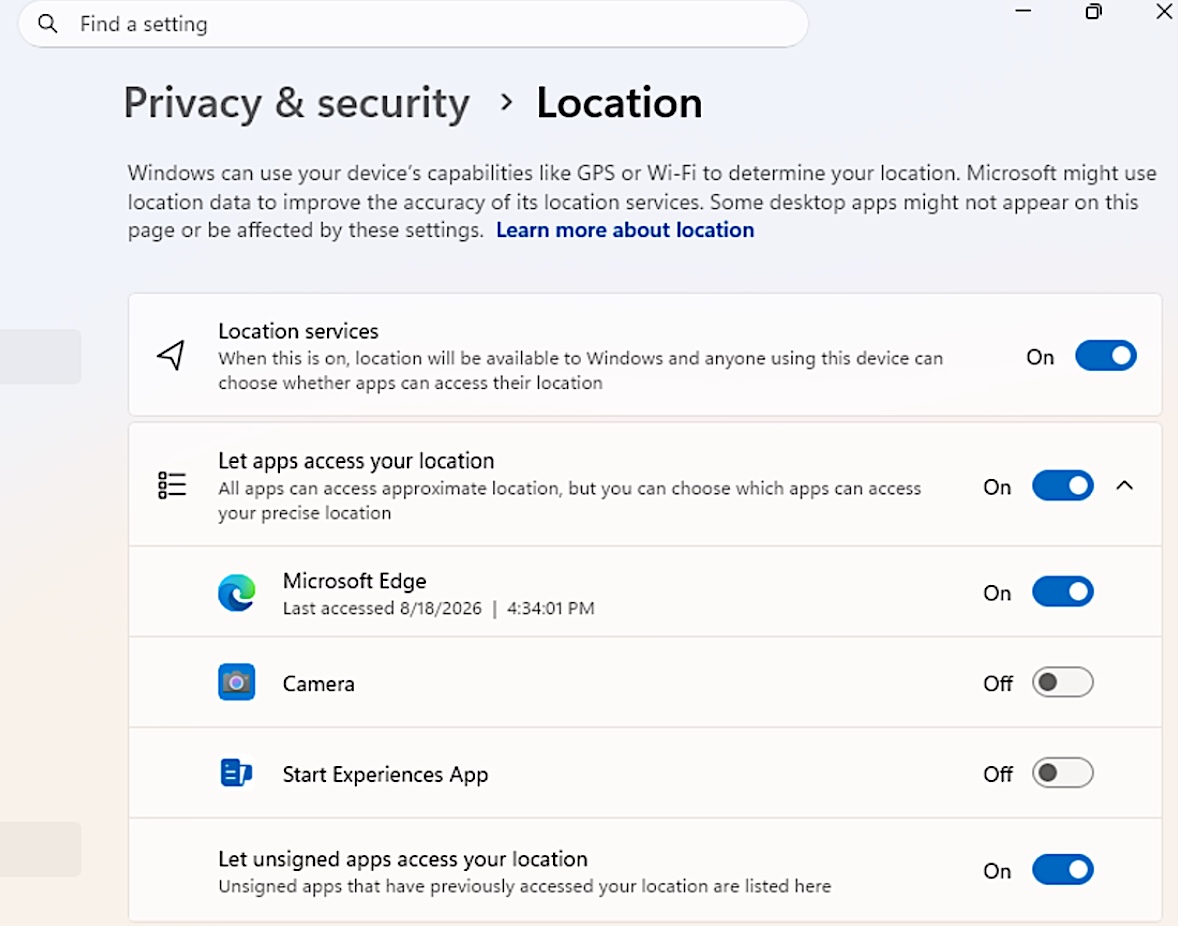
To access and manage these granular permissions, Windows Insiders can navigate to the Settings app, then proceed to "Privacy & security." Within this section, dedicated sub-menus for "Camera," "Microphone," and "Location" will be available. Here, users will find dedicated toggle switches that allow them to grant or deny access for individual applications. This streamlined interface aims to demystify the process, making it as straightforward as managing permissions on mobile devices.
Navigating Potential Complications and Publisher Verification
Microsoft has also issued a cautionary note to users, emphasizing the importance of granting access only to applications they trust and recognize. The company acknowledges that in some instances, applications that utilize shared system components, browser-hosted experiences, or similar technologies might not always present clear publisher information. In such cases, Windows may be unable to verify the publisher’s identity, leading the application to appear under a different name or as unsigned. This underscores the need for users to exercise due diligence and critical judgment when managing their privacy settings, particularly for less familiar software.
The introduction of these granular privacy controls for desktop applications is not an isolated development but rather a continuation of Microsoft’s broader commitment to enhancing user privacy and security. This initiative closely follows Microsoft’s February announcement detailing plans to introduce "smartphone-style app permission prompts in Windows 11." This earlier announcement foreshadowed a significant overhaul of how applications request access to sensitive resources, moving towards a model where explicit user consent is required before any access is granted.
A Timeline of Evolving Privacy Measures
The journey towards more robust privacy controls in Windows 11 has been an evolving process, driven by a recognition of the changing landscape of software development and user expectations.
- February 2024: Microsoft publicly announces its intention to integrate smartphone-style app permission prompts into Windows 11. This proactive communication signaled a significant shift in the company’s approach to application permissions, aiming to provide users with greater transparency and control.
- Early 2024 (Ongoing): Development and testing of these new permission models commence. This phase involves internal testing and the initial rollout to Windows Insiders for feedback.
- Experimental Preview Build 26340.9233 (Current): The first tangible implementation of granular privacy controls for camera, microphone, and location access for desktop applications begins testing with Insiders. This build allows users to manage these permissions on an app-by-app basis, a significant step beyond previous system-wide controls.
- Future Rollouts: Microsoft plans a phased rollout of these features to the broader Windows 11 user base. The company has indicated that it will closely monitor user feedback and adjust the controls and rollout speed accordingly, ensuring a smooth and effective integration.
The impetus behind this intensified focus on privacy stems from observations within the software ecosystem. As Logan Iyer, a Windows Platform Engineer, articulated at the time of the February announcement, the evolving security model was a direct response to an increasing trend of applications engaging in problematic behaviors. These included the installation of unwanted software, the overriding of user-defined settings without consent, and even modifications to core Windows experiences without explicit user permission.

The Rationale: Transparency and Consent
Iyer’s statements underscored the core principles guiding these new security measures: "Users will have transparency and consent control over how apps access their personal data and device features." This philosophy is designed to empower users by providing them with clear and understandable prompts to grant or deny applications permission to access protected data and hardware. Furthermore, the ability for users to easily revoke permissions previously granted is a critical component of this enhanced control. This ensures that user consent is not a one-time event but an ongoing dialogue between the user and their applications.
These forthcoming mobile-style Windows security controls are integrated into broader initiatives such as "Windows Baseline Security Mode" and "User Transparency and Consent." These programs aim to establish a more secure and user-empowering foundation for the Windows operating system. The phased rollout approach allows Microsoft to gather real-world data and user feedback, enabling them to refine the controls and the deployment strategy to maximize effectiveness and user satisfaction.
Broader Implications for User Security and Trust
The introduction of granular privacy controls for desktop applications represents a significant step forward in bolstering user trust and security within the Windows environment. By mirroring the user-friendly permission models common on mobile platforms, Microsoft is making it easier for a wider range of users to understand and manage their privacy. This democratization of privacy controls is particularly important in an era where applications increasingly leverage sensitive hardware and personal data.
For developers, this shift necessitates a greater emphasis on transparently communicating their data handling practices and seeking explicit user consent. Applications that were previously able to access cameras, microphones, or location data without explicit user awareness or ongoing consent will now need to adapt to this more stringent requirement. This could lead to a more responsible software development landscape, where privacy is a core consideration from the outset.
The potential impact on third-party software is considerable. While some developers may view these changes as an added burden, others will see it as an opportunity to build deeper trust with their user base. Applications that are transparent about their data usage and respect user privacy are likely to gain a competitive advantage. Conversely, applications that rely on less transparent data collection methods may face challenges in gaining user approval.
A Consistent Push for Accessibility and Usability
Beyond privacy enhancements, Microsoft is also consistently working on improving the overall user experience and accessibility of Windows 11. In a separate announcement on Friday, the company revealed that it is also testing a new accessibility setting designed to automatically maximize application windows upon opening. This feature is particularly beneficial for users who operate in tablet mode, utilize screen readers or magnification tools, or simply prefer a full-screen workspace for enhanced focus. This demonstrates Microsoft’s commitment to catering to a diverse range of user needs and preferences, ensuring that Windows 11 is an inclusive and efficient operating system for everyone.
The continuous iteration and testing of new features within the Windows Insider Program are crucial for shaping the future of the operating system. By engaging with a dedicated community of testers, Microsoft can identify potential issues, gather valuable feedback, and refine features before they are released to the general public. This collaborative approach is fundamental to Microsoft’s strategy of delivering a robust, secure, and user-friendly computing experience. The ongoing development of granular privacy controls, coupled with improvements in accessibility, signals Microsoft’s dedication to evolving Windows 11 into a platform that prioritizes both user empowerment and digital well-being.