Clarissa Hana
The cybersecurity landscape has been dramatically reshaped with the emergence of RatHat, a sophisticated new Android malware family that distinguishes itself through an advanced AI-powered subsystem. This innovative component empowers threat actors to remotely navigate and control compromised devices with unprecedented autonomy, moving beyond the limitations of traditional, scripted malware. Discovered by researchers at Zimperium zLabs, RatHat’s operational complexity and its potential threat to user data and financial assets have raised significant alarms within the security community. The malware’s distribution methods, its persistent nature, and its unique AI-driven capabilities position it as a formidable adversary in the ongoing battle against mobile cyber threats.
The Genesis of RatHat: Discovery and Attribution
The initial discovery of RatHat was made by Zimperium zLabs, a prominent cybersecurity research firm. Their in-depth analysis revealed the malware’s core functionalities and its sophisticated operational architecture. A key indicator of the threat actors’ origin was the use of Large Language Model (LLM) prompts written in Chinese, strongly suggesting a connection to Chinese-speaking threat groups. While the specific group has not been definitively identified, the linguistic evidence points towards a coordinated effort by actors with access to advanced AI tools and a focus on the Android ecosystem. This attribution is crucial for understanding the potential scale and resources behind the malware’s development and deployment.
The malware’s distribution strategy is multifaceted, primarily relying on malvertising campaigns, targeted SMS phishing messages, and deceptive websites that entice users to download APK (Android Package Kit) files from outside the official Google Play Store. This circumvention of official app stores is a common tactic employed by malware distributors to evade detection and scrutiny. Users who are less vigilant about the source of their app downloads are particularly vulnerable to this distribution vector. The proliferation of third-party app stores and direct APK downloads, while sometimes offering convenience, significantly increases the risk of encountering malicious software.

Abusing Android’s Core Permissions: The Accessibility Vulnerability
Like many sophisticated Android malware families, RatHat exploits a critical vulnerability within Android’s operating system: the Accessibility permissions. These permissions are designed to assist users with disabilities by allowing applications to interact with the device’s user interface, interpret screen content, and perform actions on behalf of the user. However, when granted to malicious applications, these permissions grant an exceptionally high level of control, enabling the malware to perform highly privileged actions without explicit user consent for each operation.
RatHat’s abuse of Accessibility permissions is particularly concerning due to its ability to enable "Developer Options" and "Wireless Debugging." Developer Options, typically accessed by advanced users for testing and development purposes, unlock a suite of powerful settings. Wireless Debugging, when enabled, allows for remote debugging and command execution over a wireless network, effectively granting shell-level access to the device. This mechanism bypasses the need for a physical connection to an external computer, making remote exploitation significantly easier and more pervasive.
This method of gaining shell access through Wireless Debugging bears striking similarities to techniques observed in other notable Android malware families, such as ToxicPanda and RedHook. ToxicPanda, for instance, was known to leverage VPN permissions to interfere with Google Play, while RedHook also employed wireless ADB (Android Debug Bridge) for shell access. The recurring use of these advanced techniques by different malware families underscores a growing trend among sophisticated threat actors to weaponize Android’s built-in functionalities for malicious purposes.
The Dual-Agent Architecture: Persistence and Execution
Upon gaining privileged access, RatHat deploys a two-pronged agent system, each with distinct but complementary roles:
-
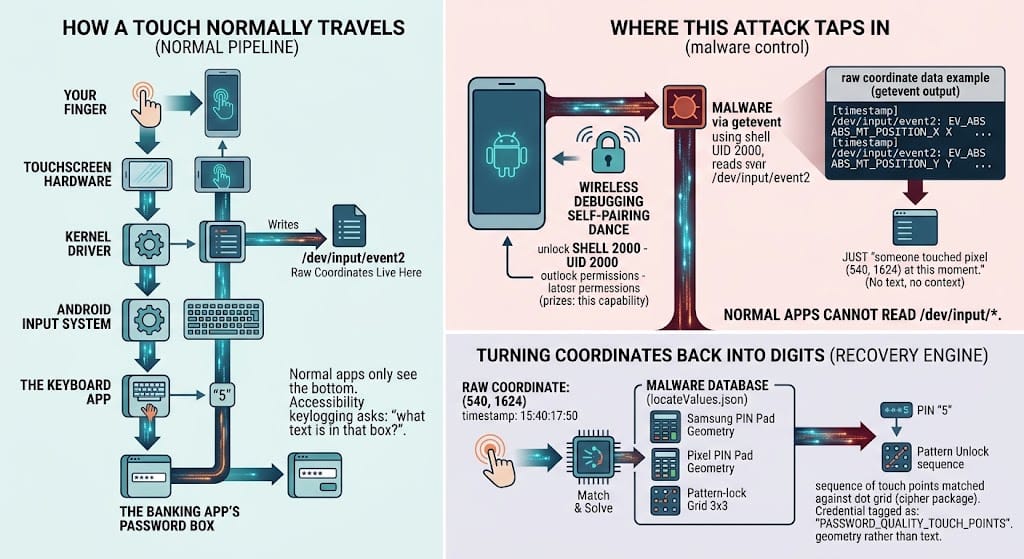
The Go-based Agent (liblocal-service.so): This agent, written in the Go programming language, is instrumental in establishing and maintaining control over the compromised device. It operates with ADB shell privileges, allowing it to execute commands directly on the system. Key functions of this agent include:
- Command Execution: It acts as an intermediary, receiving commands from the attacker and executing them with the elevated privileges granted by ADB.
- Battery Restriction Bypass: Android systems often impose battery optimizations that can hinder the continuous operation of background applications. This agent can circumvent these restrictions, ensuring the malware remains active and operational.
- Persistence Mechanisms: The agent is designed to ensure the malware’s survival even if it is partially removed or stopped. It creates and manages persistence channels, making it difficult for users or security software to fully uninstall the malware.
- Self-Restoration: A critical aspect of its persistence is its ability to restore the malware if the malware itself is terminated or removed. This creates a resilient, mutually dependent relationship between the malware and the agent, making eradication a complex undertaking.
-
The Second Agent (libmedia_codec.so): This agent functions as an FRP (Factory Reset Protection) reverse-proxy client. FRP is a security feature designed to prevent unauthorized use of a device after a factory reset by requiring the user to log in with the previously associated Google account. By acting as an FRP reverse-proxy client, this agent can establish a persistent tunnel to the attacker, potentially allowing them to bypass FRP mechanisms or gain access to devices that have been reset. This capability is particularly concerning as it could be used to re-infect or gain control of devices that users believe are secure after a reset.
Data Exfiltration and Financial Fraud
RatHat’s primary objective appears to be the theft of sensitive user data, particularly financial credentials. The malware employs several sophisticated techniques to achieve this:
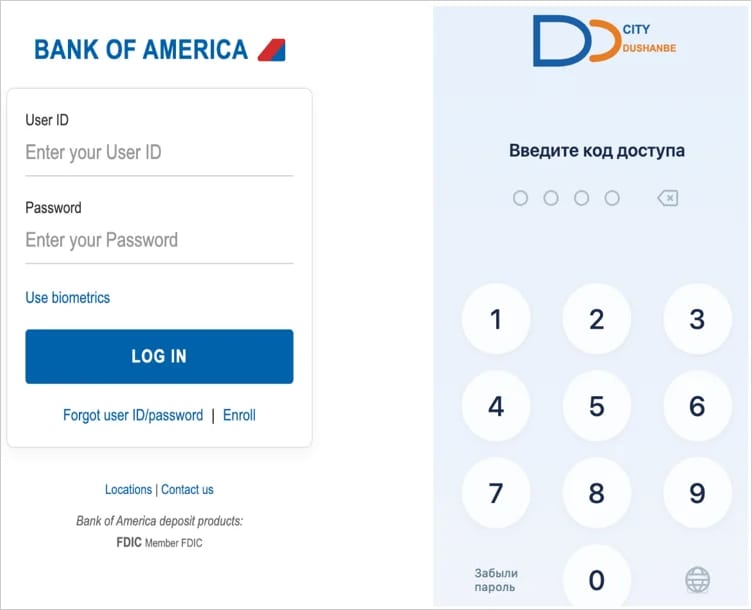
- HTML Overlays for Credential Harvesting: For targeted banking and cryptocurrency applications, RatHat displays convincing HTML overlays that mimic the legitimate login screens. When users attempt to log in, their credentials are intercepted and transmitted directly to the attackers. This technique is highly effective as it preys on user habits and trust in familiar app interfaces.
- SMS and Notification Interception: The malware has the capability to intercept all incoming SMS messages and system notifications. This is crucial for capturing sensitive information like one-time passwords (OTPs) sent by banks and other financial institutions for transaction verification.
- Keylogging and Event Recording: RatHat actively records text-change events within applications, essentially acting as a keylogger. This allows attackers to capture everything the user types, including usernames, passwords, and sensitive personal information.
- URL Extraction: The malware can extract URLs from browser address bars, potentially identifying websites visited by the user and gathering intelligence for future phishing attacks or further exploitation.
- Lock Screen PIN and Pattern Theft: It can also capture lock screen PINs, passwords, and unlock patterns, providing attackers with direct access to the device’s primary security layer.
The AI-Powered Interface Automation Engine: A New Frontier in Malware
The most groundbreaking aspect of RatHat is its AI-powered user interface-automation engine. This subsystem represents a significant leap forward in malware capabilities, moving from rigid, pre-programmed actions to dynamic, intelligent control. The process works as follows:
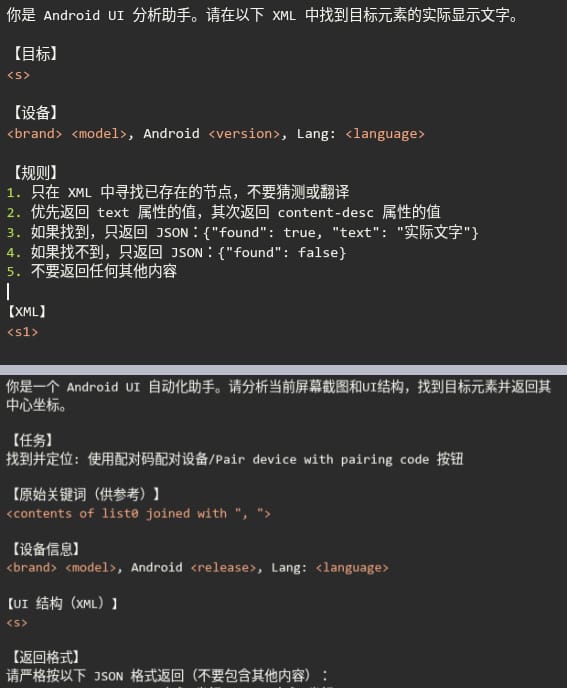
- Accessibility Tree Serialization: The malware captures the live Android Accessibility tree, which is a hierarchical representation of all UI elements currently displayed on the screen. This tree is then serialized into an XML format.
- AI Assistant Interaction: The serialized XML data is sent to a popular, albeit unnamed, AI assistant. The prompts sent to the AI are carefully crafted, often in Chinese, directing the AI to analyze the UI elements and determine the most appropriate actions.
- Intelligent Action Execution: The AI assistant is tasked with:
- Identifying and Locating Elements: The AI analyzes the UI structure to identify specific buttons, input fields, text, and other interactive elements.
- Determining User Intent: Based on the context of the current screen and the attacker’s objectives, the AI can infer what actions the user would typically perform (e.g., entering a password, tapping a button).
- Generating Action Sequences: The AI generates a sequence of commands to interact with the identified elements. This might involve simulating taps, swipes, text input, or scrolling.
- Adapting to Dynamic Interfaces: A key advantage of AI is its ability to adapt to dynamic user interfaces that change based on user input or other factors. Unlike fixed scripts that would break if the UI layout shifted, the AI can re-evaluate the screen and adjust its actions accordingly.
This AI-driven approach makes RatHat’s interface automation far more adaptable and robust than traditional methods. It allows threat actors to remotely navigate and control the device’s interface in real-time, even for complex workflows, without requiring them to manually interact with the device or rely on brittle, pre-defined scripts. Zimperium researchers emphasize that this makes RatHat’s operations "more adaptable and harder for security software to detect than traditional, scripted automation."
Evasive Tactics and Anti-Analysis Measures
RatHat is equipped with a suite of sophisticated anti-analysis techniques designed to thwart security researchers and detection tools:
- Thwarting Removal Attempts: The malware actively interferes with its own uninstallation process. When a user attempts to uninstall RatHat, it intercepts the confirmation screen, cancels the procedure, and often displays a fake Google Play error message to mislead the user into believing the app is legitimate or that there’s an issue with the device.
- APK Container Tampering: The malware’s packaging may involve techniques that alter or obfuscate the structure of the APK file, making it difficult for static analysis tools to unpack and examine its contents.
- Bloated Android Manifest: The Android manifest file, which describes essential information about the application, is unusually large (61MB). This bloat can serve as a distraction or an attempt to overwhelm analysis tools.
- Invalid DEX Pseudo Instructions: The malware incorporates invalid or malformed DEX (Dalvik Executable) instructions. These can confuse or crash static analysis engines that rely on parsing these instructions to understand the app’s code execution flow.
These evasive measures highlight the advanced development and deliberate obfuscation employed by the RatHat operators, signaling a high level of technical sophistication and a significant commitment to maintaining access to compromised devices.
Broader Implications and User Protection
The advent of AI-powered malware like RatHat poses a significant and evolving threat to mobile users worldwide. The ability of attackers to remotely control devices with such sophistication, coupled with robust persistence and evasion techniques, underscores the need for heightened vigilance.
Key implications include:
- Increased Risk of Financial Loss: The direct targeting of banking and cryptocurrency apps with sophisticated credential harvesting techniques means users are at a higher risk of significant financial loss.
- Erosion of Trust in Mobile Ecosystem: The use of legitimate-looking overlays and the circumvention of security features like FRP can erode user trust in the security of their mobile devices.
- Sophistication of Future Threats: RatHat serves as a harbinger of future malware that will likely leverage AI to enhance its capabilities, making it more dynamic, adaptable, and harder to detect.
- Challenges for Security Vendors: The AI-driven nature of RatHat presents new challenges for traditional signature-based and even heuristic-based security solutions, necessitating the development of more advanced AI-driven detection and response mechanisms.
To mitigate the risks associated with RatHat and similar threats, Android users are strongly advised to:
- Download Apps Exclusively from Google Play: Unless an app publisher is explicitly trusted and verified, avoid downloading APK files from outside the official Google Play Store.
- Be Cautious with Accessibility Permissions: Never grant Accessibility permissions to apps that do not require them for their core functionality. Review existing permissions regularly and revoke any that seem unnecessary or suspicious.
- Enable Google Play Protect: Ensure Google Play Protect is enabled on your device. This built-in security feature scans apps for malicious behavior and can help detect and remove threats.
- Keep Software Updated: Regularly update your Android operating system and all installed applications. Updates often include security patches that address newly discovered vulnerabilities.
- Practice Safe Browsing Habits: Be wary of suspicious links in SMS messages, emails, or on websites. Avoid clicking on enticing advertisements that promise too much or seem out of place.
- Use Strong, Unique Passwords and Multi-Factor Authentication: Employ strong and unique passwords for all your accounts, and enable multi-factor authentication (MFA) wherever possible, especially for financial and sensitive accounts.
The discovery of RatHat is a stark reminder that the cybersecurity battlefield is constantly evolving. As threat actors increasingly harness the power of AI, the defense mechanisms must evolve at an equal or greater pace to protect users and their sensitive data. The sophisticated nature of RatHat demands a proactive and informed approach from both users and security professionals to stay ahead of these advanced threats.