 Galang Taruna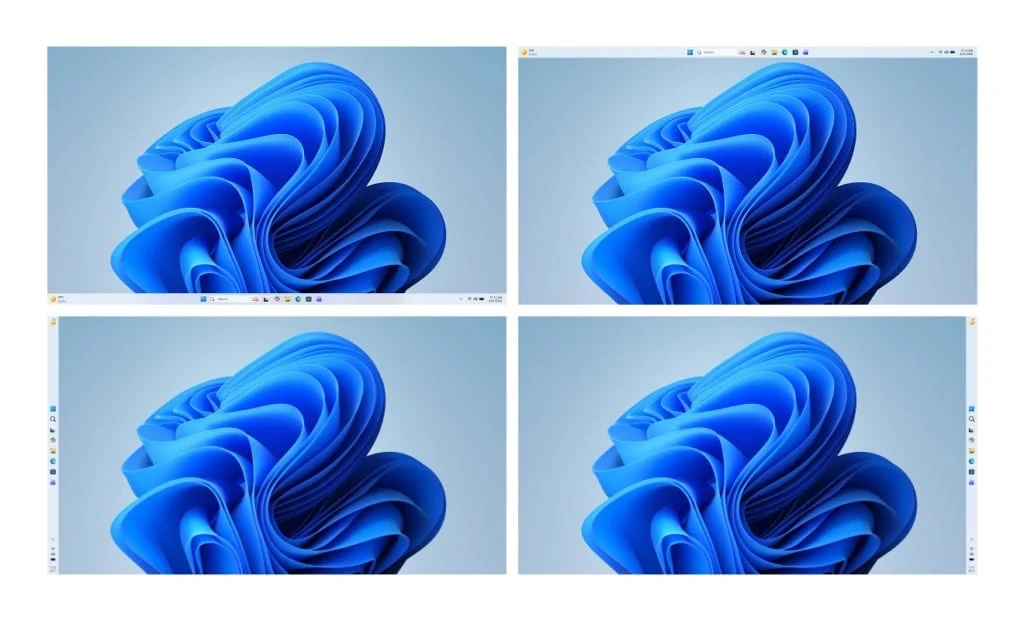
After nearly five years of persistent user feedback, a barrage of criticism from the tech community, and a notable public "mea culpa," Microsoft has announced a significant strategic shift for Windows 11, slated for release throughout 2026. The Redmond giant is set to reintroduce fundamental ergonomic features, streamline its user experience, and rethink its ambitious, often intrusive, artificial intelligence integration. Spearheaded by Windows chief Pavan Davuluri, these changes signal a comprehensive "spring cleaning" for the operating system, promising a more refined, responsive, and user-controlled environment.
Acknowledging Years of User Feedback: The Taskbar’s Return to Flexibility
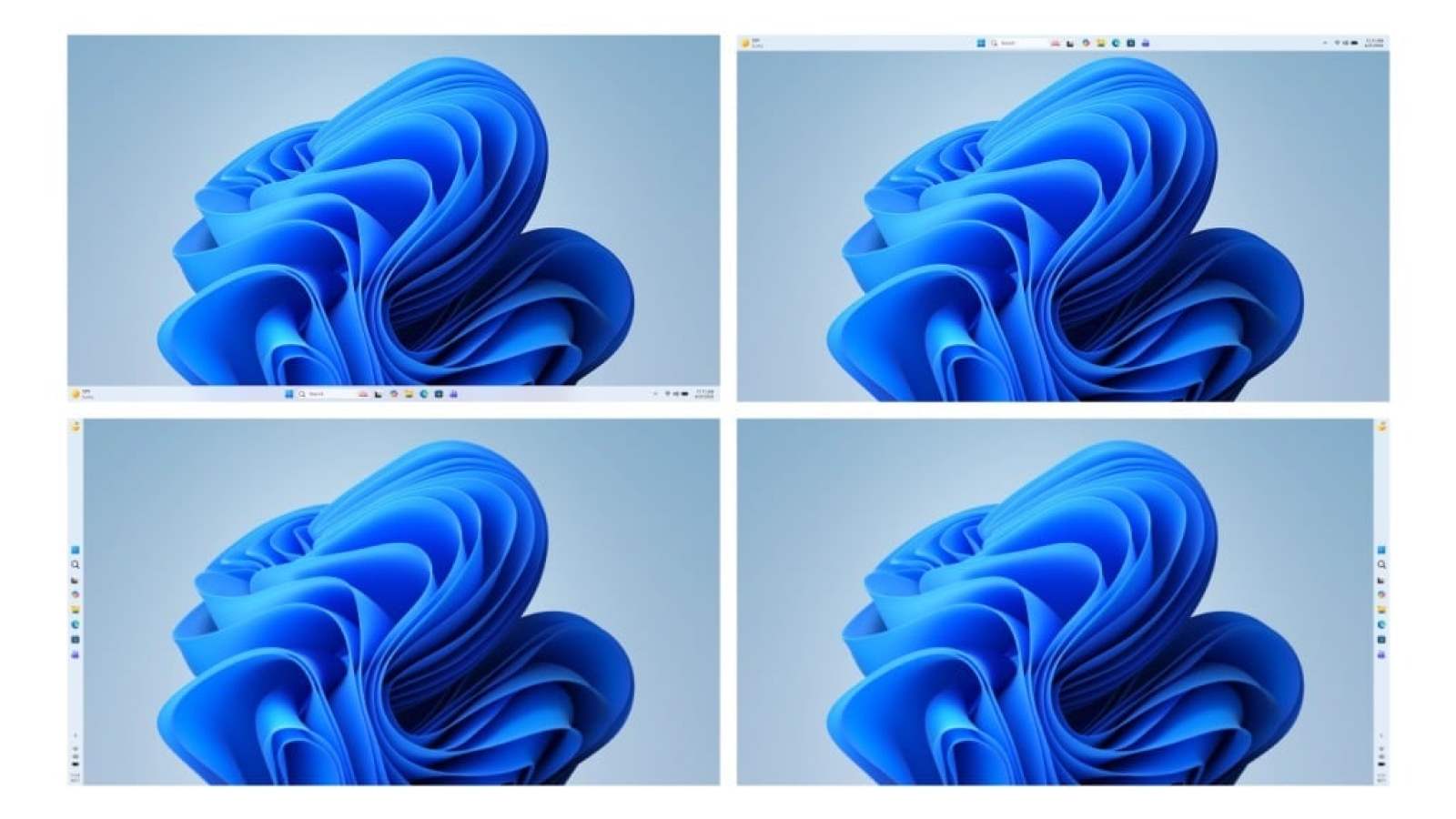
At the forefront of these highly anticipated changes is the re-establishment of taskbar customization, a feature conspicuously absent and widely lamented since Windows 11’s debut in October 2021. For years, Windows users enjoyed the freedom to reposition the taskbar to the top, left, or right edges of their screens, a staple of desktop operating systems since the Windows 95 era. Windows 11, however, controversially restricted it to the bottom, centralizing icons and removing drag-and-drop functionality, a decision that immediately alienated a significant portion of its user base, particularly power users and those with multi-monitor setups.
This design choice stemmed from the development of Windows 10X, an aborted operating system intended for dual-screen devices and tablets. While Windows 10X was eventually shelved, many of its interface elements, including the inflexible taskbar, found their way into Windows 11. This decision, aimed at simplifying the user experience for touch interfaces, inadvertently stripped away decades of established desktop usability. The outcry was immediate and sustained, echoing across tech forums, social media platforms, and specialized publications. Users consistently highlighted the ergonomic benefits of a movable taskbar, citing improved workflow efficiency, better screen real estate management on ultra-wide monitors, and simply the comfort of long-ingrained muscle memory.
Pavan Davuluri, acknowledging this prolonged period of user dissatisfaction, officially announced the return of the movable taskbar. Upcoming updates, expected to roll out to Windows Insiders first, will allow users to right-click the taskbar and select their preferred position: top, left, or right. Furthermore, Microsoft plans to introduce an option to reduce the taskbar’s size later in the year, offering even greater personalization. This move is not merely a feature addition; it represents a profound acknowledgment from Microsoft that user preference and established ergonomic principles should take precedence over a singular, top-down design vision. The company’s promise to "rehausser la barre de qualité" (raise the quality bar) for Windows 11 underscores this renewed commitment to user satisfaction.
Rethinking AI Integration: A Shift Towards "Intentionality"
Beyond interface customization, Microsoft is also undertaking a significant re-evaluation of its artificial intelligence integration strategy, particularly concerning Copilot. Introduced with much fanfare and aggressively pushed into various facets of Windows 11, Copilot’s pervasive presence has often been met with mixed reactions. While the underlying AI capabilities hold immense promise, its ubiquitous integration into every corner of the operating system, from the taskbar to fundamental utility applications, led to concerns about bloatware, performance overhead, and user fatigue.
Critics argued that Copilot was being force-fed into applications where its utility was questionable, leading to an unnecessarily cluttered and less efficient user experience. Examples cited included its automatic invocation in tools like the Snipping Tool, Photos, and Notepad, often without clear, immediate benefit to the user’s workflow. This "saturating every pixel of the interface with Copilot," as the original article implies, created a sense of cognitive overload rather than streamlined assistance.
In response, Microsoft is now adopting a more "intentional" approach, as articulated by Davuluri. This means Copilot will be scaled back from "unnecessary entry points," focusing its integration on scenarios where it genuinely adds value and enhances productivity. This strategic retreat suggests a pivot from widespread, often superficial, AI deployment to a more thoughtful, context-aware application. The implications are far-reaching: it could lead to a more optimized operating system, reduced resource consumption, and a better perception of AI as a helpful assistant rather than an intrusive presence. This refinement aligns with a broader industry trend of integrating AI thoughtfully, prioritizing user control and clear benefits over sheer novelty.
Performance and User Experience: A Modernized Foundation
Underpinning these visible changes are crucial improvements aimed at the core performance and stability of Windows 11. A major target for this overhaul is the File Explorer, an application that has increasingly drawn criticism for its sluggishness, inconsistent interface elements, and tendency to "flicker" during navigation. Users have long complained about the File Explorer feeling like a "usine à gaz" (gas factory) – an overly complex and inefficient system that struggles with basic tasks.
Microsoft’s commitment to addressing these performance bottlenecks is paramount. The company promises "lancements plus rapides, moins de clignotements d’interface et une navigation enfin fluide" (faster launches, less interface flickering, and finally fluid navigation). A key enabler of this improvement is the progressive transition of the File Explorer and other core UI components to WinUI 3. WinUI (Windows UI Library) is Microsoft’s modern user interface framework, designed to provide a consistent, performant, and visually appealing experience across all Windows applications.
The current state of Windows 11’s interface has often been described as a "patchwork" – a blend of modern WinUI elements, older Universal Windows Platform (UWP) components, and legacy Win32/WPF elements. This architectural inconsistency is a significant contributor to the perceived latency, visual glitches, and overall lack of polish that many users have experienced. By migrating more core components to WinUI 3, Microsoft aims to create a more cohesive, responsive, and visually unified operating system. This foundational work is critical for Windows 11 to compete effectively with macOS, which is often praised for its fluid animations and consistent user experience.
Reclaiming Control: The Windows Update Revolution
Perhaps one of the most significant and universally welcomed changes addresses a long-standing "traumatisme collectif" for Windows users: Windows Update. For decades, the update process has been a source of frustration, famous for its untimely forced restarts, lengthy download and installation times, and incessant, often disruptive, notifications. The scenario of a PC unilaterally deciding to update and reboot during a critical presentation or an urgent deadline is a shared experience among countless Windows users.
For 2026, Microsoft is pledging to "redonner les clés du camion" (give back the keys to the truck) to its users. This means a radical shift in how updates are managed, putting control firmly back in the hands of the individual. Key improvements include:
- Optional Reboots: Users will finally be able to shut down or restart their machines without being forced to install pending updates immediately. This provides critical flexibility for users who need their machines available without interruption.
- Skipping Initial Downloads: The arduous process of waiting for interminable downloads during the initial setup of a new PC will be streamlined, allowing users to get started faster.
- Extended Pause Options: The ability to pause updates for significantly longer periods will provide greater control over when maintenance occurs, minimizing disruption.
These changes are designed to eliminate the "bruit" (noise) of constant notifications and the anxiety of forced restarts at the worst possible moments. By making Windows Update less punitive and more predictable, Microsoft directly addresses one of the most common complaints about its operating system. This move also implicitly acknowledges the superior user experience offered by competitors like macOS, where updates are generally perceived as less intrusive and more user-initiated. For business and enterprise users, the ability to better manage updates will be invaluable for IT departments, allowing for more controlled deployment and reduced downtime.
Broader Impact and Strategic Implications
These comprehensive updates, expected to roll out throughout 2026, represent more than just feature additions; they signify a profound strategic recalibration for Microsoft’s flagship operating system. The company’s public mea culpa and the direct addressing of long-standing user grievances suggest a renewed focus on user satisfaction and perceived quality, an area where Windows 11 has struggled to match the polish of rivals like macOS.
Rebuilding User Trust: By actively listening to feedback and reversing unpopular decisions, Microsoft can begin to rebuild trust with its extensive user base, particularly power users and IT professionals who felt overlooked by the initial Windows 11 design philosophy. This could translate into improved user loyalty and a more positive brand image.
Competitive Edge: In an increasingly competitive landscape, where operating systems are judged not only on features but also on user experience and reliability, a more refined Windows 11 could strengthen its position against macOS, ChromeOS, and even Linux distributions. The goal of "moins de distractions, moins de notifications inutiles, et un système de mise à jour moins punitif" directly tackles areas where macOS has historically excelled.
Future of Windows Development: This shift towards user-centric design might herald a new era of Windows development, one that prioritizes iterative improvements based on real-world feedback rather than imposing top-down visions derived from niche projects like Windows 10X. It suggests a more agile and responsive development cycle, where user pain points are addressed proactively.
Market Adoption: While Windows 11 adoption has been steady, it hasn’t been as rapid as some previous versions, partly due to its strict hardware requirements and initial user dissatisfaction with certain interface changes. A significantly improved user experience in 2026 could accelerate its adoption rate, encouraging more users and businesses to upgrade their systems and invest in new Windows PCs. This would be particularly beneficial for hardware partners relying on a compelling software experience to drive sales.
In conclusion, Microsoft’s planned overhaul of Windows 11 for 2026 is a monumental step towards rectifying past missteps and repositioning the operating system as a truly user-friendly and high-quality platform. The return of taskbar flexibility, the more thoughtful integration of AI, the foundational performance enhancements, and the revolutionary changes to Windows Update collectively promise a desktop experience that is less frustrating, more efficient, and ultimately, more respectful of its users’ time and preferences. This "grand nettoyage de printemps" could very well mark a turning point for Windows 11, transforming it from a source of widespread criticism into a benchmark for modern desktop computing.