 Metty Iskandar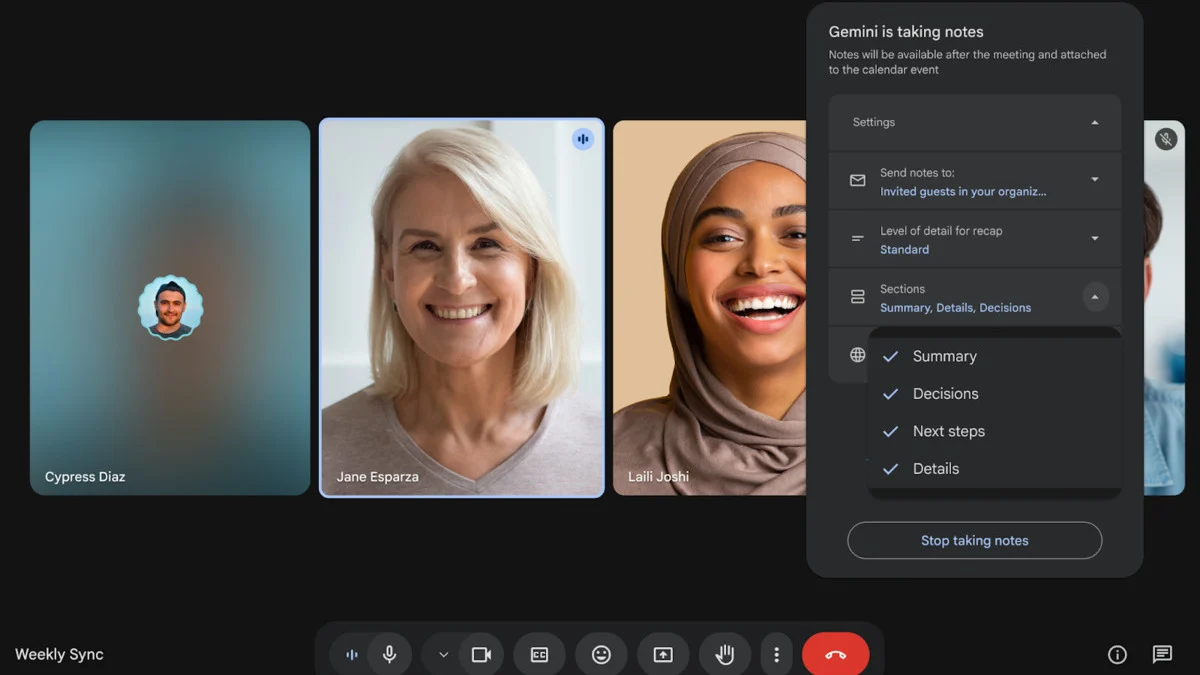
Google is significantly upgrading its AI-powered note-taking feature within Google Meet, introducing a suite of new customization options and a dedicated "Decisions" section designed to streamline meeting outcomes and action items. This enhancement builds upon previous iterations of the "Take notes for me" functionality, aiming to provide users with more control and clarity in capturing essential meeting information. The update is rolling out to a wide range of Google Workspace and Google AI customers, marking a continuous effort by the tech giant to bolster the productivity capabilities of its collaboration tools.
Evolution of "Take Notes for Me"
The journey of "Take notes for me" within Google Meet has been one of progressive refinement, aiming to transform passive meeting attendance into an active and organized information-gathering experience. Initially, the feature focused on generating an automated summary of conversations. However, user feedback and evolving technological capabilities have spurred Google to expand its utility.
The first significant enhancement, introduced a few months prior to this latest update, allowed users to adjust the length of the AI-generated meeting notes. This was a crucial step in making the summaries more digestible and tailored to individual preferences, acknowledging that not all meetings require lengthy recaps. This initial adjustment signaled Google’s commitment to user-centric design, recognizing that a one-size-fits-all approach to meeting notes was insufficient.
The current wave of updates represents a more substantial leap forward, offering granular control over the structure and content of these AI-generated notes. This move reflects a deeper understanding of how teams utilize meeting summaries in professional environments, where specific categories of information are often prioritized.
Granular Control Over Meeting Notes
At the core of the latest update is the introduction of enhanced customization options that allow users to sculpt their meeting notes according to their specific needs. Previously, AI-generated notes might have included a standard set of information. Now, users can actively select which sections they wish to see in their notes. These sections include:
- Summary: A high-level overview of the discussion.
- Decisions: A dedicated area for tracking agreed-upon outcomes and their status.
- Next Steps: Outlines the action items and responsibilities assigned.
- Details: A more comprehensive record of the conversation, potentially including key points and supporting information.
This ability to toggle sections on and off provides a significant advantage. For instance, a project manager might prioritize "Decisions" and "Next Steps" for a status update meeting, while a technical team might opt for a more detailed "Summary" and "Details" section for a brainstorming session. The flexibility ensures that users are not burdened with extraneous information, allowing them to focus on what is most critical for their role and the meeting’s objective.
It is important to note that these customization choices are session-specific. This means that the settings applied to one meeting will not automatically carry over to the next. Upon concluding a meeting and generating notes, the settings will reset to the default configuration for subsequent calls. While this approach prioritizes a clean slate for each new meeting, it may lead some users to desire persistent customization profiles for recurring meeting types. The current implementation, however, emphasizes immediate adaptability for each individual meeting.
The New "Decisions" Section: Capturing Outcomes
A standout addition to the Google Meet note-taking feature is the dedicated "Decisions" section. This element addresses a critical pain point in many professional settings: the often-hazy tracking of actionable outcomes. Meetings frequently culminate in agreements or resolutions, but without a clear mechanism for recording and tracking these, they can easily fall through the cracks.
Google defines the "Decisions" section as a space designed to "capture outcomes and track their status." This implies a dynamic element where not only the decision itself is logged but also its current standing. The example statuses provided by Google – "Aligned," "Needs further discussion," "Disagreed," or "Shelved" – offer a structured framework for monitoring the progress and resolution of key agreements.
This feature has the potential to significantly improve accountability and project momentum. By clearly demarcating and categorizing decisions, teams can ensure that important agreements are not lost in the general flow of conversation. Furthermore, the ability to track status provides a visual cue for follow-up, allowing team members to quickly identify decisions that require further attention or clarification.
Initially, this powerful "Decisions" section will be exclusively available in English. Google has not yet provided a timeline for the introduction of support for other languages, a point that will likely be of interest to the company’s global user base. The phased rollout of multilingual support is a common strategy for AI-driven features, allowing for rigorous testing and refinement in a primary language before broader expansion.
Streamlined Summaries for Quicker Comprehension
Beyond the structural enhancements, the "Summary" section itself is also receiving an overhaul. The updated summaries are designed to be more "concise and scannable." This improvement is critical in today’s fast-paced work environments where individuals often attend multiple meetings per day. The goal is to enable users to grasp the essence of a meeting, or to quickly catch up on what they might have missed, with minimal effort.
A scannable summary implies the use of bullet points, shorter sentences, and clear thematic organization. This moves away from potentially dense paragraphs and towards a format that is easily digestible at a glance. For users who were not present for the entirety of a meeting, or who need to reference key takeaways rapidly, this enhanced conciseness will be a significant time-saver and comprehension booster. This aligns with the broader trend in digital tools towards information density and efficient user interaction.
Availability and Target Audience
These comprehensive updates to the "Take notes for me" feature are rolling out starting today. The availability is segmented across various Google Workspace and Google AI subscription tiers, indicating Google’s strategy of delivering advanced features to its premium customer base.
The update is accessible for users with the following subscriptions:
- Enterprise Standard and Plus: These tiers often cater to larger organizations with advanced IT and collaboration needs.
- Business Standard and Plus: Targeted at businesses of varying sizes, these plans offer robust productivity tools.
- Frontline Plus: This plan is designed for organizations with a significant frontline workforce, often requiring mobile-first solutions.
- Google AI Pro for Education: This specialized offering underscores Google’s commitment to enhancing educational collaboration and learning through AI.
Additionally, the enhanced features will also be available to individuals subscribed to:
- Google AI Pro: This subscription likely focuses on leveraging advanced AI capabilities for individual productivity.
- Google AI Ultra: This premium tier suggests access to the most cutting-edge AI functionalities.
The broad distribution across these tiers highlights Google’s intention to embed these enhanced note-taking capabilities deeply within its professional and educational ecosystems. By making these features available to a wide array of users, Google aims to drive adoption and gather further feedback for future iterations.
Broader Implications for Collaboration and Productivity
The advancements in Google Meet’s AI note-taking capabilities represent more than just incremental feature updates; they signal a strategic push towards making virtual and hybrid collaboration more effective and efficient. In an era where remote and hybrid work models are increasingly prevalent, the ability to accurately capture, organize, and act upon information discussed in virtual meetings is paramount.
Supporting Data and Context:
The global collaboration software market is experiencing substantial growth. According to a report by Grand View Research, the global collaboration software market size was valued at USD 43.3 billion in 2022 and is projected to expand at a compound annual growth rate (CAGR) of 12.9% from 2023 to 2030. This growth is fueled by the increasing need for seamless communication and productivity tools, especially in distributed work environments. AI-powered features, such as automated note-taking and summarization, are becoming key differentiators in this competitive landscape.
Timeline and Chronology:
The evolution of "Take notes for me" can be seen as a phased approach:
- Initial Release: Basic AI-powered summarization of Google Meet calls.
- Recent Past (Few Months Ago): Introduction of adjustable note length, providing a basic level of personalization.
- Present Update (April 2026): Significant expansion with customizable sections (Summary, Decisions, Next Steps, Details), a dedicated "Decisions" section with status tracking, and more concise summaries.
Analysis of Implications:
The enhanced customization directly addresses the diverse needs of different meeting types and user roles. By allowing users to tailor their notes, Google Meet moves from a generic summarization tool to a personalized productivity assistant. The "Decisions" section, in particular, has the potential to revolutionize how teams manage follow-ups and ensure accountability. This could lead to:
- Reduced Meeting Overhead: Less time spent manually transcribing notes or trying to recall decisions.
- Improved Project Management: Clearer tracking of action items and outcomes can accelerate project completion.
- Enhanced Inclusivity: Users who join late or miss parts of a meeting can quickly get up to speed with scannable summaries.
- Data-Driven Insights: Over time, the structured data captured by the "Decisions" and "Next Steps" sections could provide valuable insights into team performance and project bottlenecks.
Statements or Reactions (Inferred):
While no direct quotes from Google executives were provided in the original content, the strategic emphasis on these enhancements suggests a clear objective: to solidify Google Meet’s position as a leading platform for productive virtual collaboration. The company’s continuous investment in AI features for its Workspace suite indicates a belief that intelligent automation is the future of work. Industry analysts are likely to view this update as a positive step, reinforcing Google’s commitment to innovation in the competitive collaboration tool market. Competitors will likely respond by either enhancing their own AI note-taking capabilities or by focusing on other areas of differentiation.
In conclusion, Google’s latest iteration of its "Take notes for me" feature in Google Meet represents a significant advancement in AI-driven meeting productivity. By offering robust customization, a dedicated "Decisions" section, and more scannable summaries, Google is equipping users with powerful tools to maximize the value derived from their virtual interactions, ultimately contributing to more efficient and outcome-oriented work environments.