admin
admin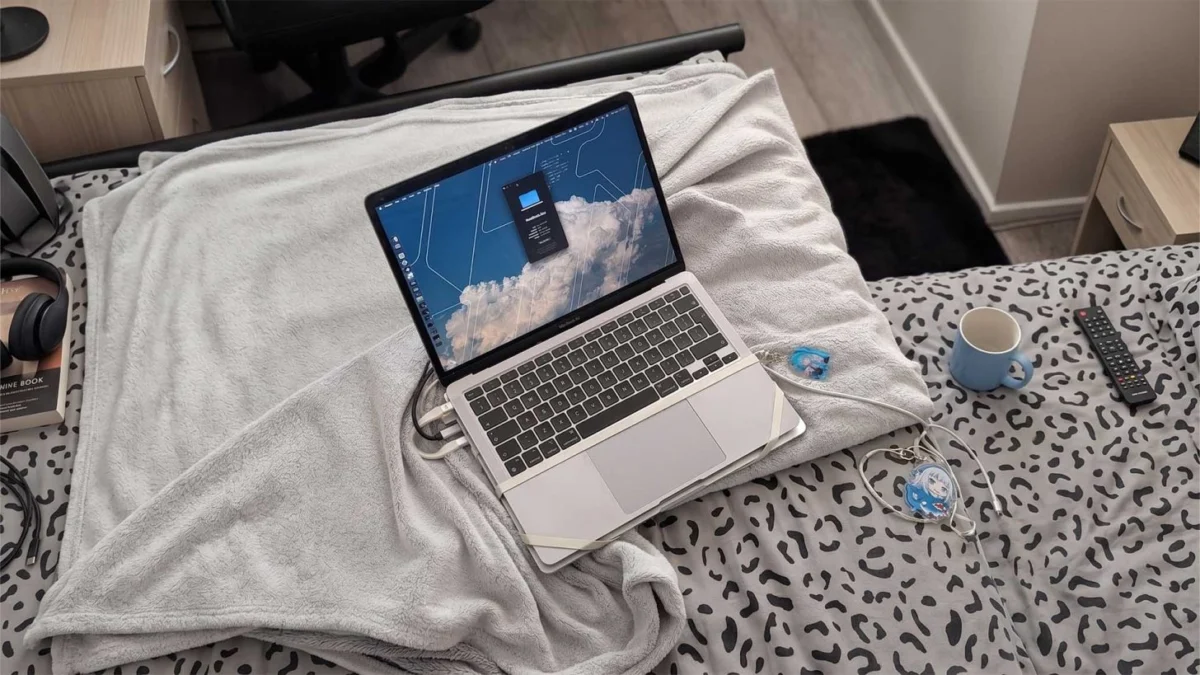
In an era where consumer electronics are increasingly characterized by integrated components and high repair costs, a recent hardware modification shared by a member of the technology community has highlighted the lengths to which users will go to maintain the utility of their devices. A Redditor operating under the pseudonym Content_Virus9971 recently gained attention for bypassing a $700 display repair quote from Apple by physically and digitally tethering a flagship M4 Pro MacBook Pro with a shattered screen to an older, functional M1 MacBook Pro. The resulting "Frankenstein" configuration utilizes high-speed networking and low-latency streaming software to repurpose the older laptop as a dedicated monitor for the newer, more powerful machine.
The incident underscores a growing trend among "headless" MacBook users—individuals who continue to use the bottom half of a laptop after the display has failed. While many simply connect these units to traditional desktop monitors, the portability requirement led this specific user to a more complex, mobile solution involving rubber bands, Thunderbolt cables, and specialized network protocols.
Technical Execution and Networking Architecture
The hardware configuration devised by the user involves a literal stacking of two generations of Apple silicon. The M4 Pro MacBook Pro, which serves as the primary computational engine, sits atop the chassis of an M1 MacBook Pro. To ensure the setup remains physically unified during transport, the user employed heavy-duty rubber bands to secure the two units. However, the true innovation lies in the data transmission layer that allows the M1’s display to act as a zero-latency viewfinder for the M4 Pro.
To facilitate this, the user established a Thunderbolt LAN (Local Area Network) connection. By connecting the two devices via a Thunderbolt 4 cable, the macOS operating system recognizes the link as a high-bandwidth network bridge. Unlike standard Wi-Fi or even Gigabit Ethernet, a Thunderbolt-based bridge can theoretically support speeds up to 40Gbps, though the software overhead usually limits actual throughput. This high-speed pipeline is essential for the second component of the fix: Moonlight.
Moonlight is an open-source implementation of NVIDIA’s GameStream protocol, originally designed for streaming high-end PC games to mobile devices with minimal lag. By running a host server on the M4 Pro and a client on the M1 MacBook Pro, the user can stream the entire desktop environment in real-time. The use of a wired Thunderbolt LAN ensures that the input lag—the delay between moving a mouse and seeing the cursor move on the screen—is virtually imperceptible, a feat that would be impossible over standard wireless AirPlay or Sidecar configurations.
The Economic Reality of Apple Repair Pricing
The primary driver behind this unconventional modification is the significant cost associated with official Apple hardware service. For the current generation of MacBook Pro models, particularly those featuring Liquid Retina XDR displays with Mini-LED backlighting and ProMotion technology, the display assembly is the single most expensive component outside of the logic board.
Industry data suggests that out-of-warranty screen replacements for 14-inch and 16-inch MacBook Pro models typically range from $600 to $850 depending on the region and specific model. The $700 quote received by the user represents approximately 35% to 45% of the total retail value of a new M4 Pro MacBook Pro. For many consumers, such a high repair-to-value ratio makes official service economically unfeasible, especially when they possess older hardware that can be repurposed.
The high cost of these repairs is attributed to the complexity of the display assembly. Modern MacBook screens are not merely LCD panels; they are integrated units containing the webcam, ambient light sensors, True Tone sensors, and the sophisticated Mini-LED array. Furthermore, Apple’s practice of "parts pairing"—where specific components are digitally serialized to the motherboard—can complicate third-party repairs, often leading users back to official channels or creative DIY workarounds.
Comparative Evolution: M1 vs. M4 Pro Specifications
The use of an M1 MacBook Pro as a "dumb terminal" for an M4 Pro illustrates the rapid advancement of Apple’s proprietary chips over the last four years. The M1 chip, introduced in late 2020, was a landmark in power efficiency and performance for the ultra-portable market. However, the M4 Pro, built on a second-generation 3nm process, offers a vastly superior computational profile.
| Feature | M1 MacBook Pro (2020) | M4 Pro MacBook Pro (2024) |
|---|---|---|
| CPU Cores | 8-Core (4 Performance / 4 Efficiency) | Up to 14-Core (10 Performance / 4 Efficiency) |
| GPU Cores | 8-Core | Up to 20-Core |
| Memory Bandwidth | 68.25 GB/s | Up to 273 GB/s |
| Neural Engine | 11 Trillion Operations Per Second | 38 Trillion Operations Per Second |
| Display Tech | Retina LED (500 nits) | Liquid Retina XDR (1600 nits peak) |
By utilizing the M1 as a display, the user retains the massive processing power of the M4 Pro—essential for tasks like 8K video editing, complex 3D rendering, or large-scale software development—while leveraging the perfectly functional, albeit older, display technology of the 2020 model.

The Rise of the Headless MacBook Subculture
This specific case is part of a broader movement within the tech community involving "headless" MacBooks. On secondary markets like eBay and specialized hardware forums, MacBooks with broken screens are often sold at steep discounts. Tech-savvy buyers purchase these units to use as high-performance "slab" computers.
The "headless" trend has gained momentum because the bottom half of a MacBook Pro remains a formidable computer in its own right, featuring a high-quality keyboard, a best-in-class trackpad, and a robust thermal management system. For users who primarily work at a desk with external monitors, a headless M4 Pro offers the performance of a Mac Studio or Mac Mini with the added benefit of a built-in UPS (the battery) and integrated input devices.
The Redditor’s modification takes this a step further by attempting to restore portability. While the stacked configuration is physically cumbersome and doubles the weight of the device, it serves as a functional mobile workstation that avoids the "e-waste" trap of discarding a powerful machine due to a single failed component.
Software Dependencies and Remote Accessibility
While the Thunderbolt LAN connection works for local use, the user noted that taking the setup to a public location, such as a coffee shop, introduces new challenges. To maintain the connection without a direct cable, or to access the "headless" M4 Pro from a distance, tools like Tailscale are required.
Tailscale is a zero-config VPN that creates a secure mesh network between devices. By using Tailscale in conjunction with Moonlight, a user can theoretically access their M4 Pro from anywhere in the world using the M1 MacBook Pro as the interface. However, this introduces the latency issues that the Thunderbolt cable was designed to solve. The user’s reliance on these sophisticated networking tools highlights the technical barrier to entry for such a workaround; it is a solution born of necessity that requires a relatively high level of networking knowledge to maintain.
Broader Implications for the Right to Repair
The viral nature of this DIY fix has reignited discussions regarding the "Right to Repair." Advocates argue that if displays were more modular or if Apple provided more affordable paths for screen replacement, users would not need to resort to strapping two laptops together with rubber bands.
Apple has made strides in this area with its Self Service Repair program, which allows users to purchase genuine parts and tools. However, the price of the parts themselves remains high. For a 14-inch MacBook Pro, the display part alone can cost over $500, even before labor or the necessary specialized calibration software is considered.
Environmental analysts also point to the sustainability aspect of this story. By finding a way to continue using the M4 Pro, the user is preventing a highly sophisticated piece of hardware from entering the waste stream. Simultaneously, they are extending the lifecycle of the M1 MacBook Pro, which might otherwise have been retired or sold.
Conclusion and Future Outlook
The "rubber-banded M4 Pro" stands as a testament to user ingenuity in the face of restrictive repair economies. While not a permanent or aesthetically pleasing solution, it functionalizes a top-tier professional machine that would otherwise be relegated to a desk or a scrap heap.
As display technology continues to advance with rumored future shifts toward Tandem OLED panels in the MacBook lineup, repair costs are unlikely to decrease. This suggests that the "headless" MacBook community and creative DIY workarounds will continue to grow. For now, the combination of Thunderbolt networking and low-latency streaming software provides a viable, if unconventional, bridge for those unwilling—or unable—to pay the "Apple Tax" on hardware accidents.
The story serves as a reminder to the tech industry that consumers value the longevity of their investments and will utilize every software and hardware tool at their disposal to keep their devices operational, regardless of how many rubber bands it takes.