admin
admin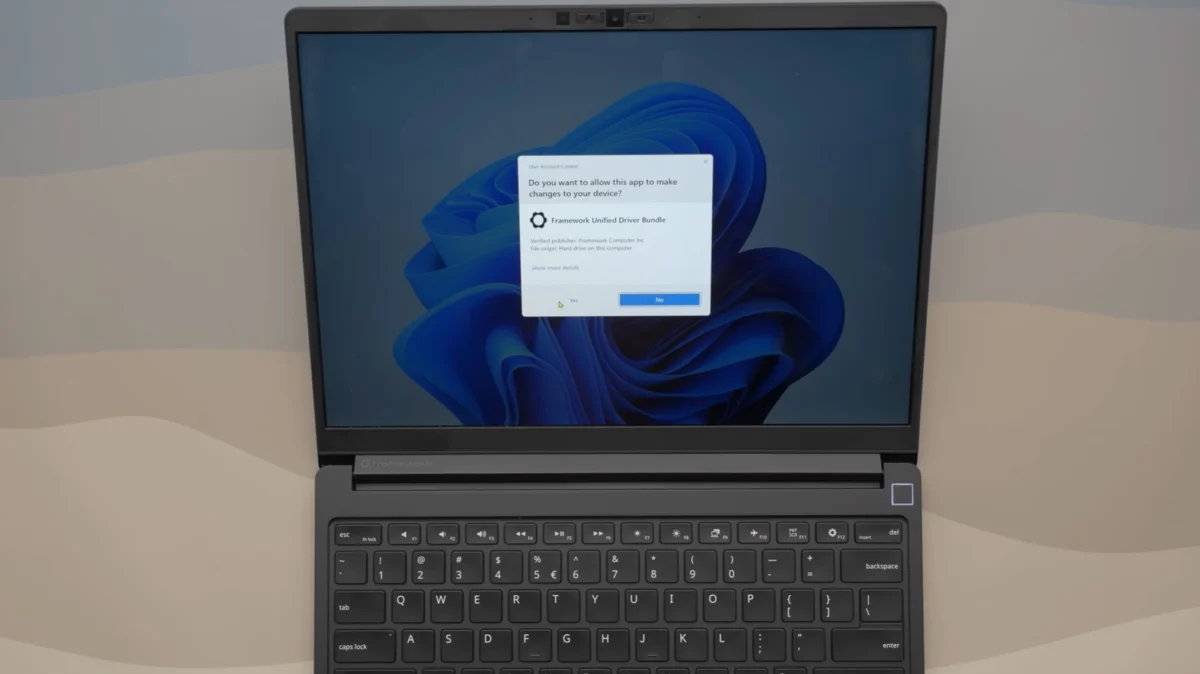
The Traditional Friction of DIY Laptop Maintenance
For years, the process of setting up a clean installation of Windows on a laptop has been a multi-stage ordeal that often deters less experienced users from attempting their own repairs or upgrades. When a user performs a fresh installation of Windows 11, the operating system rarely includes all the necessary firmware to make the hardware function at peak performance. Components such as the Wi-Fi card, the trackpad, the fingerprint sensor, and the specialized power management controllers often require specific drivers provided by the Original Equipment Manufacturer (OEM).
In the traditional ecosystem, a user must navigate to the manufacturer’s support website, search for their specific model and serial number, and then download dozens of individual files. Each driver—from the Intel Chipset to the audio codec—typically comes as a separate executable. This process is not only time-consuming but frequently requires multiple system reboots between installations. Furthermore, if the Wi-Fi driver is not included in the base Windows installation, the user finds themselves in a "Catch-22" scenario where they need the internet to download the drivers but cannot access the internet because the drivers are missing. This usually necessitates using a second computer and a USB drive to bridge the gap.
Framework’s new approach eliminates this friction entirely. By consolidating every necessary driver for the Framework Laptop 13 Pro into a single "Driver Bundle" executable, the company has streamlined a process that previously took hours into a task that takes minutes. This move is being hailed as a significant victory for the "Right to Repair" movement, as it lowers the barrier to entry for users who wish to maintain their own hardware without professional assistance.
Technical Analysis of the Framework Driver Bundle
The unified installer, recently highlighted by the technology channel Linus Tech Tips, represents a shift in how firmware is delivered to the end-user. According to technical documentation and visual evidence from the installation process, the Framework Driver Bundle targets the Intel Core Ultra Series platforms. Upon execution, the software initiates a command-line interface that automates the sequential installation of every critical component.
The bundle includes, but is not limited to:

- Intel Chipset Device Software
- Intel Management Engine Interface
- Intel Serial IO Drivers
- Intel HID Event Filter
- Intel GNA (Gaussian & Neural Accelerator)
- Intel Integrated Graphics Drivers
- Realtek Audio Drivers
- Specialized drivers for the Framework-specific modular ports
One of the most notable features of this executable is its ability to handle "driver injection" and registration without requiring a system restart after every individual component is updated. By utilizing a script-based wrapper, the installer ensures that the drivers are placed in the correct order—ensuring, for example, that the chipset drivers are active before attempting to install secondary components that rely on the chipset bus. This prevents the common "Yellow Bang" errors in the Windows Device Manager, which signify a device that is present but non-functional due to a lack of software communication.
Contrast with Industry Standards and Bloatware
The broader PC industry has historically taken a different approach to post-installation software. Major brands often pre-install "Control Centers" or "Support Assistants." While these programs are intended to keep drivers updated, they are frequently criticized for being "bloatware"—software that consumes system resources, displays unwanted advertisements, or collects user data. In many cases, these dedicated control suites are buggy, fail to recognize available updates, or require the user to create an account to access basic hardware functionality.
Framework’s decision to provide a clean, "no-frills" executable stands in stark contrast to this trend. There is no background service that stays active after the installation is complete, and there is no telemetry gathered during the process. This "set it and forget it" philosophy aligns with the company’s core mission of giving the user total control over their hardware.
Industry analysts suggest that the reason larger OEMs have not adopted this simplified method is not due to a lack of resources, but rather a lack of incentive. For many manufacturers, the software pre-installed on a laptop is a source of revenue, often through partnerships with antivirus companies or cloud storage providers. By simplifying the driver process to a single, clean executable, Framework is prioritizing user time and system stability over the potential monetization of the desktop environment.
The Role of the Tech Community and Linus Tech Tips
The visibility of this software improvement is largely due to the coverage provided by Linus Tech Tips (LTT). Linus Sebastian, the founder of the channel, has been a vocal proponent of Framework, even becoming a significant investor in the company. In recent coverage, LTT pointed out that the "migraine-inducing" aspect of Windows 11 setup is a hurdle that even seasoned enthusiasts dread.
The community reaction has been overwhelmingly positive. On social media platforms and tech forums, users have noted that this software-level refinement is the "missing piece" of the DIY laptop experience. While Framework had already mastered the hardware side of modularity with their swappable mainboards and Expansion Card system, the software experience was previously seen as a standard, somewhat clunky Windows affair. By addressing the driver installation bottleneck, Framework has moved closer to providing a "boutique" experience that rivals the seamlessness of vertically integrated ecosystems like Apple’s macOS, while maintaining the openness of the PC platform.

Chronology of the Framework 13 Evolution
To understand the significance of the Framework Laptop 13 Pro, it is helpful to look at the timeline of the company’s development:
- 2021: The Debut: Framework launches the original Framework Laptop 13 with 11th Gen Intel Core processors. It introduces the concept of the Expansion Card system and a 10/10 repairability score from iFixit.
- 2022: Iteration: The company releases 12th Gen Intel Core upgrades and introduces a new, higher-tension hinge based on community feedback.
- 2023: Expansion: Framework introduces the Framework Laptop 16 and AMD Ryzen options for the 13-inch model, proving that their modular chassis could support different processor architectures.
- 2024-2025: Professional Grade: The "Pro" series is introduced, focusing on higher-resolution displays, improved webcams, and the Intel Core Ultra (Series 3) architecture.
- Current Milestone: The release of the unified driver executable marks the company’s transition from focusing purely on hardware modularity to optimizing the end-to-end user lifecycle, from assembly to OS maintenance.
Broader Implications for the Laptop Market
Framework’s move could potentially force a shift in how other notebook brands approach customer support. As the "Right to Repair" legislation gains momentum in the United States and the European Union, manufacturers are under increasing pressure to make their devices easier to maintain. If a small company like Framework can provide a streamlined, user-friendly software solution, it becomes harder for multi-billion-dollar corporations to justify their fragmented and difficult-to-navigate support portals.
Furthermore, this development highlights the evolving relationship between hardware manufacturers and Microsoft. While Windows 11 includes a feature called "Windows Update" that is supposed to handle driver installations automatically, it is notoriously unreliable for specialized hardware. Framework’s unified installer acts as a necessary bridge, ensuring that the hardware performs exactly as intended from the first boot.
The success of the Framework Laptop 13 Pro’s software strategy also serves as a proof of concept for the "DIY-first" business model. It proves that there is a market for consumers who are willing to trade the convenience of a pre-built, locked-down machine for a device that offers transparency and ease of repair. By removing the software "headaches" associated with DIY builds, Framework is expanding its target audience from hardcore enthusiasts to general professional users who value longevity and efficiency.
Conclusion and Future Outlook
The Framework Laptop 13 Pro is more than just a hardware refresh; it is a statement of intent regarding the future of personal computing. By solving the "driver dilemma," Framework has addressed a grievance that has plagued PC users for decades. While the company continues to innovate in the physical realm—exploring new materials and modular components—this software refinement demonstrates a holistic understanding of the user experience.
As we look toward future iterations of the Framework line, the industry will be watching to see if competitors like Dell, HP, or Lenovo adopt similar unified installation methods. For now, Framework remains at the forefront of the movement to make technology more accessible, repairable, and user-centric. For the DIY buyer, the "Pro" in Framework Laptop 13 Pro now signifies not just professional-grade hardware, but a professional-grade setup experience that respects the user’s time and technical autonomy.