
 George Chandra Eka
Apple’s AirPods have become a ubiquitous accessory, seamlessly integrating into the daily lives of millions with their intuitive design and reliable performance. While these wireless earbuds offer a commendable audio experience straight out of the box, their true potential for personalized sound and enhanced functionality often remains untapped by many users. Apple has progressively introduced a sophisticated suite of customization options, allowing owners of various AirPods models to fine-tune their listening experience, adapt to diverse environments, and even leverage their devices for crucial accessibility support. This article delves into the comprehensive range of audio adjustments available, exploring their evolution, practical applications, and broader implications for personal audio technology. Understanding and utilizing these advanced settings can transform the standard AirPods experience into one uniquely tailored to individual preferences and needs.
The Evolution of AirPods Audio: A Chronology of Innovation
Since their initial launch in 2016, AirPods have undergone significant technological advancements, moving beyond simple wireless audio transmission to incorporate complex features that redefine personal listening. The first generation of AirPods primarily focused on seamless connectivity and Apple ecosystem integration. However, the introduction of the AirPods Pro in 2019 marked a pivotal moment, bringing Active Noise Cancellation (ANC) and Transparency Mode to the forefront. These features allowed users unprecedented control over their acoustic environment, either by immersing themselves fully in their audio or remaining aware of their surroundings.
The subsequent release of the AirPods (3rd generation) in 2021 further expanded capabilities with Spatial Audio and Adaptive EQ, dynamically adjusting sound based on the fit and seal of the earbuds. The second generation of AirPods Pro, launched in 2022, integrated even more advanced functionalities, including enhanced ANC, Adaptive Audio, Conversation Awareness, Personalized Volume, and Loud Sound Reduction, alongside improved Spatial Audio. These incremental yet substantial upgrades underscore Apple’s commitment to pushing the boundaries of personal audio, transforming AirPods from mere playback devices into intelligent, adaptable audio companions. The anticipated arrival of Custom EQ with iOS 27 in the fall further highlights this trajectory, promising an even deeper level of user-controlled sound shaping.
Mastering Your Soundstage: Deep Dive into Listening Modes
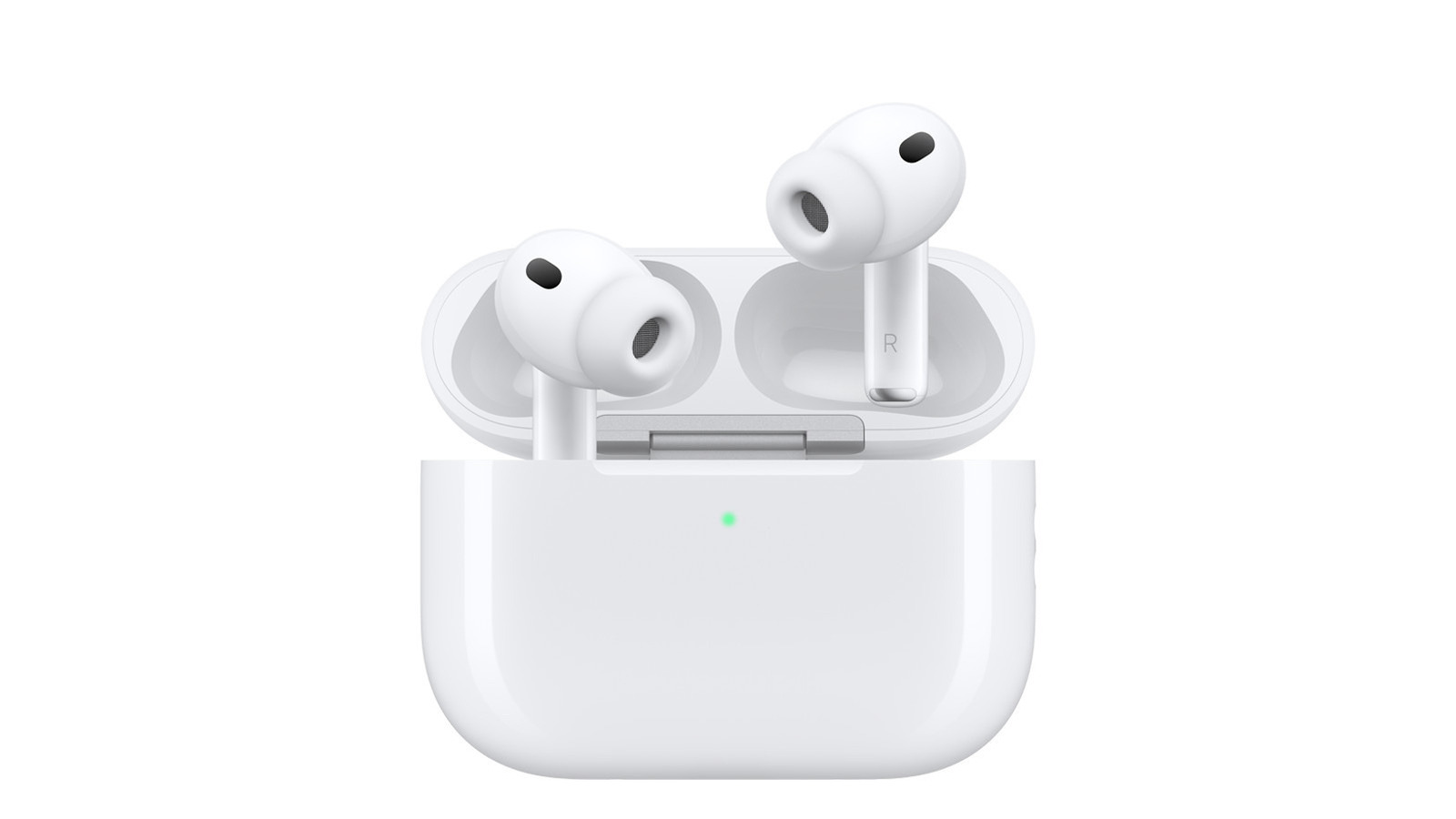
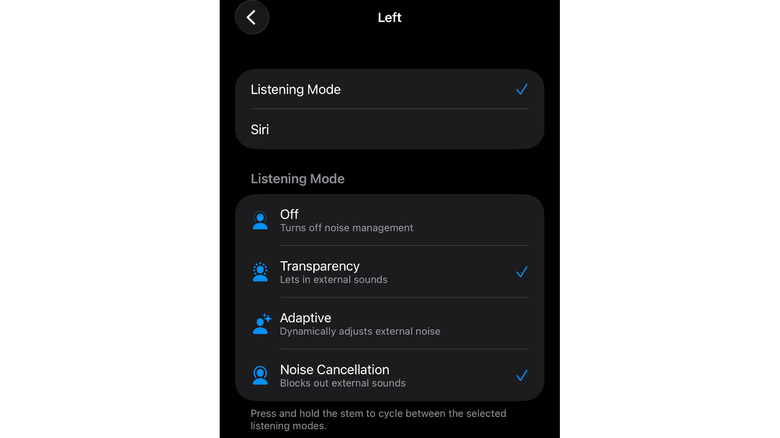
One of the most frequently utilized and customizable features on AirPods Pro models and the AirPods (3rd generation) is the "Listening Mode." Users can effortlessly switch between Active Noise Cancellation, Transparency Mode, and Adaptive Audio. This functionality is typically controlled by pressing and holding the force sensor on the stem of either earbud, an action that provides tactile feedback with a distinct click. An accidental mode switch is a common reason for a sudden change in audio perception, prompting many to explore the customization options.
Active Noise Cancellation (ANC): This mode employs advanced algorithms and microphones to detect external sounds and generate anti-noise, effectively canceling out ambient distractions. It is particularly beneficial in noisy environments such as bustling commutes, open-plan offices, or while traveling, offering a sanctuary for focused listening or quiet contemplation.
Transparency Mode: In contrast, Transparency Mode allows ambient sounds to pass through, ensuring users remain aware of their surroundings. This is invaluable for safety in urban environments, engaging in quick conversations without removing the earbuds, or listening for important announcements.
Adaptive Audio: Introduced with the latest AirPods Pro models, Adaptive Audio represents a significant leap forward. It intelligently blends Active Noise Cancellation and Transparency Mode, dynamically adjusting the level of external noise based on the user’s environment. For instance, it might reduce the drone of a train while still allowing a sudden announcement to be heard clearly, offering a fluid and context-aware listening experience.
Users can customize which modes are cycled through when the force sensor is pressed and held. This is accessed via the Settings app on an iPhone, iPad, or Mac, under the specific [name] AirPods or AirPods Pro section. It is crucial for the AirPods to be connected or for their charging case to be open to access these settings. Within this menu, under Press and Hold AirPods, users can assign specific modes to each earbud, or even introduce an "Off" option that disables advanced noise control entirely. The flexibility to choose more than two modes means the AirPods will cycle through all selected options, providing quick, on-the-fly environmental audio control without needing to interact with the connected device. This rapid accessibility is particularly useful for those who frequently transition between different acoustic environments, from a quiet office to a busy street.
Beyond Noise Control: A Suite of Personalization Options
The AirPods Control Center, accessible through the device settings, offers a wealth of additional customization options that extend far beyond basic noise control, catering to diverse user needs from convenience to critical accessibility.
Siri Integration: While one AirPod can be dedicated to cycling through Listening Modes, the other can be programmed to activate Siri with a press-and-hold action. This allows users to seamlessly manage calls, send messages, control media playback, or get information using voice commands, enhancing hands-free interaction.
Personalized Volume: Available on the latest AirPods Pro models, Personalized Volume intelligently adjusts the playback volume in real-time, responding to changes in the surrounding environment. This feature utilizes computational audio to analyze ambient noise levels and user listening habits, ensuring an optimal volume without constant manual adjustments, thereby preventing sudden loud noises or muffled audio.
Conversation Awareness: This innovative feature, also found on recent AirPods Pro models, automatically detects when a user begins speaking. Upon recognition, it lowers the media volume and simultaneously reduces background noise, focusing on the voices of those around the user. This facilitates natural conversations without the need to pause playback or remove the earbuds, offering a polite and efficient way to interact in social settings.
Loud Sound Reduction: Prioritizing hearing health, this option helps protect users from potentially damaging loud sounds. When enabled, it actively monitors and reduces excessively loud audio spikes in the environment, mitigating the risk of long-term hearing impairment, particularly for those frequently exposed to high decibel levels.
Personalized Spatial Audio: This feature creates an immersive, three-dimensional audio experience that makes sounds appear to emanate from specific points around the listener, even as their head moves. The setup involves a personalized scan using the iPhone’s TrueDepth camera, which creates a unique audio profile based on the user’s ear and head shape. This customization ensures the spatial audio effect is optimized for individual physiology, delivering a truly captivating and realistic soundstage for movies, music, and games.
Hearing Assistance: One of the most impactful advancements in AirPods functionality is their integration into Apple’s comprehensive accessibility ecosystem. AirPods, particularly the Pro models, can function as sophisticated hearing aids for individuals experiencing mild to moderate hearing loss. This capability is unlocked through "Headphone Accommodations," combined with a personalized audio profile. Users can either import results from a professional audiogram or utilize Apple’s built-in hearing test feature, which guides them through a series of questions about their hearing and environment to ensure accurate calibration. This process aims to amplify voices and crucial ambient sounds, making conversations clearer and environments more navigable. The Live Listen feature further extends this, transforming an iPhone or iPad into a remote microphone that streams audio directly to the AirPods, helping to isolate and amplify conversations in noisy environments. These features reflect Apple’s profound commitment to inclusive design, leveraging cutting-edge audio technology to improve the quality of life for millions.
Fine-Tuning Frequencies: Adjusting Treble and Bass
For audiophiles and casual listeners alike, the ability to adjust the equalization (EQ) of their audio output is paramount to achieving their desired sound profile. While a native, fully customizable EQ has been a long-requested feature, Apple has offered progressive solutions, with a significant update on the horizon.
Headphone Accommodations: Currently, for AirPods (2nd and 3rd generation), all AirPods Max models, and all AirPods Pro models, users can enable "Headphone Accommodations" to amplify softer sounds and adjust specific frequency ranges. This feature is found under Settings > Accessibility > Hearing > Audio & Visual > Audio > Headphone Accommodations. Once toggled on, users gain access to the "Audio Tuning" section, offering three distinct options:
- Balanced Tone: Provides a general boost across a broad range of frequencies.
- Vocal Range: Optimizes for speech clarity by boosting middle frequencies, ideal for podcasts, audiobooks, and calls.
- Brightness: Enhances high frequencies, adding crispness and detail to audio.
Below these options, a slider allows for further refinement, enabling users to apply the chosen boost "Slightly," "Moderately," or "Strongly." A "Play Sample" button facilitates real-time auditioning of adjustments. Users can apply these settings to "Media" (music, movies, podcasts, Siri) and/or "Phone" (calls, FaceTime, third-party video calls), offering granular control over different audio contexts.
Upcoming Custom EQ with iOS 27: A highly anticipated development is the introduction of a native "Custom EQ" with iOS 27, expected this fall. This feature will provide direct access to an equalizer, allowing users to precisely adjust low, mid, and high-frequency tones to their exact preferences. This represents a significant enhancement, granting users unprecedented control over the sound signature of their AirPods directly from the iOS settings. Enthusiasts can currently preview this functionality by installing the beta version of iOS 27 through Apple’s Beta Software Program, though beta software inherently carries the risk of bugs and instability.
Mono Audio and Balance: Within the Audio & Visual menu in Accessibility settings, users can also find options for "Mono Audio" and "Balance." Mono Audio combines the left and right audio channels into a single stream, playing the same content through both earbuds. This is particularly useful for individuals with hearing in only one ear or those who prefer to keep one ear free. The "Balance" slider allows users to adjust the volume balance between the left and right channels, compensating for any hearing discrepancies or personal preferences.
Optimizing Audio Within Streaming Platforms
Beyond the system-level settings offered by Apple, many popular music and audio streaming applications incorporate their own internal equalizers, providing another layer of customization for AirPods users. These in-app EQs are platform-agnostic, meaning they will affect audio playback regardless of the connected headphones, including AirPods.
Apple Music: For users of Apple Music, customization options are available directly on their iPhone. Navigating to Settings > Apps > Music and then tapping on EQ reveals a selection of pre-defined equalizer settings tailored for various genres (e.g., Bass Booster, Treble Reducer, Electronic, Rock). Users can also enable "Sound Check" to normalize the volume levels across different tracks, ensuring a consistent listening experience. On a Mac, similar controls are accessible within the Music app by going to Window > Equalizer, where users can select presets or manually adjust frequency sliders.
Spotify: Spotify, a leading streaming service, also offers an in-app equalizer. Users can access this by going to Settings and privacy > Playback on their mobile device. Enabling "Equalizer" allows them to choose from a range of presets or manually drag dots on the graphical equalizer interface to sculpt their desired sound, enhancing bass, treble, or mid-range frequencies according to their taste. Many other third-party audio applications similarly provide internal EQ adjustments, offering AirPods users multiple avenues to personalize their listening experience.
The Broader Impact: Accessibility, Personalization, and the Future of Audio
The extensive array of audio customization options for AirPods signifies more than just enhanced listening pleasure; it reflects broader trends in technology towards hyper-personalization and inclusive design.
Accessibility as a Core Tenet: The integration of features like Headphone Accommodations, Live Listen, and the potential for AirPods to act as sophisticated hearing aids underscores Apple’s strategic emphasis on accessibility. By offering clinical-grade audio amplification and fine-tuning capabilities, AirPods are democratizing access to hearing assistance, making advanced solutions available to a wider demographic without the stigma or cost traditionally associated with specialized medical devices. This move aligns with a growing industry push to make technology universally usable, empowering individuals with hearing challenges to participate more fully in conversations and engage with their environment.
The Era of Hyper-Personalization: These customization features are a testament to the increasing consumer demand for products that adapt to individual preferences rather than dictating a one-size-fits-all experience. From personalized Spatial Audio that maps to unique ear anatomy to dynamic volume adjustments and custom EQ, AirPods are evolving into truly personal audio companions. This level of customization fosters greater user satisfaction and loyalty, as the device feels more attuned to the individual’s specific needs and listening habits.
Implications for the Personal Audio Market: Apple’s continuous innovation in AirPods audio settings raises the bar for the entire personal audio industry. Competitors are challenged to match or exceed these sophisticated features, driving further advancements in noise cancellation, adaptive audio processing, and accessibility integrations. This competitive landscape ultimately benefits consumers, as it accelerates the development of more intelligent, versatile, and user-centric audio devices. The introduction of Custom EQ is particularly significant, as it addresses a long-standing desire among power users for more granular control, moving AirPods beyond purely automated sound processing.
The Future of Audio: Looking ahead, the trajectory of AirPods suggests an even deeper integration of artificial intelligence and advanced sensor technology. Future iterations may offer even more sophisticated real-time environmental analysis, more precise health monitoring capabilities through audio feedback, and potentially even cognitive load management through adaptive soundscapes. The current suite of customization options lays a robust foundation for an audio future where personal sound is not just heard, but intelligently understood and meticulously tailored to every facet of a user’s life.
In conclusion, while AirPods deliver an excellent baseline experience, a deeper dive into their settings reveals a powerful ecosystem of customization designed to optimize audio for virtually any user or environment. From controlling ambient noise and personalizing spatial sound to enhancing clarity for specific hearing needs and fine-tuning frequency responses, Apple has equipped AirPods with tools that elevate them beyond simple headphones. Embracing these advanced options allows users to unlock the full potential of their AirPods, transforming them into an indispensable and uniquely personalized audio extension of their digital lives.







