
 Metty Iskandar
The latest iteration of Google’s flagship smartphone line, the Pixel 11 series, has introduced significant enhancements to its screen saver capabilities, building upon the foundational improvements seen in the Pixel 10 generation. The refined screen saver experience now offers a novel "Charge" style, providing users with a more intuitive and visually informative way to monitor their device’s charging status, alongside a broader spectrum of clock customization options. These advancements, currently exclusive to the Pixel 11 devices, signal Google’s continued commitment to refining the user interface and adding value to the idle screen experience, potentially drawing inspiration from competitor functionalities.
Evolution of the Pixel Screen Saver
Google’s journey with the screen saver feature on its Pixel devices has been one of gradual evolution. While early Android versions offered rudimentary screensavers, often tied to ambient displays or simple clock functions, the Pixel 10 series marked a pivotal moment. This generation introduced a more robust and user-centric screen saver, transforming the dormant phone into a functional bedside clock or a dynamic digital photo frame. This move was widely praised for adding practical utility to a typically underutilized screen state, enhancing the device’s role within the home environment.
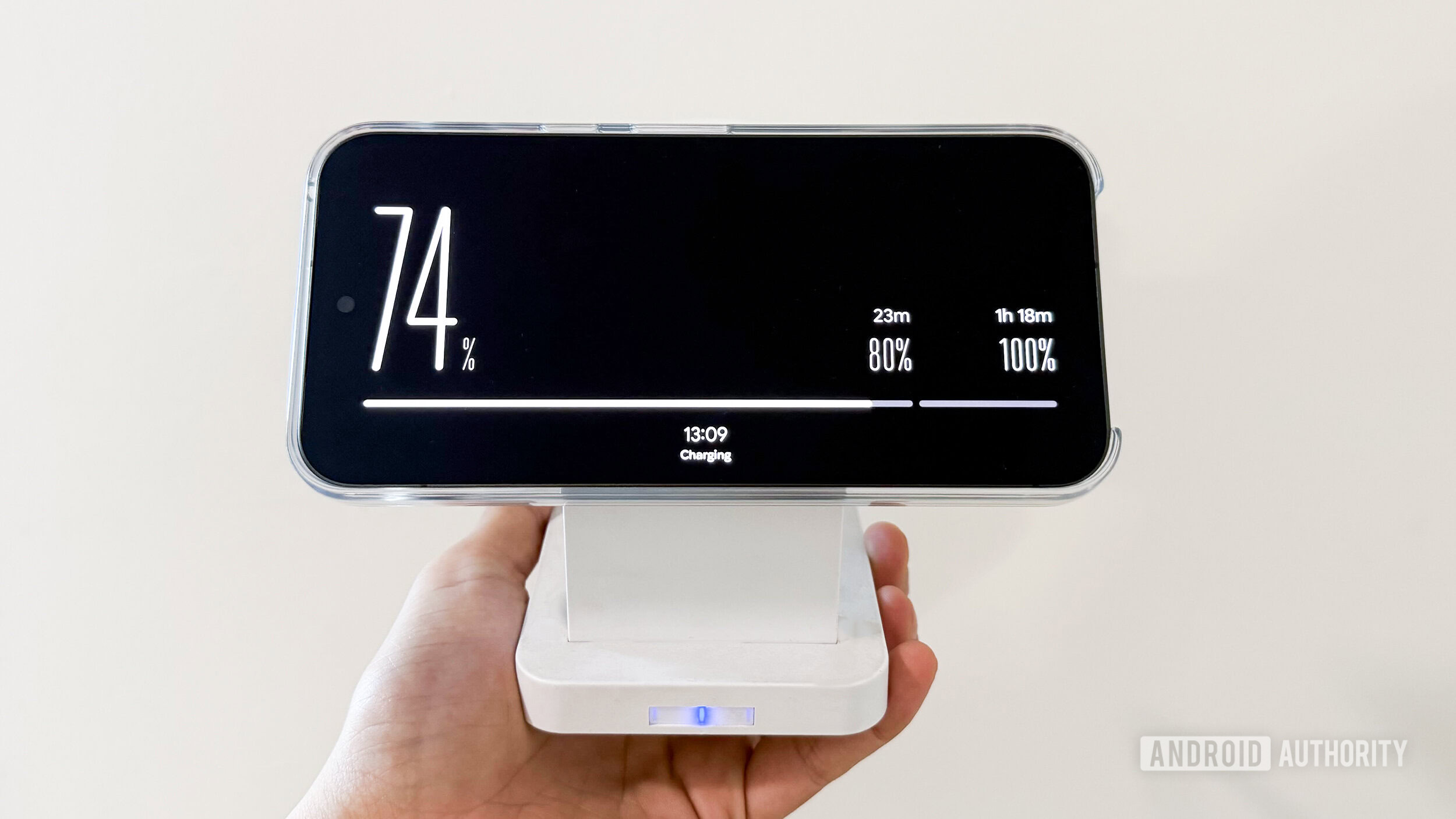
The Pixel 11 series now takes this a significant step further. The introduction of the "Charge" screen saver style is a direct response to user needs for at-a-glance information during charging. This new mode eschews traditional clock faces for a more utilitarian display focused on power levels. A prominent bar, positioned along one edge of the screen, visually represents the current battery percentage. This is complemented by large, easily readable numerical figures indicating the exact charge level. Notably, the "Charge" screen saver also highlights significant charging milestones, displaying "80%" and "100%" in a smaller font, providing users with clear visual cues as their device approaches full charge. The time is also present, albeit in a more subdued font at the bottom of the screen, ensuring it doesn’t detract from the primary charging information.
This "Charge" screen saver has been observed to function seamlessly in both portrait and landscape orientations, offering consistent usability regardless of how the device is positioned. Furthermore, users have granular control over when this feature is activated. It can be configured to display every time the Pixel 11 device is plugged in, or more selectively, only when the phone is undergoing wireless charging. This flexibility allows users to tailor the experience to their specific charging habits and preferences.
Expanding Clock Customization Options
Beyond the innovative "Charge" style, the Pixel 11 series also significantly broadens the customization landscape for its existing clock-based screen saver options. Users can now delve into a far more extensive library of analog and digital clock faces. The key enhancement lies in the ability to select from a variety of fonts for these existing clock designs. This granular control allows for a more personalized aesthetic, enabling users to match the screen saver to their individual tastes or even their room’s decor.
To streamline the selection process, Google has consolidated the analog and digital clock face options into a unified menu. This move simplifies navigation and makes it easier for users to explore the full range of available designs without having to switch between separate categories. This thoughtful integration aims to enhance user experience and encourage exploration of the available customization features.
A Nod to Competitor Innovation
An intriguing aspect of the Pixel 11’s screen saver enhancements is the introduction of swipe gestures for cycling through available options. This functionality mirrors a similar feature found on Apple’s iPhone, specifically within its "StandBy" mode. StandBy, introduced in iOS 17, transforms the iPhone into a smart display when charging and oriented horizontally, offering glanceable information like clocks, calendars, and widgets. The ability to swipe through different widgets or clock styles on the iPhone’s StandBy mode appears to have directly inspired the gesture-based navigation now present in the Pixel 11’s screen saver. This cross-pollination of ideas between major mobile operating system developers is a common occurrence in the tech industry, often leading to the adoption of successful user interface paradigms across different platforms.
Availability and Future Outlook
The new "Charge" screen saver style and the expanded clock customization features are currently active and accessible on the newly launched Pixel 11 series phones. Initial observations indicate that these specific enhancements are not retroactively applied to older Pixel models, including the Pixel 10 and Pixel 10 XL. This raises questions about the long-term availability of these features on previous devices.
Google has a history of introducing new software features as exclusive to its latest hardware, often citing hardware-specific optimizations or new sensor capabilities. For instance, the recently introduced "Pause Point" feature within Digital Wellbeing was initially exclusive to the Pixel 11. Whether these new screen saver functionalities will remain exclusive to the Pixel 11 series or eventually be rolled out to older devices through software updates remains to be seen. Android Authority will continue to monitor for official clarification from Google on this matter.
For users of other Android devices seeking similar screen saver functionalities, there are already third-party applications available on the Google Play Store. One notable example, previously highlighted by Android Authority, offers a comprehensive suite of features that can replicate many of the advanced screen saver capabilities found on Pixel devices, including dynamic clock displays, photo slideshows, and informational overlays. This underscores the vibrant ecosystem of app development that often fills functional gaps or provides alternative avenues for users not on the latest flagship hardware.
Analyzing the Implications
The evolution of the Pixel screen saver reflects a broader trend in smartphone design: the increasing importance of the device as a central hub for information and interaction, even when not actively in use. By transforming the idle screen into a functional display, Google is enhancing the perceived value of its devices and reinforcing their integration into daily life. The "Charge" screen saver, in particular, addresses a practical need for clear and immediate battery status updates, a common concern for smartphone users.
The subtle adoption of iOS-like gestures also signals a pragmatic approach to user experience design. Google, like many tech companies, is not afraid to integrate successful interface paradigms from competitors if they demonstrably improve usability. This can lead to a more intuitive and familiar experience for users who may be transitioning between different platforms or simply appreciate well-executed design principles.
The potential exclusivity of these features to the Pixel 11 series, while a common business strategy, can also lead to user segmentation and disappointment among owners of older devices. The decision of whether to roll out these enhancements more broadly will likely depend on a combination of technical feasibility, market strategy, and user feedback.
As smartphones continue to become more powerful and integrated into our lives, the utility of their idle screens will only grow. Google’s continued investment in features like the advanced screen saver demonstrates a forward-thinking approach to smartphone design, aiming to make every aspect of the user experience, even the dormant moments, more engaging and informative. The Pixel 11 series is a clear indicator that the era of the "dumb" idle screen is rapidly coming to an end.









