Metty Iskandar
Google is continuously refining its suite of productivity tools, with Google Vids emerging as a significant player in AI-powered content creation. The latest enhancement to Google Vids, announced today, allows users to effortlessly convert PDF files, Google Docs, and Microsoft Word documents into polished video summaries. This new "Docs to Video" feature promises to revolutionize how individuals and organizations consume and present information, transforming dense textual content into engaging visual narratives.
The Evolution of Google Vids: From Generation to Integration
Google Vids has seen a steady stream of updates aimed at expanding its capabilities and user accessibility. Initially introduced as a tool for generating videos, it has progressively incorporated advanced features. Notably, the platform already supports Veo 3.1 for video generation, indicating a commitment to leveraging cutting-edge AI models for creative output. Furthermore, its integration into Google Slides has streamlined the process of incorporating video content into presentations, making it a more versatile asset for educators, marketers, and business professionals alike. The introduction of the "Docs to Video" functionality represents the next logical step in this evolution, addressing a fundamental need for efficient information synthesis.
"Docs to Video": A New Paradigm for Content Consumption
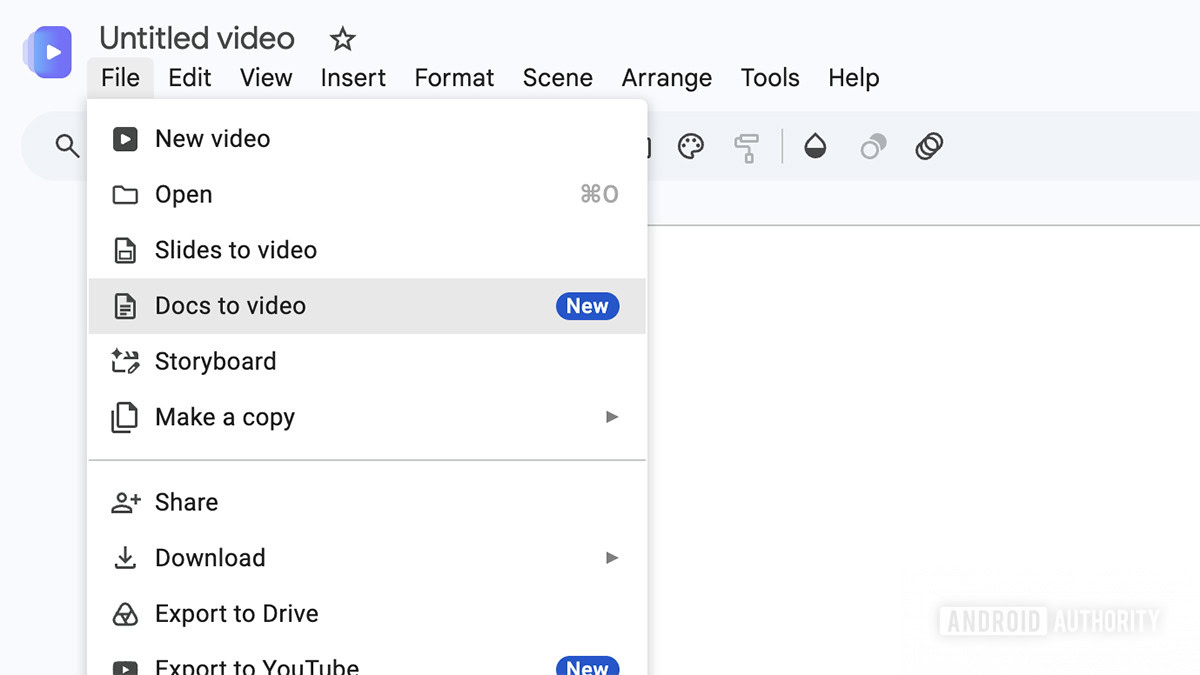
The core of this new feature lies in its ability to leverage artificial intelligence to interpret and transform static documents into dynamic video content. Users can initiate this process through a new "Docs to Video" option within the File menu. From there, they can select a document directly from their Google Drive or upload a file from their local computer. The supported file types—PDF, Google Docs, and Word documents—cover a broad spectrum of common business and personal document formats, ensuring wide applicability.
Once a document is selected, Google Vids employs its AI engine to analyze the text. This process involves several key steps:

- Script Generation: The AI reads through the document to identify key themes, arguments, and factual information, subsequently generating a coherent video script. This script acts as the narrative backbone of the video, ensuring that the most crucial information from the original document is conveyed.
- Narration Integration: The generated script is then paired with AI-powered narration. Users are provided with the flexibility to edit the script if they find the AI’s interpretation needs adjustment. They can also choose from a variety of narration voices, allowing for a degree of personalization in the final output.
- Visual Assembly: Following script and narration finalization, Google Vids constructs the video. This involves utilizing AI-generated images and backgrounds that are contextually relevant to the script’s content. This automated visual creation process aims to produce professional-looking videos without requiring extensive design skills from the user.
The Practical Implications of Automated Video Summarization
The introduction of "Docs to Video" carries significant implications for various sectors. For students and academics, it offers a powerful tool for digesting lengthy research papers, textbook chapters, or lecture notes. Instead of wading through dense prose, they can opt for a concise video summary that highlights the essential points. This could be particularly beneficial for visual learners or those facing time constraints.
In the corporate world, the feature has the potential to streamline internal communication and knowledge management. Long reports, meeting minutes, policy documents, or training materials can be transformed into easily digestible videos, facilitating quicker comprehension and broader dissemination of information. This could lead to improved employee engagement and a more informed workforce. For instance, a company can quickly convert its quarterly earnings report into a video for its employees, ensuring everyone understands the key financial takeaways without needing to read a multi-page document. Similarly, onboarding materials can be presented in a more engaging video format, enhancing the new hire experience.
The marketing and sales departments can also leverage this feature. Case studies, product manuals, or white papers can be transformed into promotional videos, making them more accessible and shareable across social media platforms and digital marketing campaigns. This could lead to increased lead generation and customer engagement by presenting complex information in a more appealing and digestible format.
A Look at the User Experience and Rollout
While the concept is highly promising, early user experiences, as reported by some, indicate that the feature is still in its nascent stages of development and deployment. One user noted encountering errors during the video generation process after the AI had successfully created a script. This suggests that while the AI’s ability to understand and script content from documents is functional, the final video assembly phase might still be prone to technical glitches. Google’s track record suggests these issues are likely to be addressed through iterative updates and bug fixes.
The rollout of "Docs to Video" has already commenced. For users with Workspace accounts that are configured to receive scheduled updates, the feature may take up to 15 days to become fully available. This phased approach is standard for Google to manage the deployment of new features across its vast user base and to monitor performance.
Availability and Subscription Tiers
The "Docs to Video" feature is not universally available across all Google accounts. It is currently accessible to users who fall under specific Google Workspace plans:
- Google Business plans: This tier caters to businesses of various sizes, suggesting that Google views this feature as a valuable tool for professional productivity.
- Google Enterprise plans: Designed for larger organizations with more complex needs, the inclusion of "Docs to Video" here highlights its potential for enterprise-level knowledge management and communication.
- Google Education plans: This indicates that educational institutions can also benefit from the feature, aiding both educators in content creation and students in learning.
In addition to Workspace subscriptions, the feature is also available for users with premium individual Google AI subscriptions:
- Google AI Plus: A mid-tier subscription offering enhanced AI capabilities.
- Google AI Pro: A higher tier for users requiring more advanced AI features.
- Google AI Ultra: The top-tier subscription, likely providing the most comprehensive access and performance for AI-driven tools like Vids.
This tiered availability suggests that Google is positioning "Docs to Video" as a premium feature, reflecting the advanced AI technology underpinning its functionality. The company’s strategy appears to be to offer these advanced tools to users who are already invested in its ecosystem and are seeking to leverage AI for enhanced productivity.
The Broader Context: AI in Productivity Suites
The introduction of "Docs to Video" is part of a larger trend of AI integration into mainstream productivity software. Companies across the tech industry are racing to embed AI capabilities into their platforms, aiming to automate complex tasks, personalize user experiences, and unlock new levels of efficiency. Microsoft’s Copilot, for instance, aims to bring AI assistance across its Office suite, while Adobe has been actively incorporating AI into its creative tools.
Google’s approach with Vids, and specifically this new feature, demonstrates a strategic focus on making AI accessible and practical for everyday users. By transforming dense textual information into engaging video formats, Google Vids is not just automating a task; it’s fundamentally changing how we interact with and understand information. As AI continues to evolve, we can expect further innovations that blur the lines between content creation, information consumption, and human creativity, making tools like Google Vids increasingly indispensable in our digital lives. The successful implementation and widespread adoption of "Docs to Video" could mark a significant milestone in the democratization of video content creation and a powerful new way to engage with information.