Clarissa Hana
Microsoft has commenced a phased rollout of a "Classic Outlook" theme for users accessing Outlook on the web and through the new Outlook for Windows application. This initiative aims to bridge the gap for users transitioning from the long-standing traditional Outlook experience to the modernized interface, offering a more familiar visual and interactive environment. The targeted release began in mid-August and is slated for completion by the end of September. Following this, the theme will become globally available between late September and late October, ensuring a broad user base can benefit from this nostalgic yet functional update.
A Strategic Move Towards User Adoption
The introduction of the Classic Outlook theme is a strategic decision by Microsoft to ease the adoption of its newer Outlook platforms. The company acknowledges that while the new Outlook offers enhanced capabilities and a modern design, the visual cues and operational workflows of the classic version are deeply ingrained for many users. By providing a thematic option that mirrors the classic interface, Microsoft seeks to reduce the learning curve and potential friction associated with migrating to the new client. This move is particularly significant given the ongoing transition of Windows Mail to the new Outlook as the default email application on Windows 11 and Windows operating systems.
Understanding the Thematic Integration
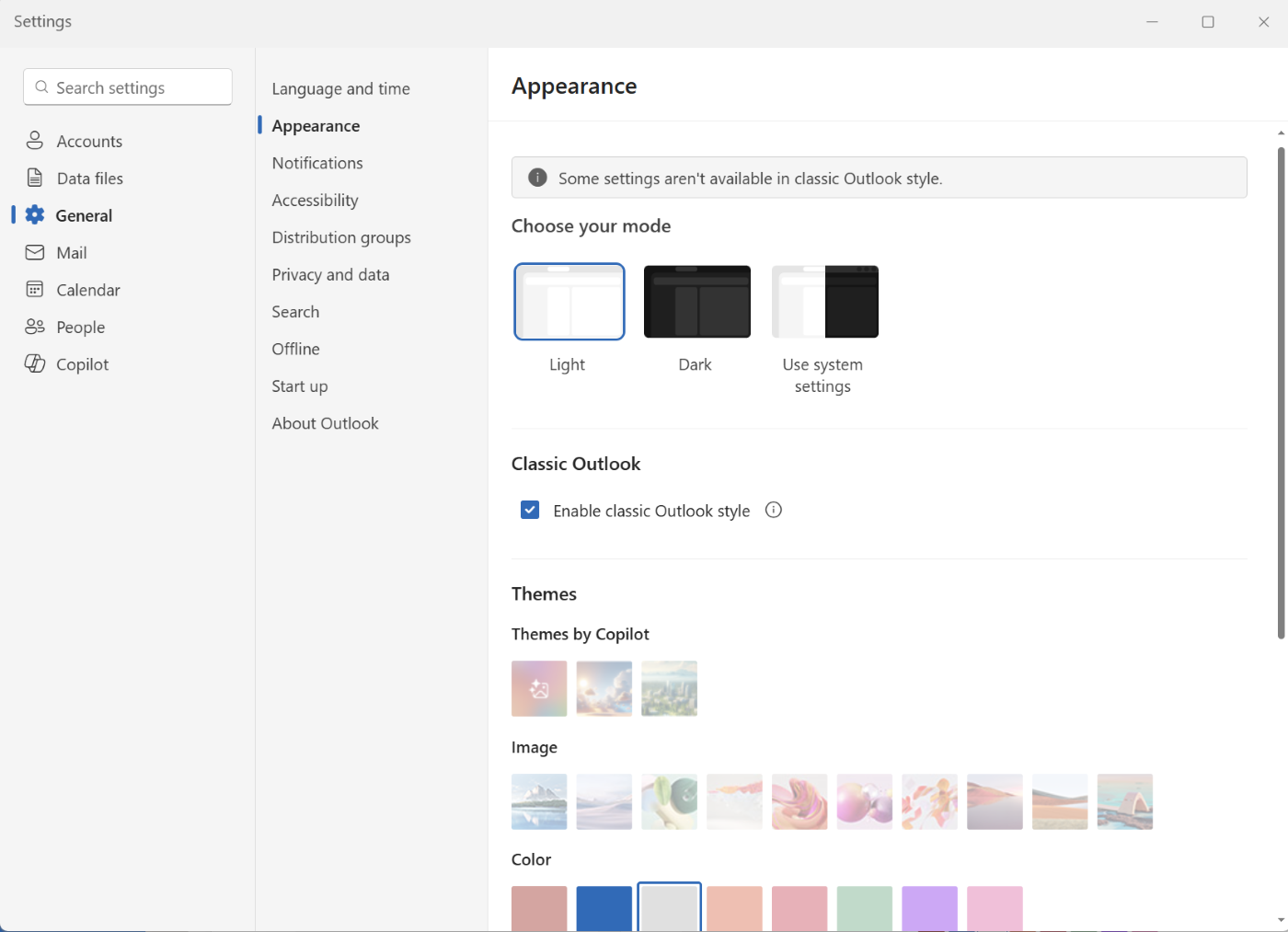
According to a Microsoft 365 Message Center update, the Classic Outlook theme, once enabled, will implement comprehensive changes across the Outlook experience. This encompasses coordinated adjustments to visual styling, layout, typography, icons, and selected user interactions. The goal is to create a cohesive and familiar environment without compromising the underlying functionality and advancements of the new Outlook. Microsoft emphasized that this new user interface style will be enabled by default for a subset of users who are transitioning from the classic Outlook to the new version. However, users will retain the flexibility to revert to the standard theme via the Settings menu, navigating to General > Appearance.

Crucially, the rollout of this theme is designed to be non-disruptive to existing IT configurations. The feature will not override any administrator-defined settings and will not automatically migrate users from the classic Outlook client to the new Outlook. This grants IT departments control over the deployment and user experience within their organizations, ensuring compliance and managed transitions. For individual users, the ability to toggle the theme on or off provides immediate control over their personalized Outlook environment.
Microsoft articulated the rationale behind this update, stating, "This update is designed to help users who are transitioning from classic Outlook by providing a more familiar experience while maintaining the capabilities of the new Outlook." The company further clarified that the setting will be accessible to all users and can be switched at any time. While it will be off by default for the majority of users, a phased rollout will see it enabled by default for some individuals moving from the classic Outlook to the new Outlook. These users will have the option to modify the setting at their discretion.
The Evolving Outlook Landscape: A Chronology
The introduction of the new Outlook for Windows, often referred to simply as "New Outlook," has been a gradual process, replacing the legacy Windows Mail application. This transition began with Windows 11 in October 2023 and is set to extend to Windows 10 users starting in January 2025. The first preview version of the New Outlook client was unveiled by Microsoft in May 2022, signaling the company’s intent to modernize its flagship email and calendar application.
The new Outlook client reached general availability for personal accounts in September 2023. This coincided with the September 26 Windows fall update and became available through the Microsoft Store on Windows 11. For commercial customers, general availability was achieved in August 2024, indicating a staggered release strategy to accommodate different user segments and their specific needs.

The broader migration strategy for businesses has seen some adjustments. In February of the current year, Microsoft announced a postponement of the new Outlook opt-out phase for businesses. Initially scheduled for April 2026, this deadline has been extended to March 2027. This twelve-month extension provides enterprise administrators with additional time to meticulously plan and execute a staged migration to the new client, acknowledging the complexities of enterprise-level software deployments. This decision was made by Microsoft despite reporting "strong and accelerating adoption of new Outlook," suggesting a commitment to ensuring a smooth transition for all organizational stakeholders.
Beyond the Desktop Client: Web and OWA Updates
The rollout of the Classic Outlook theme extends beyond the desktop application to encompass Outlook on the web. This unified approach ensures a consistent user experience across different platforms. In parallel with these desktop and web client updates, Microsoft has also been streamlining its email service offerings. In July, the company announced the upcoming retirement of Outlook Web Access (OWA) Light. Introduced approximately two decades ago as a lightweight alternative to OWA Premium, OWA Light will be disabled in a future Exchange Server update. This move signifies a continued push towards modern web-based email access, consolidating resources and development efforts on more advanced platforms.
Implications for Users and Organizations
The introduction of the Classic Outlook theme carries several significant implications for both individual users and organizational IT departments. For users, it offers a welcome degree of familiarity and comfort during what can often be a disruptive period of software evolution. The ability to retain the visual aesthetics and common interaction patterns of the classic interface can significantly improve user satisfaction and productivity, especially for those who rely heavily on Outlook for their daily tasks. This familiarity can reduce the initial intimidation factor associated with new software and encourage more active engagement with the new platform’s features.
For organizations, the ability to control the deployment of the theme and its default status provides crucial flexibility. IT administrators can leverage this feature to manage user expectations and provide targeted support during the transition. The phased rollout and the non-disruptive nature of the theme update mean that IT teams can implement it strategically, aligning with broader migration plans for the new Outlook client. This ensures that the transition is not only technically sound but also user-centric, minimizing disruption to business operations.
The postponement of the enterprise opt-out deadline to March 2027 also highlights Microsoft’s understanding of the complexities involved in large-scale enterprise software migrations. This extended timeline allows organizations to conduct thorough testing, develop comprehensive training programs, and implement phased deployments that minimize risk and maximize user adoption. It also provides an opportunity for organizations to further evaluate the new Outlook’s feature set and stability against their specific business requirements.
The Broader Context of Microsoft’s Software Evolution
This rollout of the Classic Outlook theme is part of a larger trend within Microsoft to modernize its suite of productivity tools while ensuring a smooth user experience. The company has consistently focused on enhancing its cloud-based offerings and streamlining desktop applications to align with modern work environments. The shift from traditional desktop applications to integrated cloud services, coupled with a commitment to user-friendly interfaces, defines Microsoft’s ongoing software development strategy.
The continued evolution of Outlook, from its legacy desktop versions to the new web and Windows clients, reflects the broader digital transformation taking place across industries. As organizations increasingly rely on digital communication and collaboration tools, the efficiency, security, and user experience of these platforms become paramount. Microsoft’s approach, which includes offering thematic options to ease transitions, demonstrates a nuanced understanding of user needs and the importance of a gradual, supportive migration process. The retirement of older technologies like OWA Light further underscores this commitment to modernization and consolidation, paving the way for more integrated and feature-rich future iterations of its services.