George Chandra Eka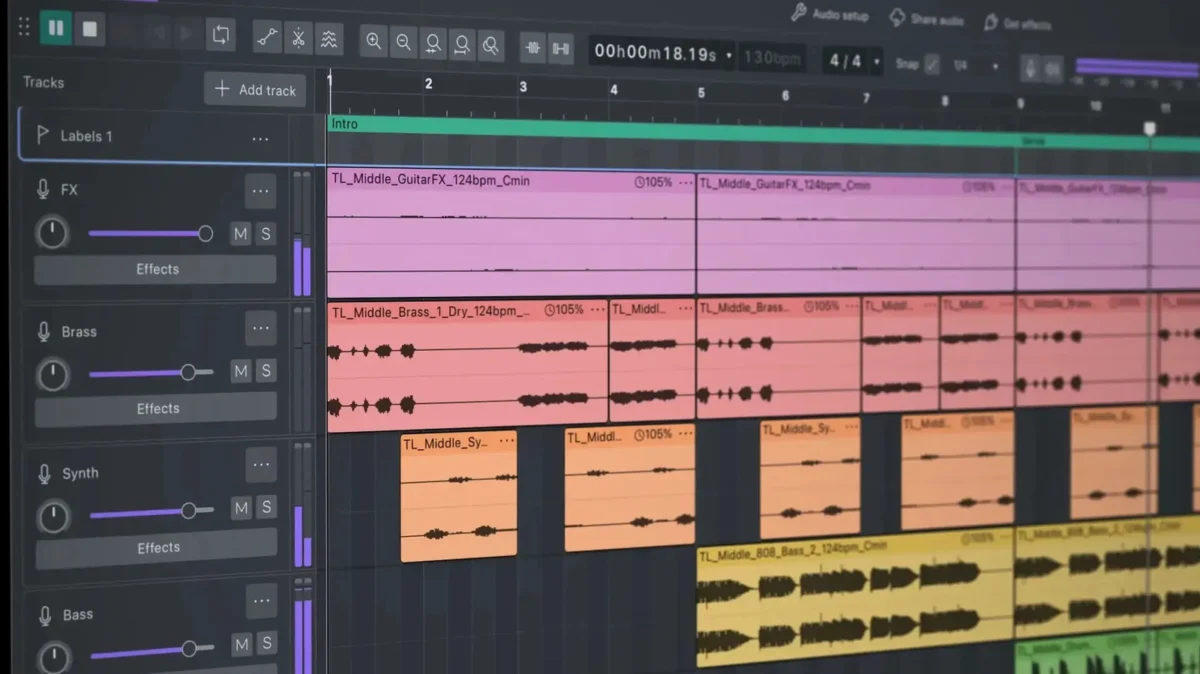
A Fresh Visual Identity: Introducing the Colorful Dark Mode
One of the most immediate and striking changes users will encounter in Audacity 4.0 is its brand-new visual identity, highlighted by the long-awaited introduction of a dark mode. This isn’t merely a cosmetic change but a thoughtfully designed interface that enhances user experience, particularly during extended editing sessions. The new dark theme is complemented by a more vibrant and playful aesthetic, featuring colored audio clips that improve visual organization and more pronounced accent colors on key UI elements, such as gain sliders and selection indicators. This visual refresh aims to reduce eye strain and improve overall clarity, aligning Audacity with modern software design trends prevalent across professional digital audio workstations (DAWs).
Recognizing the deep-seated preferences of its diverse user community, Muse Group has prudently included an option to revert to the classic Audacity look. This ensures that users who prefer the traditional interface or those accustomed to its long-standing design can continue their workflow uninterrupted, without being forced to adapt to the new visual paradigm. This commitment to user choice underscores the developers’ understanding of their community’s varied needs and their dedication to fostering a smooth transition.
Revolutionizing Workflow: Expanded Non-Destructive Editing
Audacity 4.0 significantly expands its non-destructive editing capabilities, a feature first introduced in Version 3.2. This enhancement represents a paradigm shift for many Audacity users, moving the software closer to the operational fluidity found in professional DAWs. Non-destructive editing means that original audio files remain untouched, and all edits, cuts, and effects are applied as layers or metadata, allowing for complete reversibility and iterative refinement without fear of permanently altering the source material.
A crucial aspect of this expanded functionality is the ability for clips to finally overlap on the same track. This seemingly minor change unlocks a wealth of creative possibilities, enabling seamless crossfades, layered audio effects, and more complex sound design arrangements that were previously cumbersome or impossible within Audacity. Furthermore, the new trimming mechanism reveals covered-over audio when clips are adjusted, providing an intuitive way to recover or fine-tune edits. Users can now select and trim multiple clips simultaneously by dragging a single handle, drastically improving efficiency for batch processing or intricate arrangements. The ability to group clips for complex edits further streamlines the workflow, allowing users to manipulate sections of audio as cohesive units, a feature indispensable for managing multi-track projects. These advancements address long-standing requests from the community and bring Audacity’s editing capabilities into closer alignment with industry standards for efficiency and flexibility.
Precision Control: The New Envelope and Splitting Tools
The update introduces an intuitive envelope tool, a feature that will be immediately recognizable to users of professional DAWs like Ableton Live or Pro Tools. This tool allows for the creation of draggable control points directly on the waveform, enabling precise automation of parameters such as gain. As users manipulate these control points, waveforms visually update in real-time, providing immediate feedback on how changes affect the audio. This visual representation is critical for identifying potential issues, such as ‘redlining’ (clipping), before export, allowing for proactive adjustments and ensuring optimal audio levels throughout a track. The envelope tool empowers users to craft dynamic mixes, adding nuanced changes in volume, panning, or effects over time, moving beyond static adjustments.
Complementing these granular controls is a new one-click splitting tool, simplifying the process of segmenting audio clips. This feature, common across a wide range of creative software from Adobe Premiere to Logic Pro, allows users to quickly and accurately cut clips at specific points with minimal effort. The addition of this tool further enhances Audacity’s reputation as a more professional and efficient audio production utility, reducing the need for multi-step workarounds and accelerating the editing process. Together, the envelope and splitting tools significantly enhance the precision and speed of editing, making complex tasks more accessible and less time-consuming.
Micro-Adjustments and Macro-Monitoring: Sample-Level Editing and Track Meters
Audacity 4.0 introduces the powerful capability to edit down to the sample level, a feature typically found in high-end audio analysis and mastering software. By zooming in sufficiently on a clip, users can now make incredibly fine micro-adjustments, correcting minute imperfections or precisely shaping transient sounds. This level of detail is invaluable for tasks such as de-clicking, de-noising specific artifacts, or achieving perfect waveform alignment, pushing Audacity’s utility into the realm of professional audio restoration and detailed sound design. This granular control ensures that even the most demanding audio projects can be refined with exceptional precision.
In addition to micro-level control, the update also enhances macro-level monitoring with the inclusion of an accompanying meter for each track. Previously, users often relied on the master output meter to identify clipping, making it challenging to pinpoint the exact source of an overload in a multi-track project. With individual track meters, producers can now instantly identify which specific track is clipping the mix, allowing for targeted adjustments and more efficient troubleshooting. This feature is fundamental for maintaining proper gain staging and achieving a clean, balanced mix, especially crucial for podcasters, musicians, and voiceover artists working with multiple audio sources.
Addressing Changes: The Removal of Sync-Lock and New Shortcuts
One of the more controversial changes in Audacity 4.0 is the removal of the traditional sync-lock feature. Sync-lock previously ensured that multiple clips remained in tandem during edits, preventing desynchronization. While its removal might initially cause concern among some long-time users who relied on this functionality, Muse Group has implemented new keyboard shortcuts designed to replicate and potentially enhance this capability. This approach often indicates a move towards more efficient, hotkey-driven workflows favored by professional editors, who prioritize speed and direct control. The transition to keyboard shortcuts for synchronization tasks suggests a commitment to evolving Audacity’s interface to support faster, more agile editing practices, while acknowledging the need to provide equivalent functionality through modern means.
Audacity’s Position in the Audio Software Landscape: Free Professionalism
The enhancements in Audacity 4.0 collectively mark a significant stride towards bridging the gap between free audio editors and fully-featured professional Digital Audio Workstations (DAWs) such as Ableton Live 12 or Pro Tools. These professional-grade programs typically command hundreds, if not thousands, of dollars for their licenses, placing them out of reach for many aspiring content creators, independent musicians, podcasters, and students. By integrating sophisticated features like expanded non-destructive editing, granular automation, and sample-level precision into Audacity, Muse Group is democratizing access to powerful audio production tools.
This strategic evolution reinforces Audacity’s unique value proposition: offering robust, professional-level capabilities at no cost. For millions of users globally, Audacity has served as the entry point into audio editing, a foundational tool for everything from simple voice recordings to complex musical arrangements. Version 4.0 elevates this foundation, empowering a new generation of creators with advanced tools without the prohibitive financial barrier. The continued investment in Audacity by Muse Group, a company with a strong portfolio in music technology (including Ultimate Guitar, MuseScore, and StaffPad), signifies a long-term commitment to fostering an inclusive and accessible audio production ecosystem. The inclusion of more robust plugin support further enhances this, allowing users to expand Audacity’s functionality with a vast array of third-party VST, AU, and LADSPA plugins, further blurring the lines between free and paid software capabilities.
Historical Context and Muse Group’s Stewardship
Audacity’s journey to Version 4.0 has been marked by significant developments, particularly in recent years. Founded in 1999, Audacity quickly established itself as a cornerstone of the free and open-source software community, revered for its accessibility and comprehensive feature set. For over two decades, it remained a go-to tool for audio editing across various disciplines.
The most notable shift in its trajectory occurred in 2021 when Audacity was acquired by Muse Group. This acquisition, while promising new resources and development impetus, was met with apprehension and, in some instances, outright controversy. Following the release of Version 3.0, a proposed update to the privacy policy generated widespread user backlash. Concerns were raised regarding data collection practices, telemetry, and the potential for user data to be shared with third parties, leading to accusations of "spyware" by some factions of the open-source community. This period represented a critical challenge for Audacity’s reputation and user trust.
In response to this significant user outcry, Muse Group engaged in a transparent dialogue with the community, swiftly revising the contentious privacy policy to address specific concerns about data collection and user anonymity. This experience undoubtedly shaped the development philosophy for subsequent versions, particularly Audacity 4.0. The current release reflects a conscious effort by Muse Group to demonstrate its commitment to the open-source ethos, prioritizing user empowerment, privacy, and community-driven development. The decision to preserve the classic Audacity interface as an option in Version 4.0 is a direct testament to this renewed focus on user preference and continuity, indicating a developer team that listens and responds to its community.
Broader Implications and Future Outlook
Audacity 4.0’s release holds significant implications for the broader audio production landscape. For independent content creators, podcasters, educators, and musicians working with limited budgets, it represents a substantial upgrade in their toolkit, potentially eliminating the need to invest in expensive commercial software for many common tasks. This democratization of advanced audio editing capabilities can foster greater creativity and production quality across the amateur and semi-professional spectrum.
The update also solidifies Audacity’s position within the open-source ecosystem, serving as a powerful example of how community-driven projects, when supported by dedicated development and responsive stewardship, can evolve to meet modern demands. It challenges the perception that free software must inherently lag behind its commercial counterparts in terms of features and polish.
Looking ahead, Audacity 4.0 sets a new benchmark for what users can expect from a free audio editor. The foundation laid by these enhancements suggests a future where Audacity continues to integrate more professional-grade features, further refining its user experience and expanding its utility. The ongoing commitment to robust plugin support also ensures that Audacity remains a flexible platform capable of adapting to emerging technologies and user needs. This release is not just an update; it is a declaration of intent, signaling Audacity’s continued relevance and ambition in the dynamic world of audio production. Users are encouraged to explore the full breadth of changes on the official Audacity 4 webpage or through the accompanying YouTube video for a deeper dive into its capabilities.