 Clarissa Hana
Microsoft has proactively introduced enhanced security measures within Windows to counteract a growing threat vector: phishing attacks that exploit Remote Desktop Connection (.rdp) files. These new protections, integrated into recent cumulative updates for Windows 10 and Windows 11, aim to safeguard users by introducing explicit warnings and defaulting to disabled states for potentially risky shared resources within RDP connections. This move signifies Microsoft’s commitment to addressing evolving cyber threats that leverage legitimate, yet often misunderstood, system functionalities for malicious purposes.
The Remote Desktop Protocol (RDP) is a foundational technology for modern enterprise IT, enabling seamless remote access to workstations and servers. Its utility lies in its ability to preconfigure connection files, known as .rdp files, which can automate the redirection of local resources—such as printers, drives, and clipboard data—to the remote host. This feature, while indispensable for productivity in many organizations, has unfortunately become a prime target for threat actors seeking to exfiltrate sensitive information and compromise user credentials.
The Evolving Threat Landscape of RDP File Exploitation
In recent years, cybercriminals have increasingly weaponized .rdp files within sophisticated phishing campaigns. These attacks often rely on social engineering to trick unsuspecting users into opening specially crafted .rdp files. Upon execution, these malicious files can establish a silent connection to an attacker-controlled server. The inherent functionality of RDP allows for the redirection of local drives to this compromised server. Once connected, attackers gain direct access to the victim’s files, potentially harvesting confidential documents, intellectual property, and critical business data.
Beyond file exfiltration, these compromised RDP connections can also intercept sensitive information copied to the clipboard, such as passwords, credit card numbers, or confidential communication snippets. Furthermore, threat actors can exploit RDP redirection to capture authentication credentials. This can involve redirecting smart card authentication attempts or even Windows Hello biometric prompts, allowing them to impersonate legitimate users and gain further unauthorized access to systems and networks.
One notable example of this modus operandi was observed in campaigns attributed to the Russian state-sponsored hacking group APT29, also known as Nobelium or Cozy Bear. This persistent threat actor has a history of leveraging advanced persistent threat (APT) tactics, and their use of rogue .rdp files in phishing campaigns has been well-documented. These campaigns aimed to pilfer data and credentials from targeted individuals and organizations, underscoring the significant risk posed by this attack vector. Amazon, in response to such malicious activity, has previously taken action to seize domains utilized in rogue remote desktop campaigns designed to steal data, highlighting the collaborative efforts required to combat these threats.
Microsoft’s Proactive Defense: New RDP Protections Unveiled
In response to this escalating threat, Microsoft has integrated new security enhancements into the cumulative updates released in April 2026. These include:
- Windows 10: KB5082200
- Windows 11: KB5083769 and KB5082052
These updates introduce a multi-layered approach to RDP file security, focusing on user education and default security configurations.
Phase 1: Initial User Education and Acknowledgment
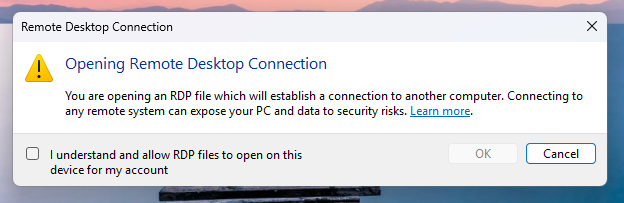
For users opening an .rdp file for the first time after applying these updates, Windows will now present a one-time educational prompt. This dialog is designed to clearly explain what RDP files are, their intended purpose, and crucially, the potential risks associated with them. The prompt will then require the user to explicitly acknowledge their understanding of these risks by clicking "OK." This step is pivotal, as it ensures that users are consciously aware of the implications before proceeding and prevents the recurring display of this educational alert for subsequent .rdp file openings by the same user.

This educational approach aligns with best practices in cybersecurity awareness training, aiming to empower users with knowledge to make informed decisions when encountering potentially risky files. By making users active participants in the security process, Microsoft seeks to foster a more security-conscious user base.
Phase 2: Enhanced Security Dialogs for Subsequent Connections
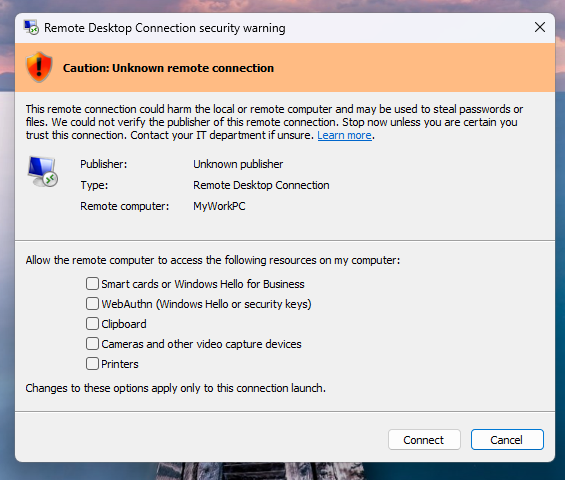
Following the initial acknowledgment, any subsequent attempt to open an .rdp file will trigger a more detailed security dialog before any connection is established. This dialog provides critical information designed to help users assess the legitimacy and safety of the connection. Key elements displayed include:
- Publisher Verification: The dialog will indicate whether the .rdp file has been digitally signed by a verified publisher. This is a crucial indicator of authenticity.
- Remote System Address: The address of the remote system the .rdp file is configured to connect to will be clearly displayed.
- Resource Redirection Status: A comprehensive list of all local resource redirections—such as drives, clipboard, printers, and other devices—will be presented. Crucially, all these redirection options will be disabled by default.
Handling Unsigned and Signed RDP Files
The new protections offer distinct warnings based on the digital signature status of the .rdp file:
-
Unsigned RDP Files: If an .rdp file lacks a digital signature, Windows will display a prominent "Caution: Unknown remote connection" warning. The publisher will be explicitly labeled as "unknown," serving as a clear indicator that there is no verifiable source for the file, significantly increasing the risk of it being malicious.
-
Signed RDP Files: Even for digitally signed .rdp files, Windows will display the identified publisher. However, it will still include a warning advising users to verify the legitimacy of the publisher before proceeding with the connection. This layered approach ensures that even signed files are not implicitly trusted without user scrutiny.
Distinguishing File-Initiated Connections from Client Connections
It is important to note that these newly implemented protections specifically target connections initiated by opening .rdp files. They do not apply to connections established through the standard Windows Remote Desktop client application. This distinction is critical for administrators and users to understand, as it means that direct connections made via the client interface will not be subject to these specific warning dialogs.
Administrator Control and Recommendations
Microsoft recognizes that in certain highly controlled enterprise environments, administrators might require the ability to temporarily disable these protections. This can be achieved by modifying a specific registry key:
- Registry Path:
HKLMSoftwarePoliciesMicrosoftWindows NTTerminal ServicesClient - Value Name:
RedirectionWarningDialogVersion - Setting: Setting this value to
1will temporarily disable the new RDP file warnings.
However, Microsoft strongly emphasizes that given the historical abuse of RDP files in numerous cyberattacks, it is highly recommended to keep these protections enabled. Disabling them should only be considered in exceptional circumstances and with a thorough understanding of the associated security risks. The default configuration of disabling resource redirection further enhances security by minimizing the attack surface presented by RDP files.
Broader Implications and the Future of Remote Access Security
The introduction of these RDP file protections by Microsoft is a significant step in fortifying the Windows ecosystem against a prevalent and evolving threat. Phishing attacks continue to be a primary vector for initial access, and the exploitation of legitimate functionalities like RDP is a testament to the increasing sophistication of threat actors.
This development highlights several key trends in cybersecurity:
- The Rise of "Legitimate-Feature Abuse": Attackers are increasingly moving beyond exploiting software vulnerabilities to abusing built-in operating system features and protocols. This makes detection more challenging, as the underlying functionality itself is not inherently malicious.
- The Importance of User Education: While technological safeguards are crucial, empowering users with knowledge and awareness remains a vital component of a robust security posture. The one-time educational prompt is a testament to this principle.
- Default Security Configurations: The decision to disable risky resource redirections by default is a proactive measure that aligns with the "secure by design" philosophy. This shifts the burden from the user to actively enable potentially dangerous features.
- The Need for Continuous Adaptation: The cybersecurity landscape is in constant flux. Microsoft’s timely introduction of these protections demonstrates the necessity for vendors to continuously monitor emerging threats and adapt their security offerings accordingly.
The implications of these protections extend beyond individual users and organizations. For enterprises relying heavily on remote access, understanding and correctly configuring these new settings will be paramount. Administrators will need to assess their current RDP usage patterns and determine the appropriate balance between security and operational efficiency. For security professionals, this development underscores the need to continuously review and update their threat intelligence on RDP-based attacks and to reinforce user training programs.
As remote work and hybrid work models continue to be prevalent, the security of remote access solutions will remain a critical focus. Microsoft’s proactive stance on RDP file security is a welcome development, offering a much-needed layer of defense against a sophisticated and persistent threat. Organizations and users alike are encouraged to ensure their Windows systems are up-to-date to benefit from these enhanced security measures.