
 George Chandra Eka
Amazon Fire TV Sticks, ubiquitous in modern entertainment setups, often prompt users to ponder their true longevity. While these compact streaming devices are engineered to outlive their explicitly guaranteed support windows, a confluence of factors, including the escalating demands of modern applications and the relentless march of hardware evolution, frequently compels users to consider replacement much sooner than physical failure might dictate. This dynamic creates a complex relationship between a device’s operational capacity and its practical usability.
Amazon’s Stance: Security Updates vs. Hardware Lifespan
Unlike many consumer electronics that come with a clearly defined "end-of-life" or "expiration date," Amazon maintains a nuanced, and some might argue, deliberately vague position regarding the typical physical lifespan of its Fire TV streaming sticks. There is no hidden timer in the device settings, nor does the company issue explicit recommendations for replacement after a specific number of years, such as three, four, or five. This ambiguity leaves consumers to interpret the lifespan of their devices based on performance and evolving technological landscapes rather than a manufacturer’s directive.
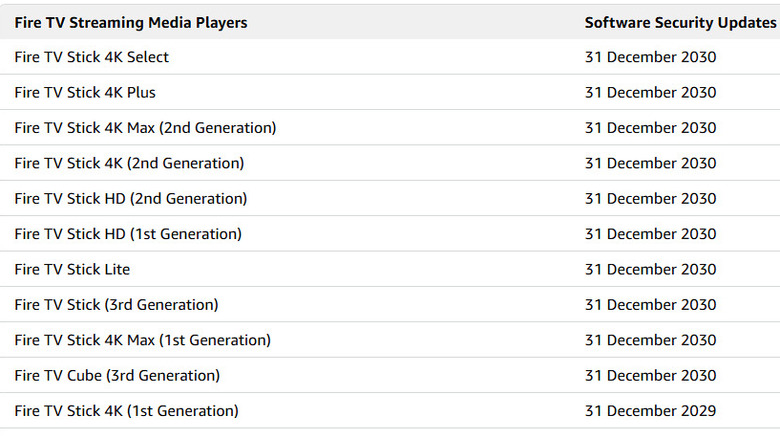
However, Amazon does provide a firm commitment regarding security updates. The company explicitly states that security updates are provided for at least four years from the date a Fire TV device is purchased new directly from Amazon as the seller. Alternatively, support continues until a specified date listed for that particular model, whichever period extends longer. For instance, current flagship models such as the Fire TV Stick 4K Select and Fire TV Stick 4K Plus benefit from guaranteed security updates through at least December 31, 2030. This policy ensures that devices remain protected against emerging vulnerabilities for a significant duration, safeguarding user data and maintaining system integrity.
It is crucial to differentiate this security update deadline from an actual hardware lifespan. Amazon’s support commitment focuses on the software’s security posture, not the physical endurance or optimal performance duration of the hardware. A device may continue to power on and function long after its security update window has closed, but its utility and user experience can degrade significantly due to other factors. The four-year minimum for security updates serves as a baseline for safe operation, not a countdown to the device’s inevitable demise or a trigger for disposal.
The Evolving Landscape: Why Hardware Outlives Its Practicality
While a Fire TV Stick might technically remain operational beyond its security-update window, merely turning on is a low bar for a streaming device in today’s fast-paced digital environment. The practical lifespan of a Fire TV Stick is often curtailed by the increasing demands of streaming applications, the evolution of user interfaces, and the continuous advancement of video and audio standards. Even if the internal components remain physically sound, the user experience can become progressively frustrating.
One primary driver of this functional obsolescence is the relentless evolution of streaming applications. Services like Netflix, Disney+, and Max constantly update their apps, introducing new features, more complex graphical user interfaces, and higher-resolution content streams. These advancements require more processing power, greater memory, and enhanced graphical capabilities, which older hardware, designed for a previous technological era, may struggle to provide. A once-snappy interface can become sluggish, apps may take longer to load, and navigating menus can feel unresponsive, leading to a diminished viewing experience.
Video codecs also play a pivotal role. Modern video compression standards, such as H.265/HEVC (High Efficiency Video Coding) and AV1, are designed to compress video more efficiently than older codecs like H.264/AVC, allowing for higher quality video at lower bitrates or the same quality with reduced bandwidth. This efficiency is crucial for delivering 4K and even 8K content over typical home internet connections. However, decoding these advanced codecs efficiently often requires dedicated hardware decoders embedded in the streaming device’s chipset. Older Fire TV Stick models might lack these specific decoders or possess less powerful ones, leading to increased CPU utilization, potential buffering, or an inability to play content at its intended resolution and frame rate. For instance, Amazon’s current Fire TV Stick 4K Select and 4K Plus models boast hardware decoding for AV1 and H.265 at up to 4K60, a critical advantage over predecessors that might struggle with such demanding streams.
Furthermore, the Fire OS itself, Amazon’s Android-based operating system for Fire TV devices, evolves with each new iteration. As the OS gains new features and visual enhancements, it can become more resource-intensive. Older devices with limited RAM and less powerful processors may struggle to run the latest Fire OS versions smoothly, exacerbating performance issues. Network standards also play a subtle role; while older devices will connect to newer Wi-Fi routers, they may not be able to leverage advanced features like Wi-Fi 6 or Wi-Fi 6E, which offer improved speed and reduced latency in congested network environments, potentially impacting high-bandwidth streaming.
Chronology and Industry Parallels: The Netflix Precedent
A compelling example of how software evolution can render perfectly functional hardware obsolete is the case of Netflix discontinuing support for first-generation Fire TV devices. Launched in 2014, the original Fire TV and Fire TV Stick models provided groundbreaking streaming capabilities for their time. However, more than a decade later, in June 2025, Netflix will cease support for these devices. This decision, as reported by The Verge, underscores a critical aspect of device longevity: the willingness and ability of third-party app developers to continue supporting aging hardware. The hardware itself might still power on, but if a primary reason for its purchase—access to a specific streaming service—is removed, its practical value diminishes significantly.
This phenomenon is not unique to Amazon. Other streaming device manufacturers, such as Roku, Google (Chromecast), and Apple (Apple TV), also navigate a similar terrain. While explicit hardware lifespans are rarely declared, support for older models eventually wanes, either through official discontinuation of software updates or through app developers dropping support for legacy operating systems and hardware. Smart televisions with integrated streaming platforms also face this challenge, often finding their built-in apps becoming sluggish or losing functionality long before the display panel itself fails, leading many consumers to augment them with external streaming sticks.
When to Consider a Replacement: Identifying the Telltale Signs
Before deciding to replace a Fire TV Stick due to perceived slow performance, it is prudent to exhaust all troubleshooting options. Amazon itself suggests several steps that can often resolve common performance issues, potentially extending the comfortable usability of a device:
- Restarting the Device: A simple restart can clear temporary memory issues, close background processes, and refresh the system, often resolving minor slowdowns or glitches.
- Installing Available Updates: Keeping both the Fire OS and individual applications updated is crucial. Updates often include performance enhancements, bug fixes, and compatibility improvements that can revitalize an aging device.
- Clearing App Caches: Over time, apps accumulate cache data, which can consume storage and sometimes lead to performance bottlenecks. Clearing the cache for individual problematic apps can free up resources.
- Ruling Out Network Issues: Slow streaming or buffering might stem from an inadequate Wi-Fi signal, an overloaded network, or slow internet speeds rather than the Fire TV Stick itself. Diagnosing network connectivity, router performance, and internet service provider speeds is essential.
- Ensuring Sufficient Power: Insufficient power can lead to intermittent restarts, sluggish behavior, or even stability issues. Always use the original power adapter provided by Amazon or a compatible adapter with sufficient output.
However, if these troubleshooting steps fail to alleviate persistent problems, it may be time to consider an upgrade. Clear indicators that an upgrade could genuinely improve your streaming experience include:
- Persistent App Crashes or Freezes: If applications repeatedly crash or freeze, even after clearing caches and updating, it suggests the hardware is struggling to cope.
- Services Dropping Support: When major streaming services announce the discontinuation of support for your specific Fire TV Stick model, as with the first-generation devices and Netflix, it’s a definitive sign.
- Unresponsive Menus and Input Lag: If navigating the Fire TV interface remains consistently slow and unresponsive despite troubleshooting, the underlying hardware may no longer be adequate for the current Fire OS and app demands.
- Constant Storage Hassles: If you frequently run out of storage space, preventing the installation of new apps or updates, it can significantly limit the device’s utility.
- Inability to Stream Desired Quality: If your device consistently struggles to stream 4K content smoothly, exhibits frequent buffering, or fails to support newer HDR (High Dynamic Range) formats like Dolby Vision or HDR10+, especially when your television supports them, an upgrade is warranted.
- Lack of Advanced Features: Newer models often introduce features like enhanced remote controls with more dedicated buttons, improved Wi-Fi standards, or better voice assistant integration, which older devices simply cannot offer.
Strategic Upgrades: Investing in Future-Proofing
When considering a replacement, a modest investment in a slightly higher-tier model can significantly extend its comfortable lifespan. For instance, the Fire TV Stick 4K Select, typically priced around $40, comes with 1GB of RAM. In contrast, the Fire TV Stick 4K Plus, usually costing about $50, doubles the RAM to 2GB. Amazon itself has noted that "memory pressure" can lead to apps being killed or experiencing performance issues on lower-memory Fire TV hardware. This extra $10 for double the RAM effectively buys more headroom for future software updates and increasingly demanding applications, offering a tangible benefit in terms of longevity and user experience. While it doesn’t guarantee an extra year or two—and Amazon makes no such explicit claim—it’s a prudent consideration. The Select’s Vega OS is designed for efficiency and scalability, but the raw hardware advantage of more RAM remains significant as software grows heavier.
Beyond internal components, the remote control is another aspect of the Fire TV Stick ecosystem. Its two AAA batteries will periodically require replacement, and a failed remote can be replaced separately without needing to discard the entire streaming stick. Moreover, Amazon’s Fire TV mobile app offers a fully functional alternative for controlling the streamer, ensuring that a dead remote does not equate to a dead Fire TV Stick.
Broader Implications: E-Waste and Consumer Choice
The lifecycle of streaming devices like the Fire TV Stick highlights broader issues in consumer electronics, particularly concerning e-waste and consumer choice. The relatively short "useful" lifespan of these devices, driven more by software and feature obsolescence than physical failure, contributes to the growing volume of electronic waste. Manufacturers face a delicate balance: continuously innovating to offer better performance and new features, while also providing adequate, long-term support for existing devices.
For consumers, understanding this dynamic empowers more informed purchasing decisions. Opting for a model with slightly more robust specifications, such as increased RAM, can be a strategic move to future-proof one’s investment. Recognizing the signs of functional obsolescence, rather than waiting for a complete hardware breakdown, allows users to upgrade proactively, maintaining a high-quality streaming experience. Ultimately, while Amazon provides a clear minimum for security updates, the true lifespan of a Fire TV Stick is a subjective experience, largely determined by individual user expectations, evolving technological standards, and the increasing demands of the digital content ecosystem.







