Metty Iskandar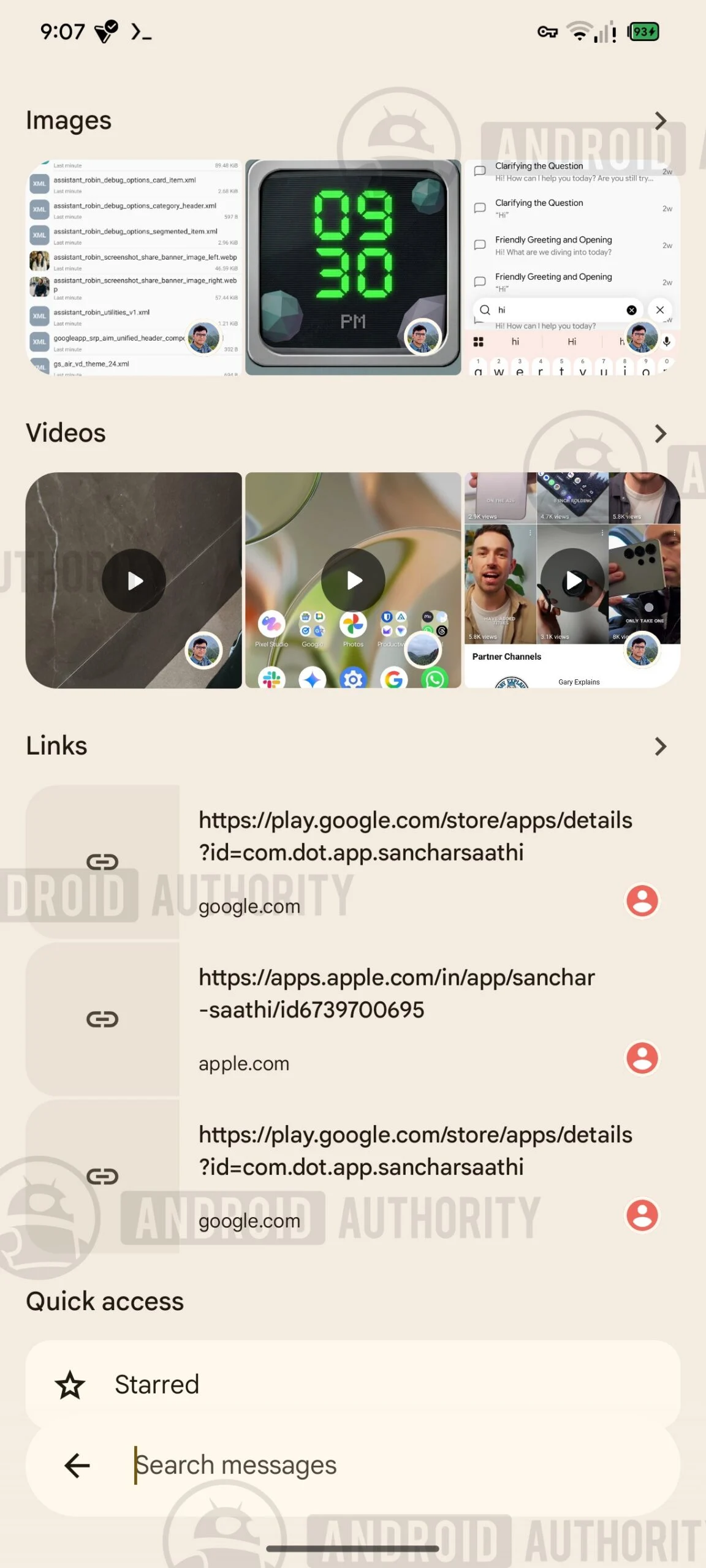
Google Messages, the default messaging application for Android devices, is on the cusp of a substantial user interface (UI) redesign, with key navigational elements and the robust search functionality being repositioned and enhanced. Recent discoveries within the latest beta build of the app, identified as messages.android_20260917_03_RC00.phone.openbeta_dynamic, reveal a strategic shift in how users interact with core features. This impending update, unearthed through an APK teardown, indicates Google’s commitment to refining the messaging experience by prioritizing accessibility and efficiency, particularly in its search capabilities.
A Strategic Reshuffle of Core Navigation
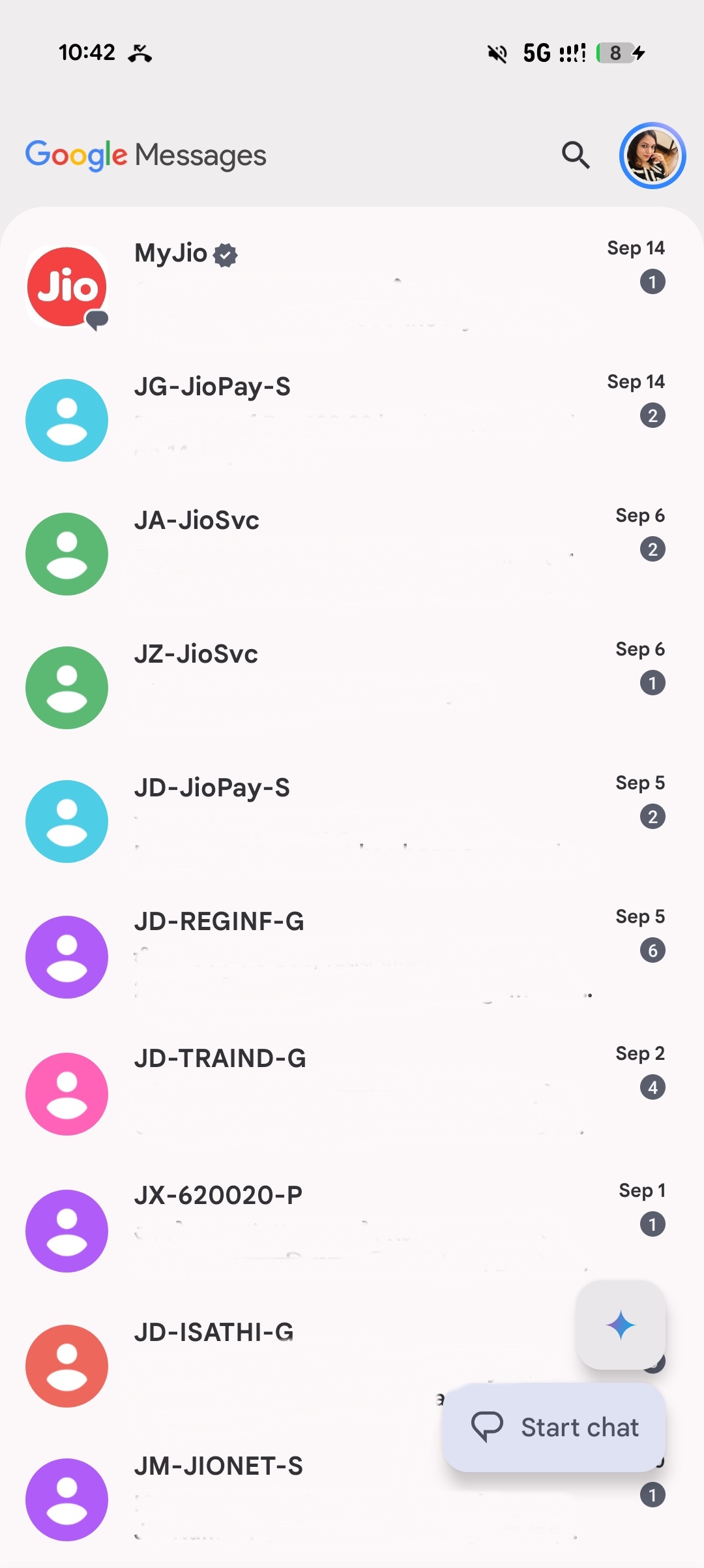
The current iteration of Google Messages places the primary "Start chat" floating action button (FAB) in the bottom-right corner of the screen. Above this, the Gemini AI integration button is situated, while the search functionality is relegated to the upper-right quadrant of the app’s header. This arrangement, while familiar to many users, has been a subject of ongoing iterative design within Google.
The forthcoming UI, however, signals a decisive move away from this established layout. Evidence from the analyzed build suggests that the Gemini button will be relocated to the header, effectively replacing the existing search icon. Concurrently, the "Start chat" button is slated to migrate from its bottom-right perch to the bottom-center of the display. This repositioning is not merely aesthetic; it represents a functional enhancement aimed at improving one-handed usability and streamlining access to frequently used features.
Perhaps the most significant change lies in the dynamic behavior of these bottom-positioned buttons. Upon initially opening the Google Messages app, the "Start chat" button will be prominently displayed in an expanded state at the bottom of the screen. However, as users begin to scroll through their conversation threads, a subtle yet intelligent transformation occurs: the "Start chat" button will collapse, and in its place, the Search button will expand. This adaptive behavior is a clear indication of Google’s intent to anticipate user needs. When actively browsing the inbox, the control most likely to be required – search – becomes readily accessible, positioned precisely within the natural reach of the user’s thumb. This thoughtful design choice aims to reduce the cognitive load and physical effort associated with navigating the app, particularly for users with larger phone screens or those who prefer to operate their devices with a single hand.
The Deepening Emphasis on Search Functionality
This strategic placement of the Search button at the bottom of the screen is intrinsically linked to a broader overhaul of the search experience within Google Messages, a development that Android Authority has been tracking closely. As far back as July, initial indicators of a redesigned Search interface were detected. These early findings pointed towards a move of the search bar to the bottom of the screen, accompanied by a visual reimagining of search filters. The previous iteration of filters was slated to be replaced by more prominent previews for images, videos, and links, offering users a more visual and immediate understanding of search results.
Further analysis from that period also revealed Google’s work on a revamped results page. This new layout was designed to distinctly separate conversations from individual messages, providing larger previews for messages that directly contained the user’s search query. The current developments suggest that this refined Search experience is nearing maturity, with the UI changes now aligning to support and highlight this enhanced functionality. By consolidating the primary Search button at the bottom, Google is not only making it more accessible but also signaling its intent to elevate search as a cornerstone of the Google Messages experience.
The implications of this focus on search are considerable. In an era where digital communication is increasingly dense with information, the ability to quickly and effectively retrieve specific messages, links, or media is paramount. A more intuitive and powerful search function can significantly enhance user productivity and reduce frustration. For businesses utilizing RCS messaging for customer interactions, an improved search capability could also translate to faster issue resolution and better customer support. The move towards larger previews and better organization of search results suggests a commitment to making the vast archives of user messages more navigable and useful, transforming the app from a simple communication tool into a more comprehensive personal information manager.

A Glimpse into Broader UI Enhancements
The UI changes surrounding search and navigation may not be the sole updates on the horizon for Google Messages. Further analysis of the app’s code has revealed other significant interface refinements that could be rolled out concurrently or in subsequent updates.
One notable development is a redesigned interface for pinned conversations. This feature, crucial for users who want to keep important contacts or threads readily accessible, has seen iterative improvements. Previous teardowns indicated a potential reduction in the number of conversations that could be pinned, a move that might be aimed at optimizing performance or encouraging users to focus on truly critical threads. The new design, however, promises a more visually appealing presentation. Pinned conversations are expected to feature larger contact icons, offering quicker visual identification. Furthermore, the interface may be enhanced to display a preview of incoming messages directly within the pinned conversation’s display, allowing users to glean information without fully opening the thread.
This ongoing evolution of the pinned conversations interface, coupled with the search and navigation overhauls, paints a picture of a Google Messages app that is striving for a more streamlined, user-centric, and feature-rich experience. The company appears to be adopting a holistic approach to UI design, ensuring that each element serves a clear purpose and contributes to an overall intuitive and efficient user journey. The integration of Gemini AI, the enhanced search capabilities, and the refined conversation management tools all point towards a future where Google Messages is not just a conduit for text messages but a comprehensive platform for digital interaction and information retrieval.
Context and Chronology of Development
The observed UI changes are not isolated incidents but rather the culmination of a series of ongoing development efforts within Google Messages. The company has a history of incrementally refining its flagship applications through beta testing and APK teardowns, allowing for user feedback and iterative improvement before a public rollout.
The initial groundwork for the enhanced search functionality was laid several months ago, with the first indications of a redesigned search interface emerging in July. This period marked the beginning of experiments with bottom-positioned search bars and the introduction of larger media previews. The subsequent months saw further refinement of these concepts, with Google actively testing different layouts and functionalities.
The current findings, within the messages.android_20260917_03_RC00.phone.openbeta_dynamic build, represent a significant leap forward, integrating these search enhancements with a broader navigational restructuring. The relocation of the Gemini button and the dynamic behavior of the "Start chat" and Search buttons suggest a more mature stage of development for this comprehensive UI overhaul.
The parallel development of the pinned conversations interface, also observed in earlier teardowns and now potentially slated for integration with the broader redesign, further emphasizes Google’s systematic approach. By addressing multiple aspects of the user experience simultaneously, the company aims to deliver a cohesive and impactful update.
Analyzing the Implications
The strategic repositioning of core navigation elements and the significant upgrade to search functionality carry several implications for Google Messages users and the broader Android ecosystem.
Enhanced User Experience: The primary implication is a tangible improvement in user experience. The emphasis on one-handed usability, particularly with the bottom-centered "Start chat" and Search buttons, will benefit a vast number of Android users. The adaptive nature of these buttons, prioritizing search when scrolling, demonstrates a keen understanding of user behavior and an intelligent application of contextual design.
Increased Productivity: A more robust and accessible search function directly translates to increased user productivity. The ability to quickly locate past conversations, specific information within messages, or shared media can save users significant time and effort, especially in high-volume messaging environments.
RCS Adoption and Engagement: As Google continues to champion Rich Communication Services (RCS) messaging, making the underlying platform more user-friendly and feature-rich is crucial for driving adoption and engagement. An improved Google Messages app, with its enhanced search and navigation, could further incentivize users to embrace RCS over traditional SMS.
Competitive Landscape: The messaging app landscape is fiercely competitive. By continuously innovating and refining its default messaging application, Google aims to maintain its relevance and offer a compelling alternative to third-party apps. This ongoing development signals Google’s commitment to providing a world-class messaging experience on its own platform.
Future of AI Integration: The relocation of the Gemini button to the header, alongside the search bar, suggests a strategic integration of AI capabilities within the app’s core functionality. This positioning could indicate a future where AI-powered assistance is more readily accessible and contextually relevant within the messaging workflow.
Official Stance and Future Outlook
While Google does not typically comment on unreleased features or APK teardowns, the consistent pattern of development observed within Google Messages builds strongly suggests that these UI changes are indeed planned for a future public release. The company’s practice of leveraging beta channels and user feedback through such teardowns allows for a period of refinement before widespread deployment.
The current evidence points towards a significant and positive evolution for Google Messages. The focus on user-centric design, improved accessibility, and enhanced functionality, particularly in search, indicates a commitment to providing an industry-leading messaging experience for Android users. As these features continue to mature in development, the Android community can anticipate a more intuitive, efficient, and powerful Google Messages application in the near future. The transition from the familiar top-heavy navigation to a more consolidated and dynamically responsive bottom interface represents a bold step forward, aligning the app with modern design principles and user expectations.
A note on APK Teardowns: An APK teardown is a process of analyzing the code of an Android application package (APK) to uncover potential upcoming features. While these discoveries are highly indicative of future updates, it is important to note that features identified through teardowns are not guaranteed to be released to the public and may be subject to change or cancellation by the developing company.