 Clarissa Hana
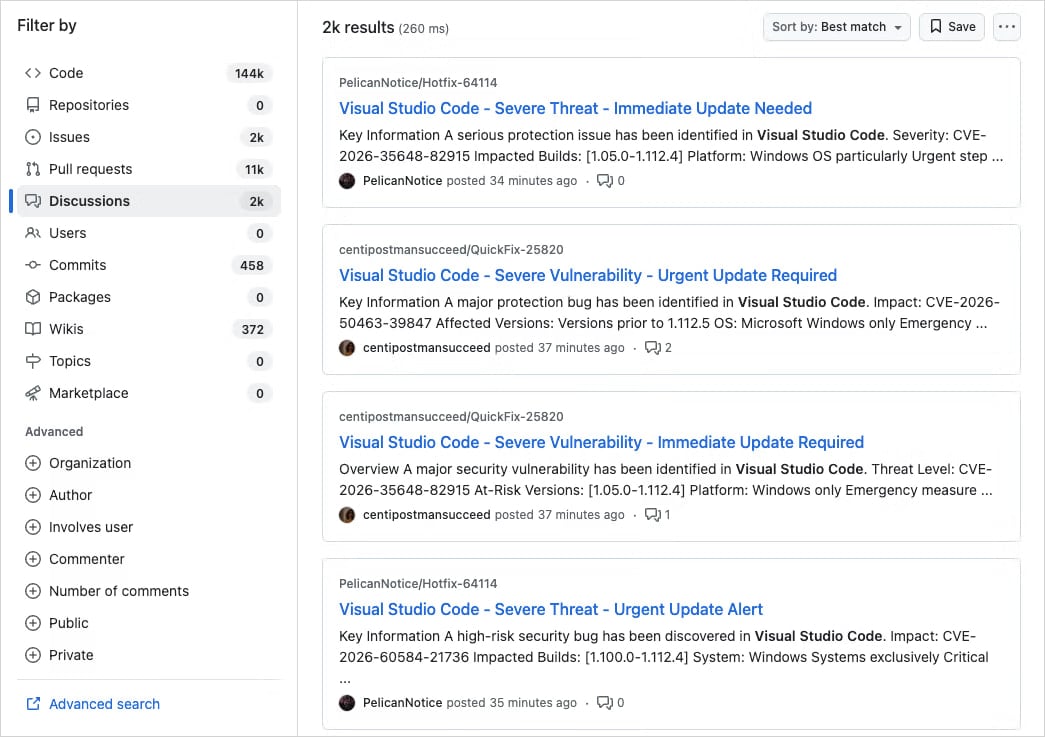
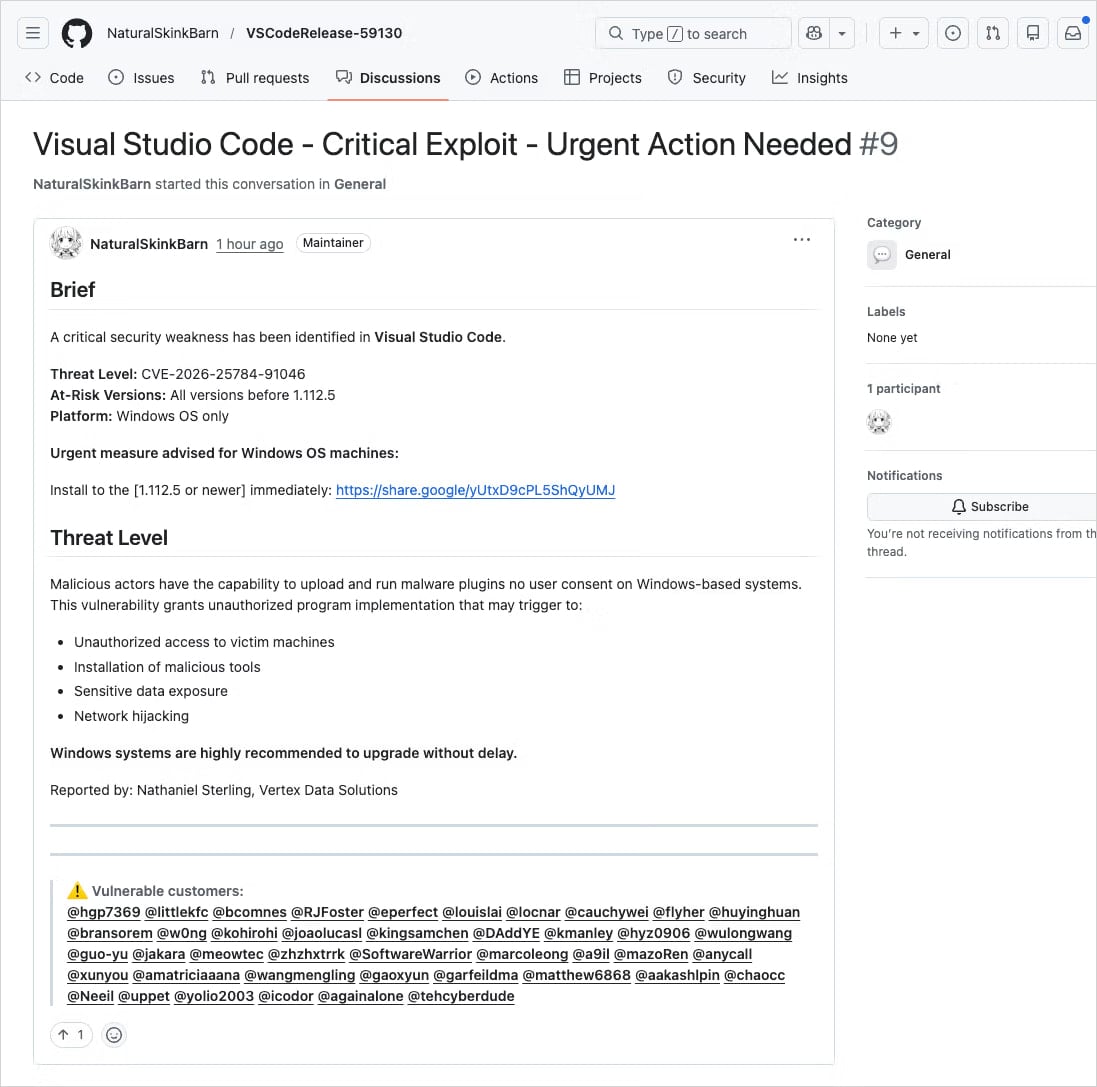
A sophisticated and large-scale malicious campaign is currently underway on GitHub, leveraging the platform’s Discussion feature to disseminate malware to unsuspecting developers. Threat actors are meticulously crafting fake security alerts, disguised as urgent vulnerability advisories for Visual Studio Code (VS Code) extensions. These deceptive posts aim to exploit the trust developers place in official communication channels and the urgency surrounding security vulnerabilities, ultimately leading them to download malicious software.
The campaign’s methodology involves creating spammy posts with highly realistic titles such as "Severe Vulnerability – Immediate Update Required." These advisories often include fabricated Common Vulnerability and Exposures (CVE) identification numbers and employ urgent language designed to bypass critical thinking and prompt immediate action. Adding a layer of deception, the perpetrators are impersonating well-known code maintainers or cybersecurity researchers, thereby lending a false sense of legitimacy to their fraudulent advisories. This tactic is particularly insidious as it preys on developers’ reliance on established figures and organizations within the software development ecosystem.
A Coordinated and Widespread Operation
Application security firm Socket, which brought this threat to light, has characterized the activity as a "well-organized, large-scale operation rather than a narrow-targeted, opportunistic attack." This assessment is based on the sheer volume and coordinated nature of the posts. Socket researchers observed that these discussions are being posted in an automated fashion from newly created or low-activity accounts across thousands of repositories within a compressed timeframe, often just minutes. This rapid deployment ensures that the malicious messages reach a vast number of developers who are either tagged in the posts or follow the respective repositories.

"Early searches show thousands of nearly identical posts across repositories, indicating this is not an isolated incident but a coordinated spam campaign," Socket researchers stated in their comprehensive report this week. "Because GitHub Discussions trigger email notifications for participants and watchers, these posts are also delivered directly to developers’ inboxes." This direct delivery mechanism bypasses the need for users to actively visit repositories, significantly increasing the reach and potential impact of the attack. The automation and scale suggest a considerable investment of resources and planning by the threat actors.
Deceptive Tactics and Malware Delivery Chain
The core of the deception lies in the links provided within these fake advisories. They direct developers to supposedly patched versions of impacted VS Code extensions, which are not hosted on official extension marketplaces but rather on external, seemingly innocuous cloud storage services like Google Drive. While Google Drive is a widely trusted service, it is not a legitimate channel for distributing VS Code extensions. However, in the heat of perceived urgency, developers might overlook this discrepancy, especially when the alert appears to be from a trusted source.
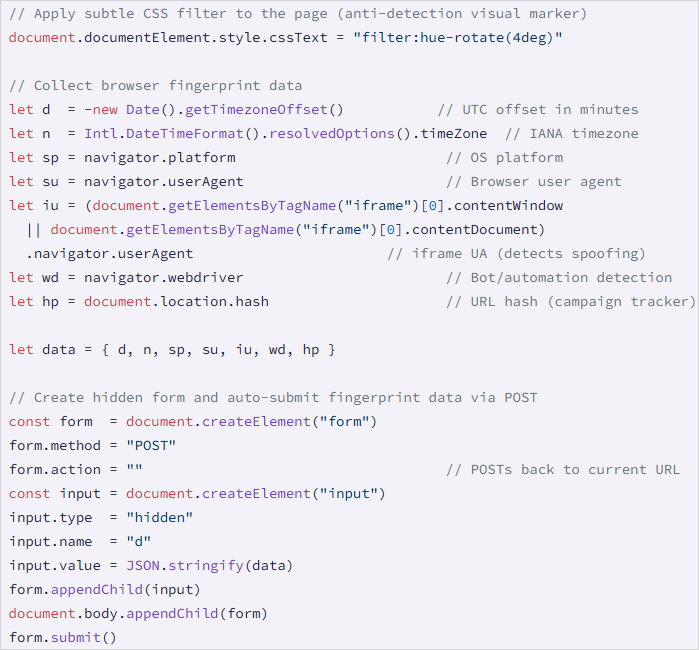
Upon clicking the provided Google Drive link, victims are subjected to a cookie-driven redirection chain. This chain ultimately leads them to a malicious domain, identified as drnatashachinn[.]com. This domain hosts a JavaScript reconnaissance script, which is the first stage of the malware payload. This script is designed to gather crucial information about the victim’s system. It collects data such as the user’s timezone, locale, user agent, operating system details, and indicators of automation. This collected data is then packaged and transmitted to a command-and-control (C2) server via a POST request.
The Reconnaissance and Filtering Layer
The JavaScript payload serves a critical function as a Traffic Distribution System (TDS) filtering layer. By profiling potential targets, the script allows the threat actors to strategically deliver the subsequent stages of the attack. This filtering mechanism ensures that the more potent payloads are only sent to validated victims, thereby conserving resources and reducing the chances of detection by security researchers or automated analysis tools. The system is designed to distinguish between genuine developers, automated bots, and security researchers, pushing out the second-stage malware only to those who fit the profile of a viable target.
While Socket researchers were able to analyze the initial JavaScript reconnaissance script, they did not capture the second-stage payload. However, they noted that the JavaScript script does not directly deliver the final payload nor does it attempt to steal credentials. This suggests a multi-stage attack designed for stealth and evasion, where the initial compromise is focused on gathering information and establishing a foothold before executing more destructive actions.
A Recurring Threat on GitHub
This is not the first instance of threat actors exploiting GitHub’s legitimate notification systems to distribute phishing lures and malware. The platform’s extensive reach and its central role in the developer community make it an attractive target for such campaigns.
- March 2025 Incident: A significant phishing campaign in March 2025 targeted approximately 12,000 GitHub repositories. This operation also utilized fake security alerts, but its primary objective was to trick developers into authorizing a malicious OAuth application. Such authorization would grant attackers broad access to their GitHub accounts, including repositories, personal information, and potentially sensitive credentials.
- June 2024 Campaign: In June 2024, threat actors actively abused GitHub’s email notification system through spam comments and pull requests submitted across various repositories. The intent was to direct targets to phishing pages designed to steal their account information.
These recurring incidents highlight a persistent vulnerability in how security-related communications are managed and perceived within collaborative development environments. The attackers are adept at mimicking legitimate security practices and leveraging the platform’s built-in communication tools to their advantage.
Implications for the Developer Community
The implications of this ongoing threat are significant for the global developer community. Developers often work under tight deadlines and rely heavily on third-party extensions and tools to enhance their productivity. The trust placed in platforms like GitHub and in the integrity of security advisories makes them particularly susceptible to these sophisticated social engineering tactics.
The compromise of a developer’s machine or GitHub account can have cascading effects. It could lead to the theft of proprietary code, sensitive intellectual property, or even credentials for other critical systems. Furthermore, if a compromised developer’s account is used to push malicious code or further spread these attacks, the damage can multiply exponentially, impacting entire projects and organizations.
Best Practices for Mitigation and Defense
In response to such evolving threats, security experts emphasize the critical need for vigilance and adherence to robust security practices among developers. When encountering security alerts, especially those requiring immediate action or directing users to external download links, developers are strongly advised to:
- Verify Vulnerability Identifiers: Cross-reference any reported CVE numbers with authoritative sources such as the National Vulnerability Database (NVD), CISA’s catalog of Known Exploited Vulnerabilities, or MITRE’s CVE program website (cve.org). Legitimate advisories will have verifiable entries in these databases.
- Scrutinize Download Sources: Always ensure that software and extensions are downloaded from official marketplaces or the vendor’s official website. Be highly suspicious of links pointing to cloud storage services or unfamiliar domains for software distribution.
- Examine Sender and Account Legitimacy: Investigate the source of the alert. If it purports to be from a known maintainer or researcher, check their profile and activity history on GitHub. Be wary of newly created accounts or those with minimal activity.
- Beware of Urgent Language and Mass Tagging: Urgent calls to action, especially those demanding immediate downloads or account changes, are common phishing tactics. Similarly, if a post tags a large number of unrelated users or projects, it is a strong indicator of a spam or malicious campaign.
- Enable Multi-Factor Authentication (MFA): For GitHub accounts and other critical development tools, enabling MFA provides an essential layer of security, making it significantly harder for attackers to gain unauthorized access even if they obtain login credentials.
- Maintain Software Updates: Ensure that VS Code and all installed extensions are kept up-to-date with the latest official versions. Security patches are regularly released to address known vulnerabilities.
The continuous evolution of attack vectors necessitates a proactive and informed approach to cybersecurity. By understanding the tactics employed by threat actors and consistently applying security best practices, developers can significantly mitigate the risks associated with such campaigns and safeguard their work and the integrity of the software development ecosystem. The responsibility lies not only with platform providers like GitHub to enhance security measures but also with individual developers to remain vigilant and educated about the evolving threat landscape.