 Clarissa Hana
Microsoft is currently addressing a significant technical issue that has disrupted the functionality of its popular collaboration platform, Microsoft Teams. A recent update to the Microsoft Edge browser has inadvertently introduced a bug that prevents users from utilizing the right-click paste function within the Teams desktop client. This widespread problem, first flagged on April 14th, has left many users frustrated as they find themselves unable to seamlessly share information via chats.
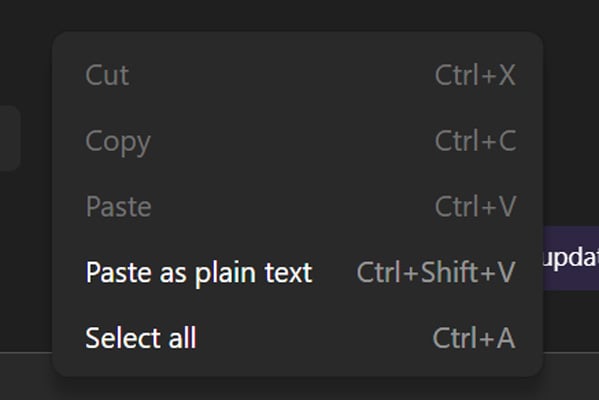
The core of the disruption lies in the disabling of the contextual paste option. Users attempting to paste URLs, text, or images into Teams conversations via the traditional right-click menu are discovering that the "Paste" command is greyed out and inaccessible. This unexpected malfunction has prompted Microsoft to issue an advisory, guiding affected users toward alternative methods for data transfer.
The Scope of the Problem and User Impact
Reports of the malfunctioning paste feature began surfacing across various online communities, including Reddit and official Microsoft forums. Administrators and individual users alike have confirmed experiencing the issue, indicating that it is not isolated to a specific user group or corporate environment. One administrator shared on the Microsoft forums, "I have multiple users on version 26072.519.4556.7438 experiencing this issue, including myself. Cannot right-click Paste, but CTRL+V and paste as text are allowed." This observation highlights a crucial detail: while the right-click method is broken, the underlying copy-paste functionality remains operational through keyboard shortcuts.
The problem appears to stem from a "code regression" within the Microsoft Edge browser. Microsoft Teams, in its desktop client, relies on certain components and functionalities of the Edge browser for its operations, including aspects of its user interface and interaction capabilities. When a recent Edge update introduced an error in this shared codebase, it directly impacted Teams’ ability to process right-click paste commands. This interconnectedness between the browser and the desktop application underscores the potential for unforeseen consequences when updating core software components.

Chronology of the Issue and Microsoft’s Response
The timeline of this technical glitch indicates a rapid escalation from user reports to official acknowledgment and subsequent remediation efforts.
- Early April 2024: Reports begin to emerge from users on platforms like Reddit and Microsoft forums detailing the inability to right-click paste in Microsoft Teams.
- April 14, 2024: Microsoft officially acknowledges the issue in an advisory, confirming that a recent Microsoft Edge browser update is the culprit. The company provides an immediate workaround for affected users.
- April 16, 2024: Microsoft provides an update on the remediation process, stating that a fix is being rolled out in stages and that the company is monitoring telemetry to ensure successful system recovery. As of this update, a precise timeline for the full rollout of the fix has not been provided.
The advisory issued by Microsoft on April 14th served as the primary communication channel for affected users. It clearly articulated the problem: "Impacted users report that they are unable to copy and paste URLs, text, and images in Microsoft Teams desktop client chats, as the paste option appears greyed out when using the right-click dropdown menu method."
Workarounds and Mitigation Strategies
In the interim, Microsoft has offered a straightforward workaround to circumvent the bug. Users are advised to utilize keyboard shortcuts for copy and paste operations. This involves:
- On Windows: Pressing
Ctrl + Cto copy andCtrl + Vto paste. - On macOS: Pressing
Cmd + Cto copy andCmd + Vto paste.
While this solution effectively restores the ability to transfer content, it represents a deviation from the intuitive and often faster right-click context menu. For users accustomed to this method, the need to consciously employ keyboard shortcuts can be an added step that disrupts workflow. Microsoft’s recommendation to "attempt to copy the intended URLs, text, and images using Ctrl + C and paste using Ctrl + V for Windows, and corresponding Cmd + C and Cmd + V for Mac" provides immediate relief but highlights the temporary nature of the solution.

Underlying Technical Causes and Broader Implications
The root cause of the problem, as identified by Microsoft, is a "code regression" within Microsoft Edge. This term refers to the reintroduction of an older, potentially flawed, piece of code into a newer version of software. In this instance, the regression occurred in a part of Edge’s codebase that Microsoft Teams utilizes for specific functionalities. This highlights the complex dependencies within modern software ecosystems. Updates to one component, even a seemingly unrelated one like a browser, can have ripple effects on other applications that share underlying libraries or frameworks.
The fact that this bug has affected both individual users and those in corporate environments suggests a broad impact. For businesses relying heavily on Teams for internal and external communication, this disruption can translate into:
- Reduced Productivity: The inability to quickly paste information can slow down communication and collaboration, particularly for tasks involving sharing links, code snippets, or visual content.
- User Frustration and Dissatisfaction: Repeated technical glitches, even if temporary, can erode user confidence in the reliability of the software.
- Increased Support Load: IT departments may face an influx of support requests related to this issue, diverting resources from other critical tasks.
While clearing the Teams cache or reinstalling the application have been explored by some users as potential fixes, they have reportedly not resolved the issue. This reinforces the conclusion that the problem lies at a deeper level, within the core browser integration.
Microsoft’s Remediation Efforts and Future Outlook
Microsoft has confirmed that its engineering teams have identified the cause of the bug and are actively working on a solution. The company is employing a phased rollout strategy for the fix, which allows for gradual deployment and monitoring. This approach is common for software updates, especially those affecting a large user base, as it minimizes the risk of introducing new, unforeseen problems.
The company is leveraging "telemetry" – data collected from user systems that report on application performance and errors – to confirm that systems are successfully recovering after the patch is applied. This data-driven approach allows Microsoft to assess the effectiveness of the fix in real-time and make adjustments as needed.
However, as of the latest update on April 16th, Microsoft has not provided a definitive timeline for when the fix will be fully deployed to all users. This lack of a precise schedule can be a source of continued uncertainty for those experiencing the disruption. Users and IT administrators will be closely watching for official announcements regarding the complete resolution of this issue.
The incident serves as a stark reminder of the intricate nature of software development and the potential for seemingly minor updates to have significant consequences. As Microsoft continues to refine its platforms and integrations, transparency and robust testing remain paramount to ensuring a seamless user experience. The resolution of this right-click paste bug in Microsoft Teams will undoubtedly be a priority for the company, aiming to restore full functionality and user confidence in its collaboration tools.