Metty Iskandar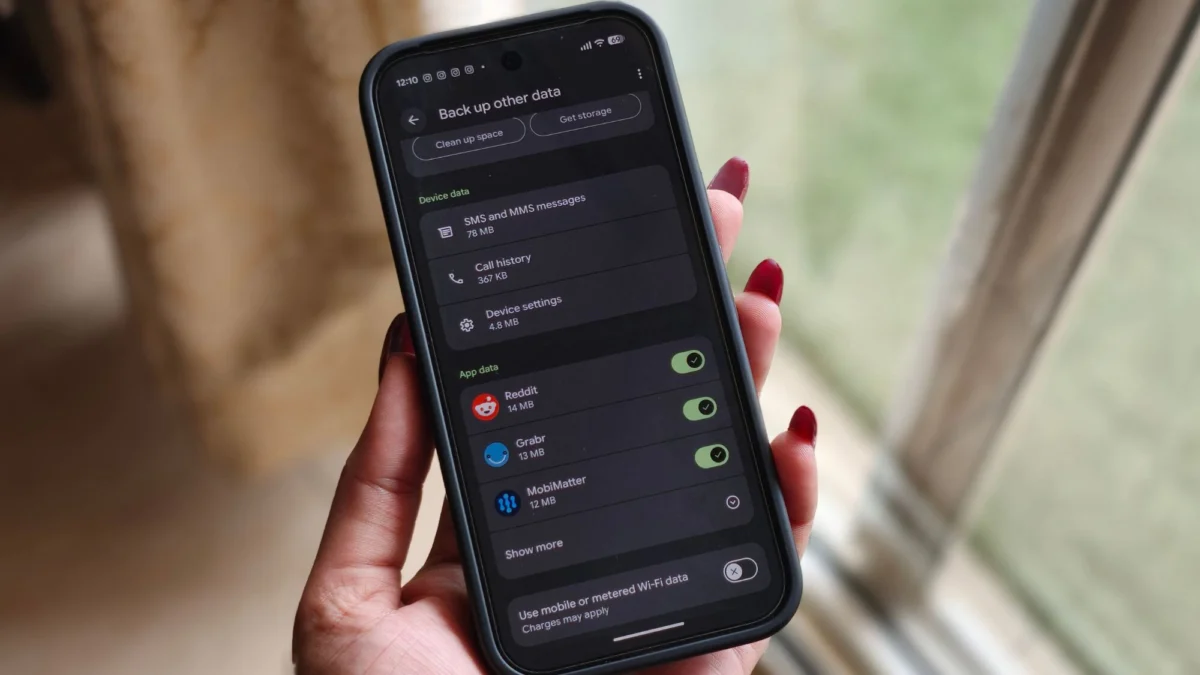
Google is significantly expanding its cloud backup services for Android users, introducing a dedicated option for backing up documents to Google Drive. This long-awaited feature, which has been in development for nearly a year, is now rolling out to Android phones via Google Play Services version 26.26. The integration aims to provide users with a more comprehensive and accessible way to safeguard their important files, extending beyond photos, videos, and app data.
The rollout signifies a maturing of Google’s backup strategy, acknowledging the diverse types of data users store on their mobile devices. Previously, documents and other non-media files often resided in a less organized manner, requiring manual transfer or reliance on third-party cloud storage solutions. This new feature directly addresses that gap, embedding document backup directly into the core Android backup framework.
A Deep Dive into the New Document Backup Feature
The newly introduced document backup option allows users to select and synchronize a wide array of file types directly from their phone’s storage to their Google Drive account. This includes common document formats such as .DOC, .PPT, .PDF, and .XLS, as well as compressed files like .ZIP. Notably, the feature also extends to APK files, providing a convenient way for users to back up application installers.
On Google Pixel devices, users can easily locate and activate this feature by navigating to Settings, then selecting "Accounts and backup," followed by "Google Backup." The "Documents" backup option now appears prominently within this menu, situated between "Photos & videos" and "Other device data." When toggled on, users are presented with their available Google Drive storage space. Options to clear existing space or purchase additional storage are also accessible directly from this interface, underscoring the fact that these backed-up documents contribute to the user’s overall Google Drive quota.
Chronology of Development: A Patiently Awaited Feature
The journey of this document backup feature from conception to widespread availability has been a protracted one, demonstrating Google’s meticulous approach to rolling out new functionalities. Initial evidence of Google working on a "Downloads" or "Documents" backup option first emerged in August of the previous year. This early indication suggested that the company recognized the need to expand its backup capabilities beyond media files.
Further confirmation of the feature’s existence came in February, when it was mentioned as part of a Google Play system update. This update hinted at the underlying framework being put in place to support local file backups. The subsequent months saw the option gradually appearing in beta versions of Google Play Services, allowing early adopters and testers to experience and provide feedback on its functionality. This phased rollout strategy is typical for Google, enabling them to refine the feature based on real-world usage before a broad public release. The recent stable rollout via Google Play Services version 26.26 marks the culmination of this development cycle, making the feature accessible to a vast number of Android users.
Technical Specifications and User Implications
The mechanism behind the document backup involves the creation of a dedicated "Android backups" folder within a user’s Google Drive. Within this main folder, a sub-folder named after the specific device will house the synchronized documents. This structured approach ensures that backed-up files remain organized and easily retrievable.
It is crucial for users to understand the implications of this backup method. Firstly, enabling the document backup feature does not automatically remove the original files from the user’s phone. Secondly, and importantly, there is no automatic synchronization of changes made to documents after they have been backed up. This means that if a document is edited on the phone, the changes will not be reflected in the Google Drive backup unless the document is manually backed up again or the backup process is re-initiated. This distinction is vital for users who expect a seamless mirroring of their local file system in the cloud. The current implementation functions as a snapshot backup, capturing files at the time of the backup process.
Users are also reminded that turning off the "Documents" backup toggle will not delete any previously backed-up files from their Google Drive. To remove these files, users will need to manually access their Google Drive and delete the relevant backup folders. This provides a safety net, preventing accidental data loss if a user decides to disable the feature.
Broader Impact and Strategic Significance
The introduction of dedicated document backup to Google Drive has several significant implications for the Android ecosystem. For users, it simplifies data management and enhances data recovery capabilities. In the event of device loss, theft, or failure, users can now more easily restore not only their essential system settings and applications but also their critical documents. This reduces reliance on manual file transfers or less integrated cloud storage solutions.
From a competitive standpoint, this move brings Android’s native backup capabilities more in line with offerings from other operating systems and cloud providers. While many third-party services have offered document synchronization for years, integrating this functionality directly into the Android backup framework provides a more cohesive and user-friendly experience for the vast majority of Android users.
The strategic significance for Google lies in strengthening its cloud ecosystem. By providing more comprehensive backup options, Google encourages users to store more of their digital lives within Google Drive and, by extension, the broader Google cloud services. This increased engagement can lead to greater adoption of other Google services, such as Google Workspace applications, further solidifying Google’s position in the productivity and cloud storage market.
Furthermore, this feature caters to a growing user base that relies heavily on their smartphones for a wide range of tasks, including work, education, and personal organization. The ability to back up and access important documents from anywhere provides a significant productivity boost and peace of mind. The inclusion of APK files in the backup is also a thoughtful addition, particularly for users who frequently install and uninstall applications or switch between devices, as it allows them to retain installers for later use.
Anticipated User Reception and Future Possibilities
While the feature is now widely available, user reception will likely focus on its ease of use, reliability, and the clarity of its synchronization limitations. Early feedback from beta testers has been largely positive, with users appreciating the convenience of having their documents integrated into the existing backup flow. However, some may find the lack of automatic file synchronization a drawback, especially those accustomed to real-time cloud syncing services.
Looking ahead, it is plausible that Google may refine the document backup feature to offer more granular control over synchronization or introduce options for real-time syncing. The current implementation serves as a foundational step, and future iterations could potentially include more advanced features such as version control for documents or selective backup of specific folders within the device’s storage.
The rollout of this document backup feature underscores Google’s commitment to enhancing the core Android experience. By addressing a long-standing user need, Google not only improves the functionality of its devices but also reinforces the value proposition of its cloud services, making Android a more robust and integrated platform for managing digital lives.