Galang Taruna
Microsoft announced a major evolution of its Copilot AI assistant on Friday, September 25, introducing three transformative new functions: Home, Code, and Autopilot. This strategic unveiling primarily targets enterprise clients, signaling Microsoft’s intensified commitment to redefining workplace productivity through advanced artificial intelligence. While businesses are set to gain comprehensive access to these innovations, individual subscribers to Microsoft 365 Premium will see a more limited rollout, with only the "Code" feature becoming available in preview by the end of the year.
The enhancements were detailed by Jared Spataro, Corporate Vice President of AI at Work at Microsoft, in a comprehensive blog post on the company’s official platform. Spataro drew a compelling parallel between Copilot’s current trajectory and the historical impact of Microsoft Office, which fundamentally reshaped the landscape of work during the PC era. This comparison underscores Microsoft’s ambitious vision: to transcend Copilot’s current role as a sophisticated question-answering tool and evolve it into a proactive, autonomous agent capable of building tools and executing complex, multi-day tasks independently. However, the immediate deployment strategy heavily favors the corporate sector, with the vast majority of these advanced functionalities initially reserved for enterprise users.
The Strategic Imperative: Redefining Workplace AI
Microsoft’s aggressive push into the realm of advanced AI agents is not merely about introducing new features; it’s about establishing a new paradigm for how humans interact with technology in the professional sphere. The company has invested heavily in AI, notably through its partnership with OpenAI, integrating cutting-edge large language models (LLMs) across its product ecosystem, from Azure to Windows, Dynamics, and GitHub. This latest Copilot update represents a critical step in making AI an indispensable co-worker, rather than just an assistant.
Spataro’s comparison to Office is particularly insightful. Just as Office applications like Word, Excel, and PowerPoint became the de facto standard for document creation, data analysis, and presentations, Microsoft envisions Copilot becoming the central intelligence layer that orchestrates and automates a vast array of business processes. This strategic direction positions Copilot as a core component of the "future of work," where AI systems are not just responsive but predictive, creative, and capable of sustained, independent action.
Unpacking the New Copilot Features
The three new features – Home, Code, and Autopilot – each address distinct facets of enterprise and, to a lesser extent, individual productivity, marking a significant departure from conventional AI assistant capabilities.
Copilot Home: The Integrated Command Center for Productivity
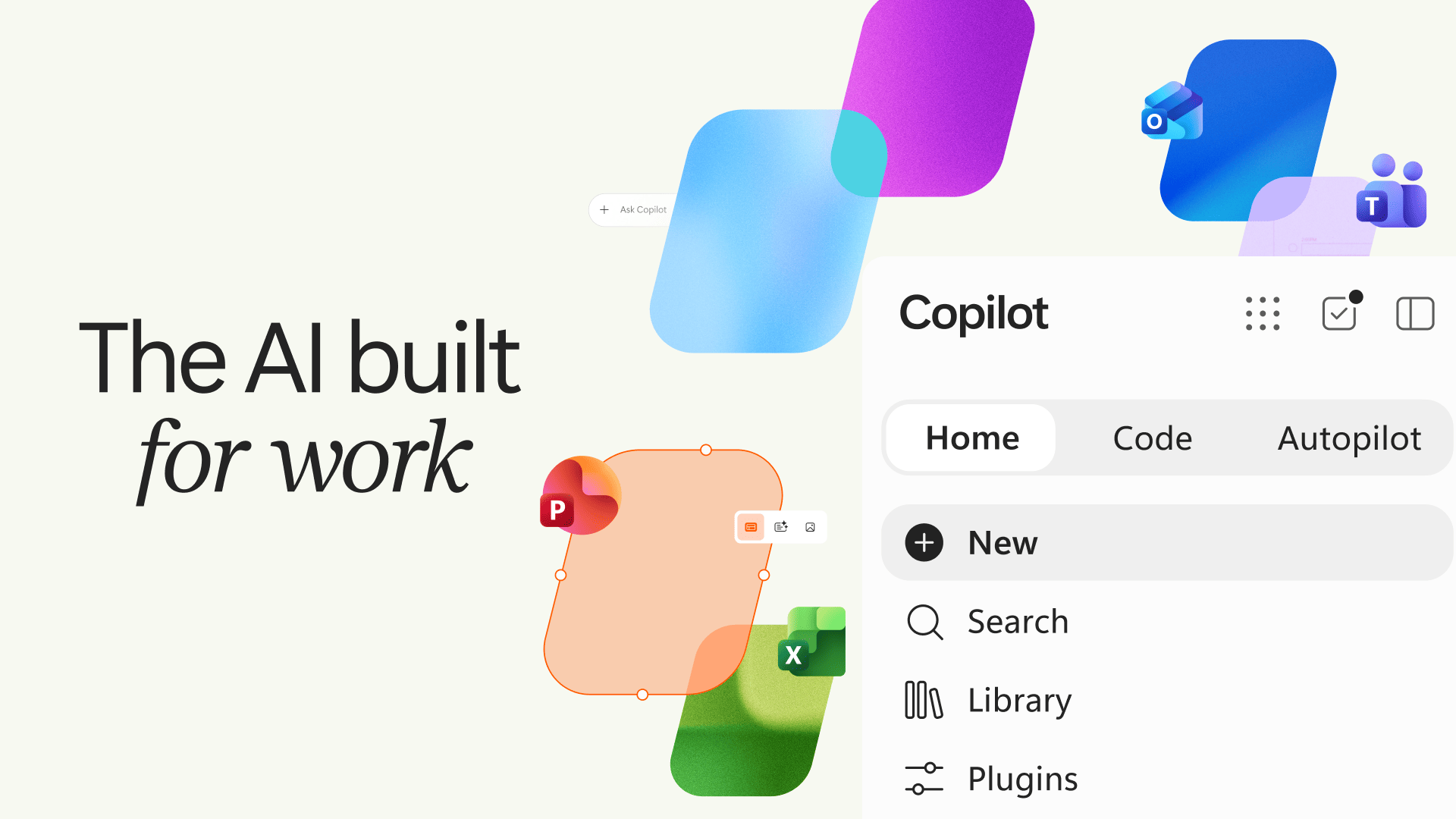
Copilot Home is designed to become the central hub for all Copilot interactions, offering a streamlined experience that consolidates various functionalities. This new landing page integrates two primary modes: "Chat," tailored for quick queries and immediate responses, and "Cowork," intended for more complex, delegated tasks. In "Cowork" mode, users can simply describe their desired outcome in natural language, and Copilot will autonomously orchestrate the necessary steps and processes to deliver a finished product. Microsoft has indicated that, in the near future, Copilot will gain the intelligence to automatically select the most appropriate mode (Chat or Cowork) based on the user’s input, further enhancing intuitive interaction.
A significant enhancement within Copilot Home is the direct integration with core Microsoft 365 applications: Word, Excel, and PowerPoint. This means users can now instruct Copilot to create a budget spreadsheet or a presentation, and the AI assistant will generate a fully editable file. Crucially, these AI-generated documents can be collaboratively edited by colleagues in real-time, allowing teams to observe the document’s evolution live. This integration aims to transform how initial drafts and foundational documents are created, dramatically reducing the time spent on repetitive or starting-from-scratch tasks.
Copilot Code: Democratizing Application Development
The "Code" feature represents a powerful leap towards democratizing software development, enabling users to create simple applications without needing extensive programming knowledge. Through natural language commands, users can describe the functionality they require—such as a custom dashboard, a tracking tool, or an automation script—and Copilot will construct the application. This capability is underpinned by the same robust technology that powers GitHub Copilot, Microsoft’s highly successful AI programming assistant designed for professional developers.
To ensure security and stability, the code generated by Copilot Code operates within a "sandbox" environment. This isolated space prevents the newly created application from interfering with other systems or data, safeguarding the broader IT infrastructure. For businesses, Copilot Code could empower non-technical employees to build bespoke tools for specific departmental needs, accelerating innovation and reducing reliance on overburdened IT teams. For individuals, particularly those in roles requiring data analysis or process automation, this offers an unprecedented level of self-sufficiency. This feature is also the only one slated for individual Microsoft 365 Premium and Pro subscribers, expected in preview by the end of the year, providing a taste of AI-powered creation.
Copilot Autopilot: Ushering in the Era of Autonomous Agents
Perhaps the most ambitious of the new features is "Autopilot," previously known by its development codename "Scout." Autopilot represents Microsoft’s foray into truly autonomous AI agents. Unlike previous iterations that required explicit prompts for each step, Autopilot is designed to operate with minimal human intervention after an initial setup. Users can assign Autopilot a name, define a role, and set an overarching objective, after which the agent will independently commence its work without requiring continuous instructions.
Examples of Autopilot’s capabilities include monitoring conversations in Microsoft Teams, following up with colleagues in Outlook, or resuming and advancing a project over several days. Because Autopilot runs in the cloud, its operations continue uninterrupted, even when the user is offline or asleep, ensuring continuous progress on long-term tasks. This feature signifies a profound shift from reactive AI to proactive, persistent AI, capable of managing and executing complex workflows autonomously. Its initial availability is exclusively for enterprise clients, underscoring its sophisticated nature and the strategic value Microsoft places on its B2B AI offerings.

Staggered Rollout and Market Availability
The introduction of these features is being rolled out in a phased approach, reflecting the complexity and strategic importance of these advancements. "Home" and "Code" are slated for release within the coming weeks as part of Microsoft’s "Frontier" program. This initiative grants early access to a select group of users for testing and feedback on new AI functionalities.
"Autopilot," given its advanced capabilities and potential impact, will enter a private preview phase by the end of September, limited to a curated selection of enterprise clients. This controlled rollout allows Microsoft to fine-tune the agent’s performance, address any potential issues, and gather critical feedback from high-value users before a broader release. Additionally, "Today," a new dashboard designed to organize emails, calendar events, and meetings, is scheduled to follow in October, further enhancing the productivity suite.
For individual consumers, the path to these advanced features is more constrained. While enterprise clients gain access to the full suite of new capabilities, only "Code" is earmarked for individual Microsoft 365 Premium and Pro subscribers, with a preview expected by the end of the year. The exact date remains unspecified. This tiered access strategy highlights Microsoft’s primary focus on the enterprise market, where the immediate return on investment for such powerful tools is clearer and the impact on large-scale productivity can be more immediately realized. For context, in France, a Microsoft 365 Premium subscription costs 219 euros per year or 22 euros per month.
Microsoft’s Broader AI Strategy and Market Implications
This latest Copilot update is a testament to Microsoft’s unwavering commitment to embedding AI deeply across its entire ecosystem. Building on its multi-billion dollar investment in OpenAI and the integration of large language models into its Azure AI services, Microsoft has been systematically deploying "Copilot" branded AI assistance across Windows, Microsoft 365, Dynamics 365, Security, and GitHub. This consistent branding strategy aims to establish a unified AI experience, making intelligent assistance ubiquitous for users across all their digital interactions.
The move also intensifies the competitive landscape in the enterprise AI space. Tech giants like Google (with Workspace AI), Salesforce (with Einstein Copilot), and Adobe (with Firefly) are all vying for market share in the rapidly expanding AI productivity sector. Microsoft’s comprehensive approach, combining conversational AI, low-code development, and autonomous agents, positions it as a formidable leader, particularly for organizations deeply integrated into the Microsoft ecosystem. Analysts project the AI market to grow exponentially, with enterprise AI software alone potentially reaching hundreds of billions in value in the coming years. Microsoft’s strategy is clearly designed to capture a significant portion of this growth.
For businesses, the implications are profound. These new Copilot features promise to unlock unprecedented levels of efficiency, automate repetitive tasks, and empower employees to focus on higher-value, creative work. The ability for Copilot to "manufacture tools" and "lead tasks alone, sometimes for several days" represents a significant shift from simple automation to intelligent agency, potentially streamlining complex workflows, accelerating project timelines, and fostering innovation across departments. Companies stand to gain from reduced operational costs, improved data analysis capabilities, and faster decision-making cycles.

The Nuance of Consumer Access and Future Outlook
The disparity in feature availability between enterprise and individual users underscores a calculated business strategy. Enterprise customers often have more complex needs, larger budgets, and a clearer pathway to demonstrating ROI from advanced AI tools. The initial focus on businesses allows Microsoft to refine these sophisticated technologies in demanding environments, gather extensive feedback, and establish robust use cases before potentially broadening access to a wider consumer base. However, this limited consumer rollout for features like Home and Autopilot might leave individual users feeling underserved, especially those who are early adopters of AI technology.
Looking ahead, the evolution of Copilot towards autonomous agents like Autopilot raises important discussions around data privacy, security, and the ethical deployment of AI. Microsoft emphasizes the sandbox environment for Code, but the broader implications of AI agents operating independently within organizational communication and project management tools will require careful consideration and robust governance frameworks. Questions about job displacement and the need for new skills will also become more pressing as AI takes on increasingly complex roles.
In conclusion, Microsoft’s latest Copilot update marks a pivotal moment in the company’s AI journey, signaling a strategic shift towards more autonomous, proactive, and deeply integrated AI capabilities. By transforming Copilot from a mere assistant into a versatile co-worker and tool-maker, Microsoft aims to redefine productivity for the modern enterprise, much as Office did for the PC era. While the immediate focus is on empowering businesses, the long-term vision clearly points towards a future where intelligent agents play an increasingly central role in both professional and personal digital lives. The coming months will be crucial in observing how these ambitious new features are adopted, refined, and ultimately reshape the landscape of work.