Metty Iskandar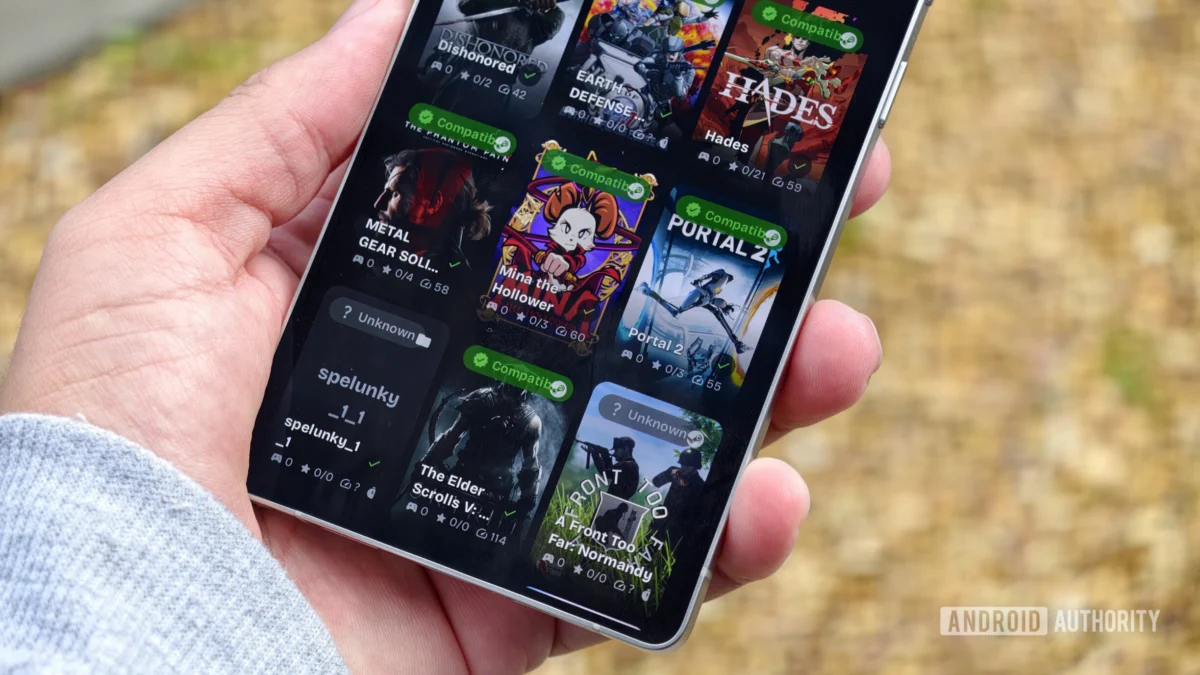
Keeping pace with the ever-expanding universe of Android applications and games is a significant undertaking, but this month’s curated selection aims to streamline that process. August 2026 brings a robust lineup of innovative software, from solutions designed to preserve beloved user interfaces to powerful tools that bridge the gap between mobile and desktop gaming. This comprehensive overview delves into each application, exploring its features, potential impact, and the underlying technological advancements that make them noteworthy.
Preserving Familiarity: Messages by OzarksMade Bridges the Gap for Samsung Users
The recent discontinuation of Samsung Messages has left a void for users accustomed to its interface and functionalities. In a landscape where Google Messages has become the de facto standard for RCS-enabled communication on Android, a new contender has emerged to offer a semblance of continuity. Messages by OzarksMade is an ambitious project designed to replicate the user experience of Samsung Messages, providing a familiar front-end for a technology that now relies on Google’s underlying infrastructure.
Background and Development:
Samsung’s decision to phase out its proprietary Messages app in favor of Google Messages signaled a broader industry trend towards platform consolidation. While this move streamlines RCS integration, it also means users lose access to the specific design language and potentially unique features of Samsung’s offering. OzarksMade recognized this user sentiment and embarked on a mission to recreate that experience. The application’s core innovation lies in its ability to integrate with Google Messages in the background. This means that while the user interacts with the OzarksMade interface, the actual messaging protocols and RCS capabilities are handled by Google’s app. This symbiotic relationship allows users to retain the aesthetic and operational feel of Samsung Messages without sacrificing modern messaging features.
Current Status and Accessibility:
Messages by OzarksMade is currently in its nascent stages of development and testing. The application is not yet widely available on the Google Play Store. However, the developers have initiated an open beta program, inviting "adventurous users" to participate. Enrollment is managed through Google Groups, providing a direct channel for early adopters to provide feedback and contribute to the app’s refinement. This phased rollout strategy is common for applications requiring extensive user testing to identify bugs and optimize performance across a diverse range of Android devices. The success of this project hinges on its ability to seamlessly mimic the original Samsung Messages experience while maintaining robust compatibility with Google’s messaging ecosystem.
Implications:
The emergence of apps like Messages by OzarksMade highlights the enduring power of user interface familiarity and the desire for personalization within the Android ecosystem. It suggests a market for applications that can offer alternative user experiences built upon established foundational technologies. The success of this approach could pave the way for similar projects that cater to users who have developed strong preferences for specific app designs, even as underlying services evolve.
Vibrant Customization Meets Simplicity: Mango Launcher Redefines the Android Home Screen
The Android launcher ecosystem is a fertile ground for innovation, offering users the ability to profoundly alter their device’s visual and functional presentation. Mango Launcher enters this competitive arena with a compelling proposition: a launcher that prioritizes both vibrant aesthetics and efficient user interaction. Billing itself as "minimal, fast, and customizable," Mango aims to place "simplicity and efficiency first."
Design Philosophy and Features:
True to its name, Mango Launcher embraces a palette of bright, engaging colors. This visual emphasis is a key differentiator, offering users extensive control over the look and feel of their home screens. The customization options are comprehensive, including support for app folders, integrated home screen widgets, and a variety of transition effects. A standout feature is its reminiscent "Nokia Z Launcher-like scribble search functionality." This allows users to quickly access apps and information by drawing simple gestures on the screen, a testament to the launcher’s focus on speed and intuitive navigation. The developer has packed the application with features, aiming to provide a rich user experience without overwhelming the user.
User Acquisition and Monetization:
Mango Launcher, though relatively new, demonstrates significant promise. However, its current monetization strategy might present a barrier for some potential users. While a two-week trial period is offered, the full feature set is unlocked through the Pro version, which comes with a lifetime unlock price of $24.99. An annual subscription option is also available. This pricing, while justifiable for the depth of features offered, is considered relatively high for a launcher that is still in its early stages of development. This pricing model will likely be a point of consideration for users comparing it against established, often free or lower-priced alternatives.
Market Impact:
The introduction of Mango Launcher signifies a continued demand for highly personalized Android experiences. Its emphasis on color and intuitive gestures could appeal to users seeking a departure from more conventional launcher designs. The success of Mango will likely depend on its ability to demonstrate tangible value that justifies its premium pricing and to continue evolving its feature set to remain competitive in a dynamic market.
Curated Information at a Glance: HomeFeed Delivers an Elegant RSS Solution
In an era of information overload, the ability to efficiently consume news and updates from preferred sources is paramount. Many users struggle to find a home screen widget that effectively consolidates this information without being obtrusive. Google News’s widget has been criticized for not meeting these needs, while standalone RSS applications are often deemed too complex or resource-intensive. HomeFeed emerges as a solution, offering an open-source RSS widget that prioritizes simplicity and user control.
Technical Implementation and Design:
HomeFeed is built with Google’s Material You design language, ensuring seamless integration with the aesthetic of Pixel devices and other modern Android smartphones. Its core functionality revolves around the aggregation of multiple RSS feeds into a single, unified stream of results directly within the widget. This eliminates the need to individually check each news source. A particularly valuable feature is its built-in reader mode, which presents articles in a clean, distraction-free format without relying on webview rendering. This not only improves readability but also potentially reduces data consumption and enhances loading speeds.
Open Source Advantage:
As an open-source project, HomeFeed offers a significant advantage: transparency. Users who are concerned about data handling and privacy can readily examine the application’s source code. This commitment to open development fosters trust and allows the community to contribute to its improvement. The open-source nature also means that the application is not beholden to commercial interests, allowing it to focus purely on user benefit.
User Experience and Potential:
The simplicity and effectiveness of HomeFeed address a common user pain point. By providing a focused and customizable news aggregation tool directly on the home screen, it empowers users to stay informed efficiently. Its adherence to Material You design principles ensures it looks at home on contemporary Android devices, further enhancing its appeal. The project’s open-source status suggests a sustainable development model driven by community interest and developer dedication.
Visualizing Time: Glance Offers a Unique Perspective on Calendar Management
Effective time management is a cornerstone of productivity, and calendar applications play a crucial role in this domain. Glance is a calendar application that reimagines how users interact with their schedules, offering a unique, zoomed-out perspective that facilitates long-term planning.
Innovative Interface and Functionality:
Glance’s core innovation lies in its visual presentation of tasks and events. Instead of the typical day-by-day or month-by-month scrolling, Glance displays three full months on a single, vertically scrollable screen. This panoramic view is akin to a large yearly calendar poster, compressed into a functional mobile application. This expansive visualization allows users to grasp their commitments and available time over extended periods, making it exceptionally useful for planning future events, projects, and goals. Tapping on a specific date transitions the view to a more granular hourly format, providing flexibility for detailed scheduling.
Optimized for Larger Displays:
The effectiveness of Glance is amplified on larger screen devices, such as tablets and foldable phones. The increased screen real estate allows for the simultaneous viewing of a greater number of events and tasks. This makes it an ideal tool for users who manage complex schedules or require a comprehensive overview of their commitments. For individuals planning long-term projects or seeking to visualize their progress towards distant goals, Glance offers an unparalleled advantage.
Development Stage and Future Outlook:
While Glance is currently stable, it remains in the early stages of development. As a result, it may not possess the extensive feature set found in more mature calendar applications. However, the fundamental concept and the current implementation are highly promising. The developers’ vision for Glance suggests a focus on powerful visualization and intuitive navigation, which could position it as a leading calendar solution for users who prioritize long-term planning and a holistic view of their time. The continued development of Glance is anticipated with keen interest, particularly regarding the potential addition of more advanced scheduling features.
Bridging Worlds: GameNative Brings PC Gaming to Android
For dedicated gamers, the ability to play their favorite titles on the go is a significant advantage. GameNative, a platform that facilitates the access and play of PC games on Android devices, has recently transitioned to a broader audience with its availability on the Google Play Store. This marks a pivotal moment for mobile gaming accessibility.
The GameNative Ecosystem:
GameNative has been a topic of discussion for its innovative approach to mobile gaming. The platform allows users to connect their existing PC game libraries, such as those from Steam, and play supported titles directly on their Android smartphones and tablets. This is achieved through a sophisticated streaming and control integration that effectively brings the desktop gaming experience to a mobile form factor. While the platform has been accessible via GitHub for some time, its official presence on the Google Play Store signifies a significant step towards wider adoption and user accessibility.
Functionality and Supported Games:
The primary function of GameNative is to enable users to play PC games on their Android devices. This requires a degree of compatibility between the game and the mobile hardware. The GameNative website maintains a searchable database of supported games, allowing users to verify compatibility before investing time and effort. This proactive approach to information dissemination is crucial for managing user expectations and ensuring a positive experience. The platform also boasts features such as cloud save synchronization between PC and mobile devices, comprehensive controller support, and various other optimizations designed to enhance the mobile gaming experience.
Impact on the Gaming Landscape:
The availability of GameNative on the Google Play Store has the potential to reshape mobile gaming. It offers a compelling alternative for gamers who wish to continue their PC gaming journeys without being tethered to their desktops. For those who travel frequently or have limited access to their gaming PCs, GameNative presents an invaluable solution. The platform’s commitment to features like cloud saves and controller support indicates a dedication to providing a robust and satisfying gaming experience. The growth of GameNative could also incentivize game developers to further optimize their titles for mobile play, fostering a more interconnected gaming ecosystem.
Conclusion:
August 2026 has delivered a compelling array of new Android applications that cater to diverse user needs, from preserving familiar interfaces to unlocking new gaming possibilities. Messages by OzarksMade addresses a specific user sentiment by recreating the Samsung Messages experience, while Mango Launcher offers a vibrant and customizable home screen alternative. HomeFeed provides an elegant solution for RSS news aggregation, and Glance revolutionizes calendar management with its unique visual approach. Finally, GameNative’s expansion to the Google Play Store democratizes PC gaming on Android, offering unprecedented accessibility. These developments underscore the dynamism of the Android platform and its continuous evolution to meet the demands of an increasingly sophisticated user base.