Clarissa Hana
Microsoft has rolled out the KB5124010 optional non-security preview update for Windows 11 versions 24H2 and 25H2, introducing a substantial package of 46 changes aimed at refining user experience and system functionality. This release, available ahead of the regular Patch Tuesday cycle, offers a glimpse into upcoming improvements, with a particular focus on enhancing Bluetooth connectivity, accessibility features, and user control over dedicated hardware keys. While not containing critical security patches, this update is designed to allow early adopters and IT professionals to test new features and bug fixes, providing valuable feedback before their broader deployment.
A Deep Dive into KB5124010: Key Features and Enhancements
The KB5124010 update brings a suite of notable enhancements to Windows 11. Among the most significant is the integration of support for Emoji 17.0, aligning the operating system with the latest Unicode standard for emoticons and symbols. This ensures users have access to the newest graphical representations for digital communication, reflecting evolving online expression.
For accessibility, a new "Open apps maximized" setting has been introduced. This feature automatically expands application windows to their full screen size upon launch, streamlining workflow for users who prefer or require a maximized view by default, reducing the need for manual window adjustments. This is a positive step towards greater user customization and efficiency.
Furthermore, the update includes a recovery remote management plug-in. This addition significantly extends the management capabilities of Windows Recovery Environment (WinRE), empowering IT administrators with more robust tools for troubleshooting and recovery scenarios. This is particularly beneficial for enterprise environments where swift and effective system restoration is paramount.
Addressing Bluetooth Woes: A Major Focus of the Update
A core area of improvement in KB5124010 is the Bluetooth subsystem. Microsoft has actively addressed several persistent issues that have plagued users of Bluetooth devices. One critical fix resolves a problem where the Bluetooth radio could unexpectedly turn off, even when the toggle in the Settings app indicated it was still active. This errant behavior often led to connection dropouts and frustration for users relying on wireless peripherals.
Additionally, the update tackles a bug that caused system crashes, identified by error code 0x139, specifically when streaming audio over Bluetooth. This issue could severely disrupt media consumption and communication, making its resolution a high priority for many users.
Beyond bug fixes, KB5124010 also brings performance and compatibility enhancements for a range of Bluetooth audio accessories. Microphone compatibility has been improved with certain Bluetooth Classic audio devices, ensuring more reliable audio input. Moreover, both the reliability and performance of connections with LE Audio accessories have been optimized. LE Audio, the latest Bluetooth audio standard, offers lower power consumption and improved audio quality, and these enhancements will allow Windows 11 users to better leverage these benefits. The consistent advancements in Bluetooth technology underscore its growing importance in modern computing, from wireless headphones and speakers to innovative IoT devices.
Empowering Users: Copilot Key Remapping and Granular Control
A highly anticipated feature for many Windows 11 users is the ability to remap the dedicated Copilot key, which has become a standard on many newer keyboards. With KB5124010, users can now customize the function of this key through a new setting within Windows 11. Specifically, the Copilot key can be reconfigured to act as either the Right Ctrl key or the Context Menu key. This offers greater flexibility and personalization, allowing users to assign the dedicated key to actions they frequently perform, potentially increasing their productivity and streamlining their keyboard shortcuts. This move acknowledges the diverse needs and preferences of users, providing them with more agency over their computing environment.
Installation and Availability: A Preview of What’s to Come
KB5124010 is classified as an optional non-security preview update. This means it is available for users and administrators to download and install before it becomes part of the regularly scheduled cumulative updates, typically released on "Patch Tuesday." This preview model allows for early testing and validation of new features and fixes.
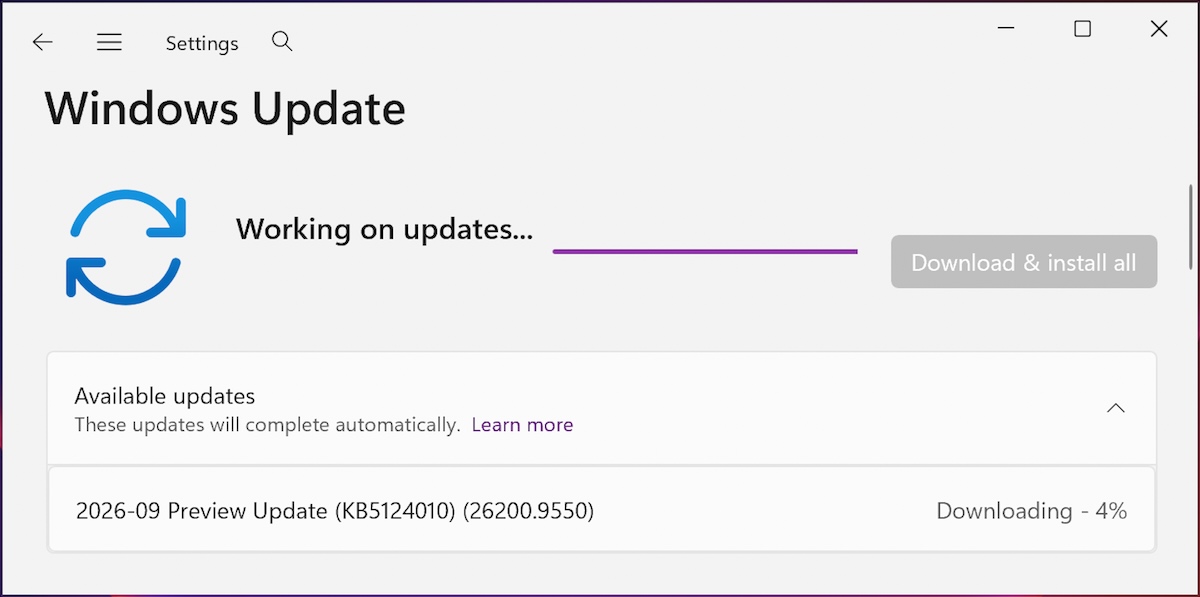
To install KB5124010, users can navigate to Settings, then Windows Update, and click on "Check for Updates." As this is an optional update, users who do not have the "Get the latest updates as soon as they’re available" option enabled will need to manually click the "Download and install" link when it appears. Alternatively, the update can be downloaded and installed manually from the Microsoft Update Catalog.
Technical Specifications and Build Information
Upon successful installation, KB5124010 will advance Windows 11 25H2 devices to build 26200.9550 and Windows 11 24H2 devices to build 26100.9550. These build numbers signify the incremental progress and refinement within the respective release channels. The inclusion of 46 changes in this single update highlights Microsoft’s ongoing commitment to iterative improvement and feature development for its flagship operating system.
Addressing Past Issues: File History and Migration Tool Updates
Beyond the new features, KB5124010 also includes a crucial fix for a known issue that impacted the built-in File History backup feature. Following the installation of the September 2026 security updates, some Windows systems experienced failures with File History. This fix ensures the integrity of user backups, a critical function for data preservation.
In a move that signals a shift in Microsoft’s migration strategy, the KB5124010 update also marks the removal of the PC-to-PC Migration tool. This utility was designed to assist users in transferring their files, settings, and preferences to new Windows devices. Microsoft now recommends utilizing Windows Backup in conjunction with OneDrive for a more modern and cloud-centric migration process. This strategic pivot aligns with the broader trend towards cloud-based data storage and synchronization, offering a potentially more seamless experience for users transitioning to new hardware.
The End of an Era for Windows 11 24H2
An important announcement accompanying this update is that KB5124010 represents the final preview release for Windows 11 version 24H2. This signifies that the 24H2 version of Windows 11 is approaching its end of support. Specifically, Windows 11 24H2 Home and Pro editions are slated to reach their end of support in October 2026. This timeline is critical for IT administrators and users to plan their upgrade strategies to ensure continued access to security updates and ongoing support from Microsoft. The lifecycle management of operating system versions is a standard practice, allowing Microsoft to focus resources on newer versions and ensure a secure computing environment for its user base.
Broader Implications and Future Outlook
The KB5124010 update demonstrates Microsoft’s proactive approach to refining the Windows 11 experience. The significant focus on Bluetooth improvements addresses a common pain point for many users, enhancing the reliability of wireless peripherals that are integral to modern computing. The introduction of user-configurable Copilot key functionality reflects a growing trend towards personalization and empowering users with greater control over their hardware and software interactions.
The inclusion of Emoji 17.0 support keeps Windows 11 current with global communication standards, while the accessibility features underscore Microsoft’s commitment to inclusivity. The removal of the PC-to-PC Migration tool and the promotion of Windows Backup with OneDrive signal a strategic shift towards cloud-centric solutions, likely simplifying the process of setting up new devices for a growing number of users who rely on cloud services.
The approaching end of support for Windows 11 24H2 serves as a timely reminder for users and organizations to stay informed about their operating system’s lifecycle. Proactive planning for upgrades is essential to maintain security and benefit from the latest features and performance enhancements. As Microsoft continues to iterate on Windows 11, users can anticipate further refinements and new capabilities that aim to make the operating system more powerful, adaptable, and user-friendly. The consistent release of updates, both optional and cumulative, ensures that Windows 11 remains a dynamic and evolving platform. The technical data points, such as build numbers, provide concrete evidence of this ongoing development. The approximately 46 changes in this single optional update suggest a concentrated effort to bundle significant improvements, providing a substantial value proposition for those who choose to install it. This proactive approach to feature delivery and bug resolution is characteristic of Microsoft’s modern development cycle for Windows.